
PDFToVideo
Verified
AI PDF to Video Conversion
Turn your PDFs into explainer videos in minutes for free—no sign-up, no editing skills required, with optional English AI voice narration.
Promoted
 AI Checker PlusAI detector that highlights which passages AI wrote. Free check, no sign-up. Plagiarism too.
 RewindType any X/Twitter handle. Get their year back as a narrated video story. Then ask it anything.
 KurodyneSell the tools from your AI side projects. Listing is free.
 Sidrune AI85% off. Stable Claude API for agent developers. Pay as you go. Invoices & refunds available.
 Pixmax.aiPixmax.ai is an all-in-one AI workspace for videos, visual stories, and marketing content.
 SEOify - Improve your SEO & rankingsBuild links to rank in Google. Improve your DR with links you can start building now.Advertise here270,000+ people visit Dang.ai every month.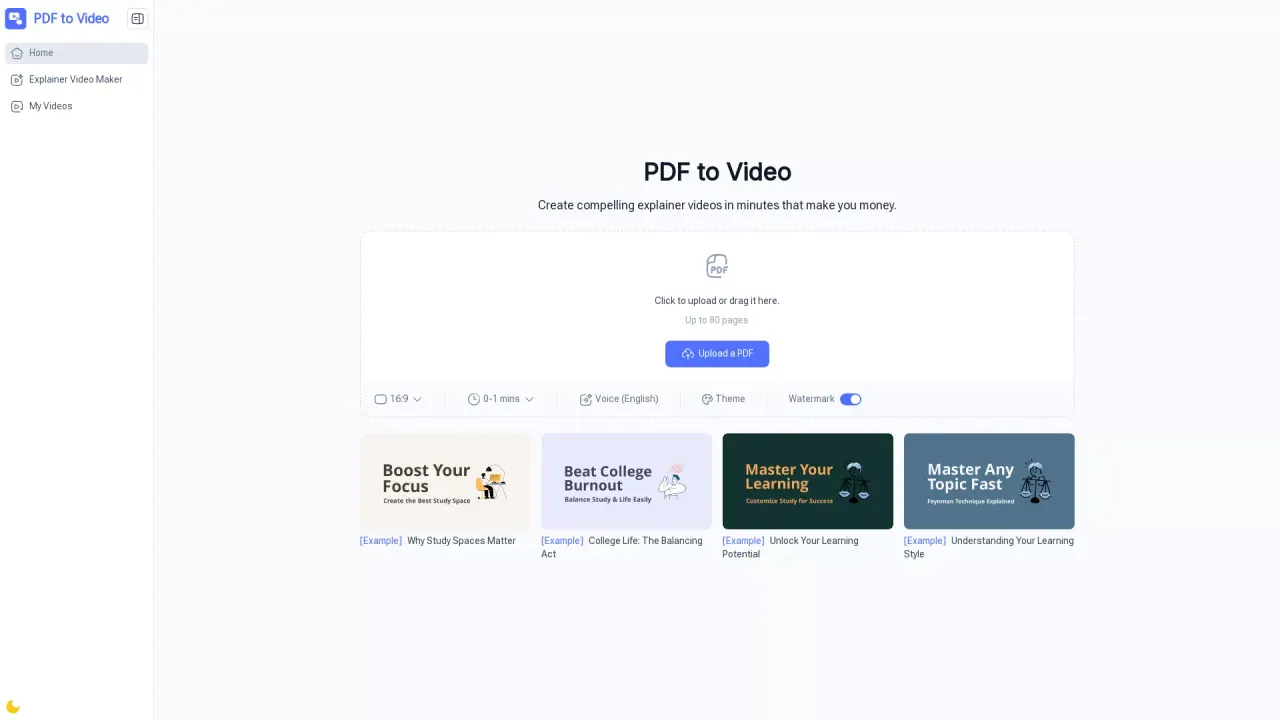
What does PDFToVideo do?
PDF to Video is an AI-powered online tool that converts your PDF documents into professional, engaging explainer videos. It turns static pages into dynamic visuals with scenes, animations, and narration, so your presentation, report, manual, or training material becomes easier to share and understand.
You can upload a PDF (up to 80 pages) and generate a video directly in your browser. The AI analyzes the text, images, and layout to create a ready-to-edit video, then you can download or share the result instantly. Conversion is typically quick—basic outputs often complete in minutes.
Customization options help you match the video to your intent. Choose an output theme, adjust speed, and include an AI voiceover in English. You can also manage details like timing and add a watermark. Videos are generated in 16:9 by default.
This tool is a good fit for teachers and trainers, business professionals, marketers, students, content creators, and nonprofits who want a fast way to turn documents into video content for learning, marketing, and social media sharing. Use cases include lesson videos, explainers from brochures, and training materials made more engaging without building a video workflow from scratch.
There’s no sign-up required, and the converter is free to use online.
Is PDF to Video free to use?
Yes—PDF to Video is free to use online directly in your browser, without sign-up or account creation.
Do I need video editing experience?
No. Upload your PDF and the AI generates the video with scenes, animations, and narration, so you can export or share it right away.
Can I add voice narration, and what language is available?
Yes. You can add AI-generated voice narration with an English voice option.
What input limits and formats are supported?
You can upload PDFs up to 80 pages. The tool also supports generating videos from URLs, documents, long text, and prompts.
How long does it take to generate a video?
Most videos generate in minutes. Basic conversions commonly show typical times around 0–1 minutes in the interface.
Can I customize the output (theme, speed, watermark)?
Yes. You can adjust voiceovers, timing, and design using options like theme, speed, and watermark. The output format is 16:9 by default.
This listing is claimed
Own PDFToVideo? Sign in with the email used to claim it to manage this listing, or upgrade to Pro for featured-first placement and a newsletter feature.