Lanta AI
Verified
AI Video Generator
Turn prompts and images into cinematic AI videos, then refine with video effects, lip sync, and native audio.
Promoted
 Sidrune AI85% off. Stable Claude API for agent developers. Pay as you go. Invoices & refunds available.
 Pixmax.aiPixmax.ai is an all-in-one AI workspace for videos, visual stories, and marketing content.
 RewindType any X/Twitter handle. Get their year back as a narrated video story. Then ask it anything.
 KurodyneSell the tools from your AI side projects. Listing is free.
 SEOify - Improve your SEO & rankingsBuild links to rank in Google. Improve your DR with links you can start building now.Advertise here270,000+ people visit Dang.ai every month.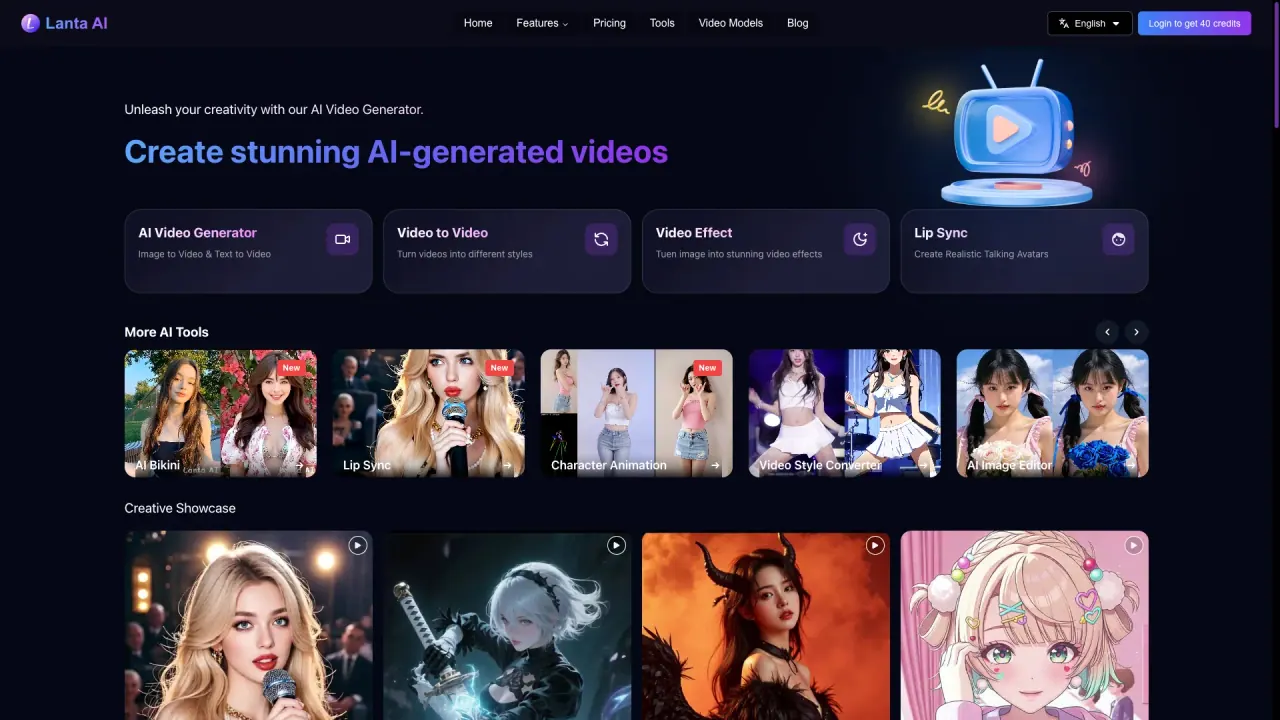
What does Lanta AI do?
Lanta AI is an AI video creation platform that helps you bring ideas to life with cinematic results. You can generate videos from text prompts or images, transform existing footage, and keep creative details consistent across shots. It’s designed for creators, marketers, storytellers, and anyone making social content who wants a streamlined workflow from first frames to finished video.
Core creation options include Text to Video and Image to Video, plus Video to Video for style transformations with multiple style conversions. Lanta AI also provides a prompt-driven video editor and one-click optimization to help you polish what you’ve created. For more direct control, you can manage camera behavior and shot timing, including montage, long takes, dolly zooms, and seamless transitions.
To make characters feel believable from frame to frame, Lanta AI emphasizes character consistency (face, hairstyle, clothing, and body shape). It also supports native audio and sound effects, including synchronized dialogue, ambient noise, and music cues, with language support such as Chinese, Spanish, English, French, Japanese, and Korean. For avatar-style storytelling, you can sync lip movements to any audio track using AI Lip Sync.
Lanta AI also includes an all-in-one image and video workflow: batch create and edit first frames, end frames, and storyboard reference images, export 4K images, and import generated images into the video generator with one click. Start free with no credit card needed; you get 40 credits after logging in, and you can choose flexible subscription plans after those credits are used.
How do I start using Lanta AI, and do I need a credit card?
You can start free with no credit card needed. Log in to get 40 credits to begin creating AI videos.
What are the main ways to generate videos in Lanta AI?
You can create videos using Text to Video and Image to Video. You can also use Video to Video to transform an existing video into new styles.
Can I keep characters consistent across different frames and scenes?
Yes. Lanta AI focuses on preserving facial features, hairstyles, clothing, and body shape so characters look consistent across shots, angles, and scenes.
What is AI Lip Sync, and what is it good for?
AI Lip Sync syncs lip movements to an audio track to produce realistic talking-avatar style videos. It’s useful for dubbing, content localization, virtual avatars, and voiceover-based creative projects.
What audio features does Lanta AI include?
Lanta AI supports native audio and sound effects such as synchronized sound effects, ambient noise, dialogue, and music cues alongside your AI video. It also supports multiple languages including Chinese, Spanish, English, French, Japanese, and Korean.
What happens after my free credits run out?
Once your 40 credits are used, you can choose from flexible subscription plans to continue creating.
This listing is claimed
Own Lanta AI? Sign in with the email used to claim it to manage this listing, or upgrade to Pro for featured-first placement and a newsletter feature.