
Getdevkit
AI Developer Toolkit
Supercharge your AI development with DevKit - the ultimate AI Developer Toolkit.
- Pricing
- Free trial
- Category
- Development
- Listed
- Jul 22, 2023
- Updated
- May 25, 2026
Promoted
 Sidrune AI85% off. Stable Claude API for agent developers. Pay as you go. Invoices & refunds available.
 Pixmax.aiPixmax.ai is an all-in-one AI workspace for videos, visual stories, and marketing content.
 SEOify - Improve your SEO & rankingsBuild links to rank in Google. Improve your DR with links you can start building now.Advertise here270,000+ people visit Dang.ai every month.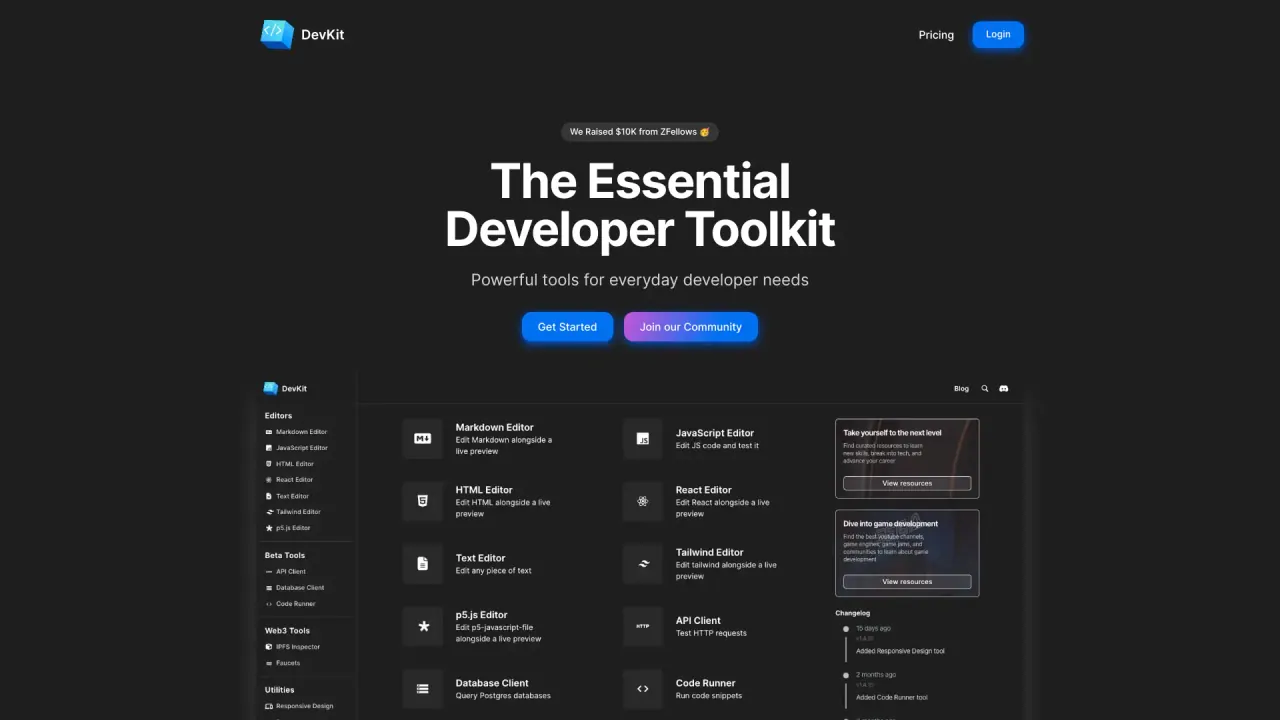
What does Getdevkit do?
What is DevKit and what can it do for developers?
DevKit is the AI assistant for developers that combines DevGPT (ChatGPT plus 30+ mini-devtools) to help you test public APIs, query databases, generate code, and create interactive art — all in one browser-based platform. It includes API Client and Database Client for in-browser testing and management, a suite of 30+ mini-tools to reduce context switching, and supports 10s of programming languages with code generation and execution inside the chat. It’s designed to save tens of hours weekly and help you build software faster. The platform has seen broad adoption, with tens of thousands of users and counting.
What is DevGPT?
DevGPT is the AI assistant that combines ChatGPT with DevKit’s 30+ mini-devtools to help you test public APIs, query databases, generate code, create interactive art, and more — often in seconds — helping you save tens of hours each week.
What are the core capabilities and components of DevKit?
- DevGPT: ChatGPT plus 30+ mini-devtools for API testing, database queries, code generation, and creative tasks
- API Client: browser-based API testing
- Database Client: browser-based database querying and management
- Mini-Tools: 30+ tools, including 7 editors and 10+ utilities, to test snippets, write docs, transform data, and more
- Code: generate and execute code within the chat; 10s of languages supported; execute code in seconds
- API & Data Breadth: 100s of public APIs supported; test and visualize data in-browser
- Postgres & SQL: query Postgres with plain English, generate SQL in seconds, plot results; MySQL and SQL Server support coming soon
- Creativity: code generation and p5.js tools for art and mini games; capture screenshots and recordings to share results
- Accessibility: all tools available in your browser
- Community: developer community with an exclusive sub-community for Pro users
How does DevKit improve software development efficiency?
DevKit provides 5+ world-class LLMs and 30+ mini-tools in a single place, enabling faster work across testing APIs, querying databases, generating code, and more. This consolidation reduces context-switching, helping you build software faster (marketing claims cite up to 10x speed) and save tens of hours each week.
Are the DevKit tools browser-based?
Yes. All tools run in your browser, including the API Client, Database Client, and the mini-tools, eliminating the need to juggle multiple apps or CLI tools.
What tasks can I do with DevKit?
- Test public APIs and configure API work in a single place
- Query Postgres databases with plain English and generate/execute SQL
- Generate, run, and debug code within the chat (10s of languages)
- Visualize results (charts, plots) and share outputs
- Create interactive art and mini games with code generation (e.g., p5.js)
- Capture and share screenshots/recordings of your results
- Access to browser-based database and API tooling in one integrated workspace
How are the mini-tools different from DevUtils?
DevUtils is a macOS-only app. DevKit’s mini-tools are browser-based, designed to be accessible directly in your browser, and the toolset and UX differ to better fit in-browser workflows.
How are the mini-tools different from CyberChef?
CyberChef’s recipe model can be less intuitive for common developer tasks. DevKit provides separate, purpose-built tools for common use cases, delivering a more developer-centric workflow.
Which languages and tasks does DevKit support?
- 10s of languages supported for code generation and execution
- 100s of public APIs available to test and integrate with
- In-chat code generation and execution across supported languages
- Postgres query capabilities with plain English, SQL generation, and plotting
Can I test APIs and manage databases in DevKit?
Yes. You can test APIs with the API Client and manage/query databases with the Database Client directly in your browser, all within DevKit’s unified workspace.
Are there learning resources or a demo I can watch?
Yes. You can watch a 1-minute demo to see DevKit in action.
Is there a community or support for DevKit?
Yes. DevKit includes a developer community, with an exclusive sub-community for Pro users to engage and get prioritized support.
How many developers use DevKit?
DevKit has grown to tens of thousands of users, including over 65,000 developers who have used the platform.
How is DevKit priced? Where can I find pricing?
Pricing details are listed on the official Pricing page. For the most accurate and up-to-date information, please refer to the Pricing page on the official site.
How do I get started with DevKit?
- Visit the official site and sign up
- Explore DevGPT and the 30+ mini-tools
- Use the API Client and Database Client for browser-based testing
- Try the mini-tools for common development tasks
- Watch the 1-minute demo to get a quick overview
- Join the community, including the Pro sub-community if applicable
Is this your tool?
Claim Getdevkit to manage this listing, or upgrade to Pro for featured-first placement and a newsletter feature.