
DeepPDF

AI PDF Translator

DeepPDF: Your AI Research Assistant for Deep Learning
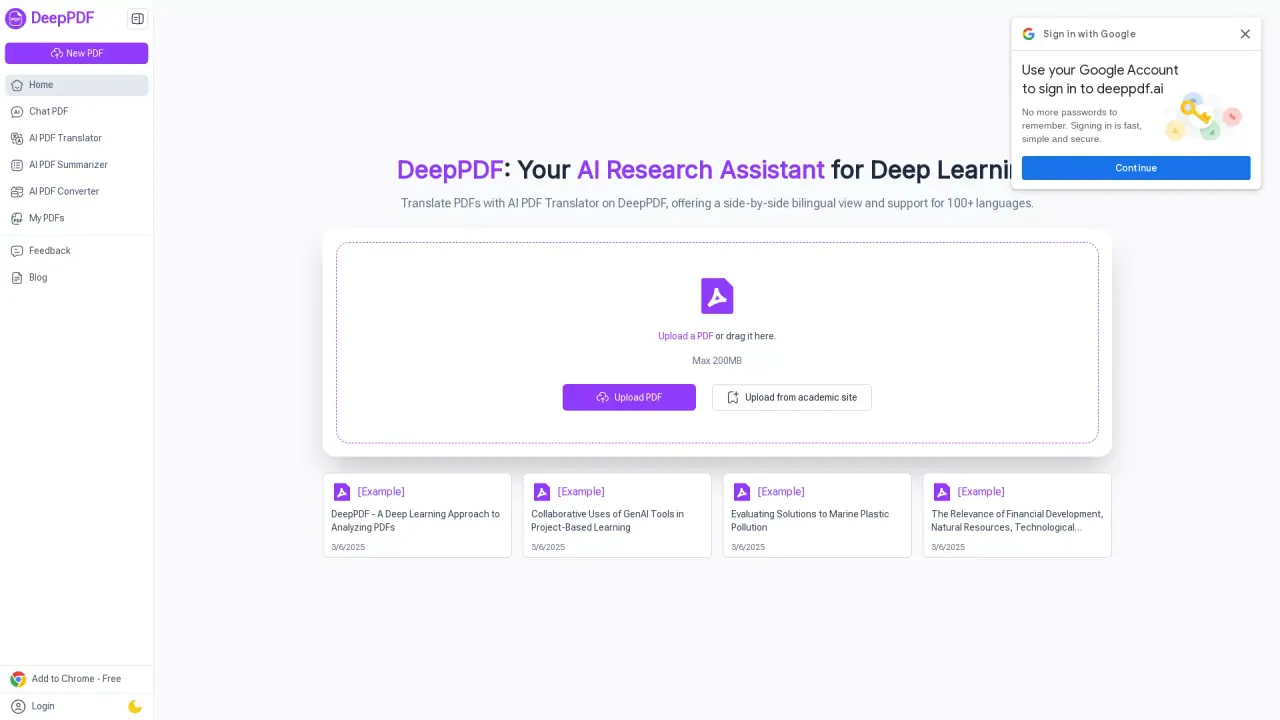
DeepPDF - AI PDF Translator Website Screenshot
Dang contacted DeepPDF to claim their profile and to verify their information although DeepPDF has not yet claimed their profile or reviewed their information for accuracy.

How can I start working with a PDF in DeepPDF?

You can upload a PDF (max 200MB) by clicking the Upload PDF button or by dragging the file into the page. After upload, you can ask questions about the document and receive AI-powered analysis.

What can I do with DeepPDF regarding PDFs?

DeepPDF offers a range of features, including Chat PDF, AI PDF Translator (side-by-side bilingual view for 100+ languages), AI PDF Summarizer, PDF Image Understanding and Formula Analysis, AI-Powered PDF Text Rewriting and Enhancement, PDF OCR, AI PDF Reader, AI Scholar & AI Academic Search Recommendations, and a comprehensive set of tools for compressing, merging, splitting, deleting pages, adding watermarks, signing documents, and editing text online.

How does the translation feature work in DeepPDF?

The AI PDF Translator provides a side-by-side bilingual view, supports 100+ languages, and aims to preserve the original meaning while translating accurately.

Can DeepPDF summarize long PDFs?

Yes. The AI PDF Summarizer extracts key points to generate concise summaries, helping you grasp essential information quickly.

Can I analyze images and formulas inside PDFs?

Yes. DeepPDF can interpret images, charts, and formulas within PDFs to help you understand visual data.

Can I rewrite or enhance text within my PDFs?

Yes. The AI-Powered PDF Text Rewriting and Enhancement feature improves clarity, tone, and readability of selected sections.

Can I convert PDFs to other formats?

Yes. DeepPDF can convert PDFs to Word, Excel, and PowerPoint, and can also convert Word (and other formats) to PDF.

Does DeepPDF support OCR for scanned PDFs?

Yes. OCR converts scanned or image-based PDFs into searchable, editable text.

Is there an in-built PDF reader in DeepPDF?

Yes. DeepPDF includes an AI PDF Reader for seamless viewing and navigation of documents.

Can I search for academic papers using Google Scholar through DeepPDF?

Yes. DeepPDF offers AI Scholar & AI Academic Search Recommendations that leverage Google Scholar to find papers and provide tailored recommendations.

What PDF management tools does DeepPDF provide?

DeepPDF includes tools to compress, merge, split, and delete pages, as well as add watermarks, sign documents, and edit text online.

How do I use DeepPDF in a few simple steps?

Step 1: Upload Your PDF. Step 2: Ask Your Question. Step 3: Receive DeepPDF's AI-powered analysis.

How can I contact DeepPDF support?

Use the Contact Us option in the site footer or on the support page to reach the DeepPDF team.

What is the maximum file size for uploads?

Up to 200MB per PDF.

DeepPDF: Your AI Research Assistant for Deep Learning

Does DeepPDF have a discount code or coupon code?

Yes, DeepPDF offers a discount code and coupon code. You can save by using coupon code when creating your account. Create your account here and save: DeepPDF.

DeepPDF Integrations

Alternatives to DeepPDF

Character - Chat with Video game Characters in AI Logo
Chat with video game characters in AI - Bring your favorite gaming worlds to life with Character.AI's interactive chat feature.
QuillBot - AI Writing Tools for Word and Google Chrome Logo
AI writing tools for Word and Google Chrome. Enhance your writing with QuillBot's text rewriting, grammar checking, plagiarism detection and more.
DeepSwapAI - AI Faceswap Tool Logo
Create realistic face swap videos and pictures instantly with DeepSwapAI, the leading AI faceswap tool. Perfect for videos, photos, and GIFs.
CivitAI - AI Image Model Generator Logo
AI Image Model Generator: Effortlessly create diverse and realistic people and avatars with CivitAI.
DeepAI - AI Creative Image Generator Logo
The AI Creative Image Generator for Naturally Creative Humans. Browse styles, generate images in seconds! Join the world's largest AI community.
PicWish - AI Photo Editor Logo
Transform your photos with ease using PicWish's AI photo editor. Unleash your creativity now!
Invideo - AI Video Editor Logo
Create pro AI videos easily and quickly with InVideo, the fastest online video editor. Enhance your workflow and boost your brand with 8M+ stock media templates.
ProWritingAid - AI Writing Assistant for Microsoft Office Logo
Improve your writing with ProWritingAid, the AI Writing Assistant for Microsoft Office.
Face Swapper - Faceswapper AI Logo
Effortlessly swap faces in photos and videos with Faceswapper AI.
DreamGen - AI Role-Play and Story Generator Logo
AI Role-Play and Story Generator. Talk to characters, generate steamy fan-fiction or just fool around.
Notion AI - AI Workspace Tool Logo
Notion AI: The AI-powered workspace tool for seamless team collaboration.
Imglarger - AI Image Enlarger Logo
Enlarge small images with AI Image Enlarger - upscale and enhance your photos without losing quality.
TrinkaAI - AI Grammar Checker Logo
Trinka is an AI-powered grammar checker and language enhancement writing assistant designed for academic and technical writing.
SlidesAI - Google Slides AI Presentation Generator Tool Logo
Effortlessly create professional presentations in seconds with SlidesAI, the ultimate Google Slides AI presentation generator tool.
VizardAI - AI Video Editor Logo
Turn recordings into viral clips with VizardAI, the AI Video Editor. Create social-ready videos instantly.
Embed a dynamic widget of your Dang.ai's company listing like the one below.

DeepPDF has not yet been claimed.

Unfortunately this listing has not yet been claimed. We strive to verify all listings on Dang.ai and this company has yet to claim their profile. Claiming is completely free and helps us ensure that all of the tools listed on Dang.ai are up to date and provide as much information to users as possible.
Is this your tool?

Does DeepPDF have an affiliate program?

Yes, DeepPDF has an affiliate program. You can find more info here.

DeepPDF has claimed their profile but have not been verified.

Unfortunately this listing has not yet been verified. We strive to verify all listings on Dang.ai and this company has yet to claim their profile. Verifying is completely free and helps us ensure that all of the tools listed on Dang.ai are up to date and provide as much information to users as possible.
Is this your tool?
If this is your tool and you'd like to verify your listing please refer to our previous emails for the verification review process. If for some reason you do not have access to these please use the Feedback form to get in touch and we'll get your listing verified.
This tool is no longer approved.
Dang.ai attempted to contact this company to verify this companies information and the company denied our request to verify the accuracy of their listing.