
Foreplay
AI Ad Management Tool
Discover Foreplay: the ultimate AI ad management tool for marketers and advertisers. Effortlessly organize, save, and collaborate on ads from top platforms.
- Listed
- Aug 4, 2023
- Updated
- May 25, 2026
Promoted
 Pixmax.aiPixmax.ai is an all-in-one AI workspace for videos, visual stories, and marketing content.
 Sidrune AI85% off. Stable Claude API for agent developers. Pay as you go. Invoices & refunds available.
 SEOify - Improve your SEO & rankingsBuild links to rank in Google. Improve your DR with links you can start building now.Advertise here270,000+ people visit Dang.ai every month.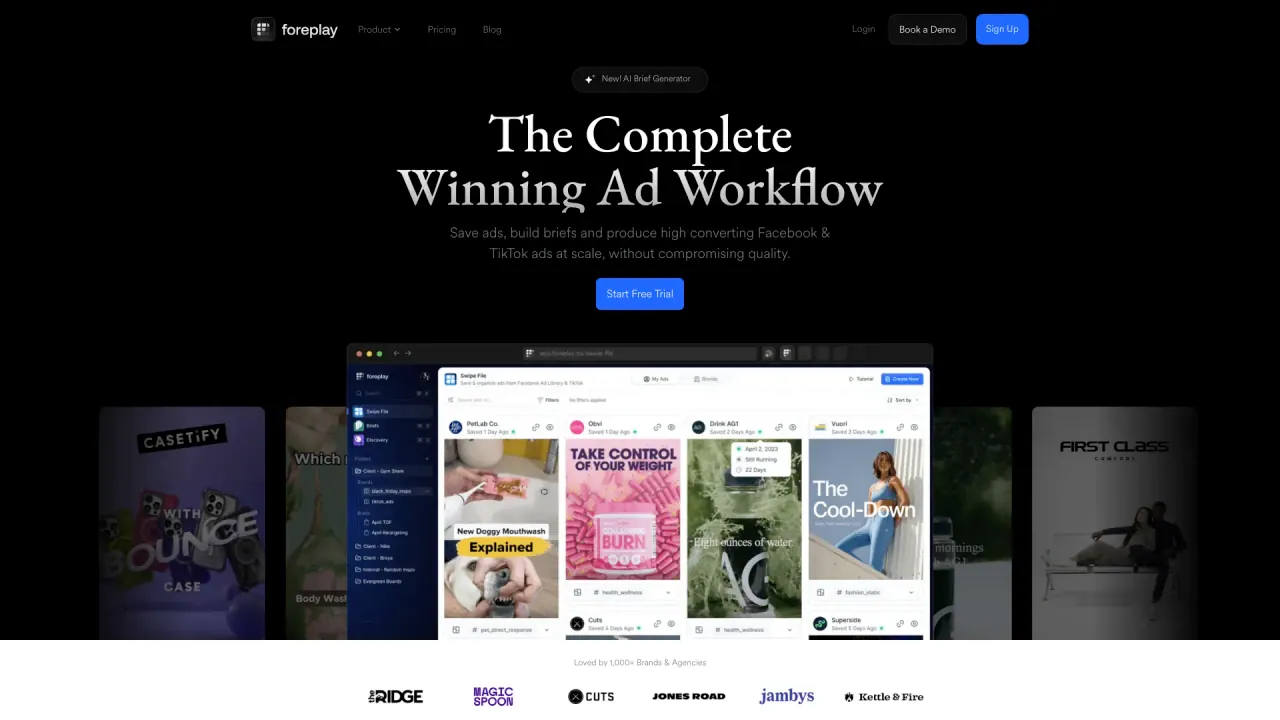
What does Foreplay do?
What is Foreplay and who is it for?
Foreplay is an all-in-one ad research and creative workflow platform designed for marketers, agencies, and creative teams. It helps you save, organize, and analyze ads from major ad libraries, discover inspiration, track competitors, and generate AI-assisted briefs. Foreplay serves multiple verticals including E-commerce & Retail, Agencies, Mobile Apps & Gaming, B2B & SaaS, Info, Education & Community, and Freelancers & Creators.
What are Foreplay's core tools and features?
- Swipe File: Save ads from anywhere and organize them.
- Discovery: A smart ad search engine with AI-driven analysis.
- Spyder: 24/7 competitor ad tracking and insights.
- Lens: Creative analytics and production guidance.
- Briefs: Turn inspiration into actionable briefs with AI help.
- Chrome Extension: Save ads from ad libraries directly in your browser.
- Mobile App: Save ads on the go from your phone.
- API: Access enriched competitor advertising data programmatically.
How does Foreplay help streamline my ad creative workflow?
Foreplay centralizes research, inspiration, saving, organization, and collaboration. Save ads, build and share mood boards, generate AI-assisted briefs, analyze patterns, and present insights—all in one platform to replace fragmented tools and manual workflows.
How does Spyder help with competitive tracking?
Spyder automatically tracks competitor ads 24/7, providing:
- Creative-first competitor tracking
- Automated insight reports
- Landing page archives
- Creative test analysis
- 24/7 ad library scraping
- Transcription and analysis of winning hooks to inform testing
What is Lens and what can I do with it?
Lens delivers creative analytics and production insights. It helps you:
- Identify winning patterns
- Build and share reports
- Compare winning themes
- Understand why certain creatives perform better
What is Briefs and how does the AI Brief Builder work?
Briefs helps you go from concept to launched assets faster. The AI Brief Builder offers:
- AI Script Writing
- Performance Storyboards
- Modular Brief Builder
- Brand Profiles
- The ability to rewrite video content based on inspiration to align with your brand
How does the Chrome Extension work?
The Foreplay Chrome Extension enables saving ads from major ad libraries (Meta/Facebook, TikTok, and LinkedIn). It’s designed for easy saving with one click, supports downloading or embedding ads into tools like Notion, and is backed by a user base of thousands with strong ratings.
Are there a Mobile App and an API?
Yes. Foreplay provides:
- A Mobile App to save ads on the go
- An API to access and leverage Foreplay data and enriched competitor advertising data
Which ad sources can Foreplay save from?
Foreplay supports saving ads from ad libraries including Meta (Facebook) Ad Library, TikTok, and LinkedIn via the Chrome Extension. The extension page highlights saving from Meta, TikTok, and LinkedIn Ad Libraries, while some knowledge-base notes reference Facebook Ad Library and TikTok Creative Center as core sources.
What are the limitations of Foreplay?
- It works in Google Chrome via the Foreplay Chrome Extension (no Chrome-less access).
- Ad-saving sources are described as Facebook Ad Library, TikTok Creative Center (with extension listings including Meta/Facebook, TikTok, and LinkedIn as sources).
- Foreplay does not provide analytics for saved ads (you see basic ad details, not impressions, clicks, or other performance metrics).
- You cannot edit saved ads within Foreplay.
- Foreplay is not an ad creation platform; it helps generate AI-assisted briefs and guide creative development, not directly run ads.
Is Foreplay an ad creation platform?
No. Foreplay focuses on inspiration, research, organization, and AI-assisted briefs. To create and run ads, you would use Foreplay in combination with other advertising platforms and tools.
How do I start using Foreplay and get a free trial?
Foreplay offers a free trial period (7 days). To start, install the Chrome Extension, sign up for an account, and access features like Swipe Builder. Pricing details are available on the Pricing page.
How can I share results and collaborate with my team or clients?
Foreplay includes collaboration and presentation features:
- Sharing & Presenting wins and opportunities
- Mood boards (inspiration boards) for internal or client-facing communication
- Performance reports, briefs, and asset collections
- Easy sharing with teammates, clients, or stakeholders
What resources are available to learn Foreplay?
- Knowledge Base
- University (ad masterclasses)
- Events & Webinars (live workshops + Q&A)
- API Docs
- Blog
- Experts
- Free Swipe Files
- Agency Directory
- Public Library
- Merch Store
How can Foreplay data be accessed programmatically?
Foreplay offers an API to access enriched competitor advertising data (agent-agnostic).
How large is Foreplay’s ad library and user base?
- Live Ad Count and historical ad counts are displayed on Foreplay’s site (e.g., 54,683,980 live ads with historical counts shown elsewhere).
- Foreplay is used by thousands of teams, with ratings reflected in the extension and product pages (e.g., thousands of users and high review ratings).
Is this your tool?
Claim Foreplay to manage this listing, or upgrade to Pro for featured-first placement and a newsletter feature.