
Freehand AI
No longer active
AI Collaborative Whiteboard
Revolutionize team collaboration with Freehand AI's intelligent canvas and seamless integrations.
Freehand AI is no longer available
- Listed
- Aug 4, 2023
- Shut down
- Jan 27, 2025
Promoted
 Pixmax.aiPixmax.ai is an all-in-one AI workspace for videos, visual stories, and marketing content.
 Sidrune AI85% off. Stable Claude API for agent developers. Pay as you go. Invoices & refunds available.
 SEOify - Improve your SEO & rankingsBuild links to rank in Google. Improve your DR with links you can start building now.Advertise here270,000+ people visit Dang.ai every month.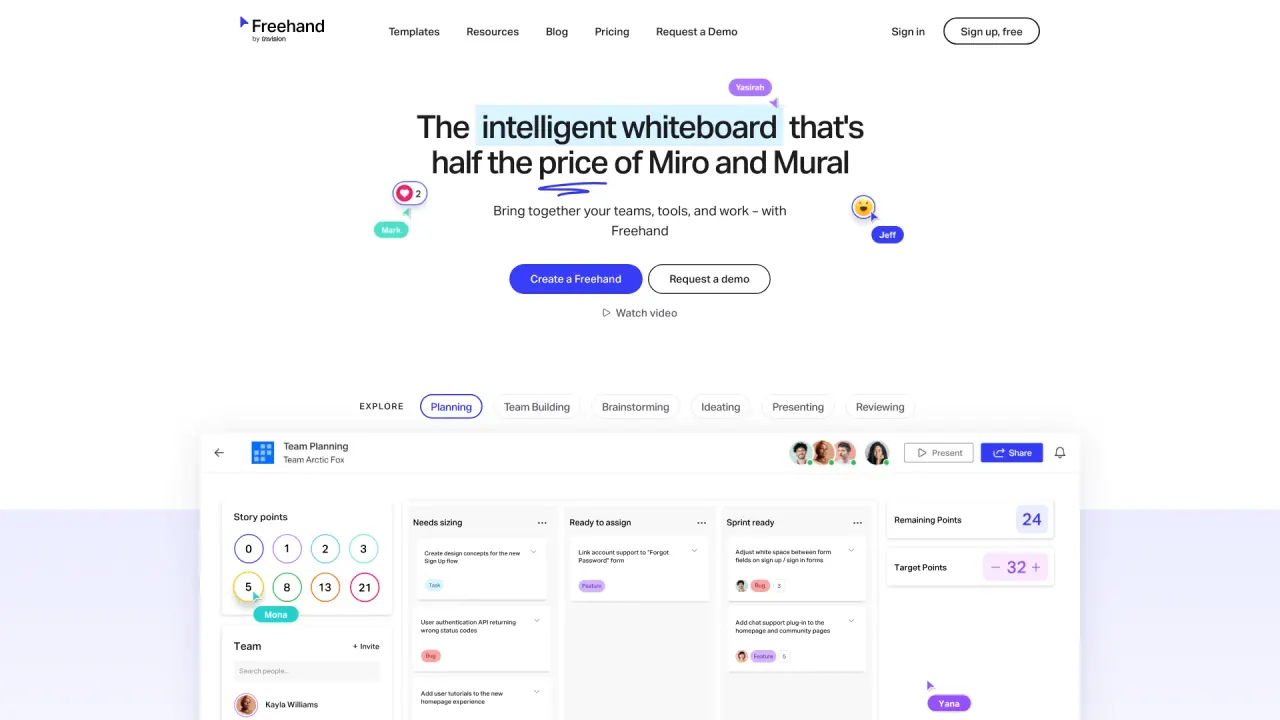
What does Freehand AI do?
What is freehandapp.com?
Freehandapp.com is the official website for Freehand by InVision, a visual collaboration platform tailored for team collaboration on projects through a digital canvas. Freehand encompasses a range of functionalities, including smart workflows, task management capabilities, bidirectional integrations, and a library of pre-built templates. This versatile tool is intended to cater to diverse roles and scenarios, including brainstorming sessions, project planning, design work, and presentations. For more detailed information on Freehand, you can explore their website or refer to their blog.
How much does freehandapp.com cost?
Freehand by InVision offers two distinct pricing plans, as detailed on their official website:
- Free Plan: Designed for individuals, this plan provides access for up to 30 active users and offers 3 freehands. In addition, it allows users to create an unlimited number of both public and private spaces. A ""freehand"" in this context refers to a digital canvas where collaborative work can take place.
- Pro Plan: Tailored for cross-collaborative teams, the Pro plan is priced at $4.95 per active user per month. With this plan, teams can accommodate up to 50 active users and enjoy the freedom of unlimited freehands and spaces. Moreover, the Pro plan comes with an array of additional features and integrations.
For organizations with more advanced team and security requirements, Freehand also offers the option to request a quote for their Enterprise plan. For a comprehensive overview of Freehand's pricing details, as well as a complete list of features, it is recommended to visit their pricing page on their website.
What are some features of freehandapp.com?
Freehand, by InVision, boasts a range of noteworthy features that facilitate collaboration and enhance productivity:
- Intelligent Canvas: This digital whiteboard enables real-time collaboration among team members. It supports the use of smart objects, workflows, and integrations, enhancing the efficiency of collaborative efforts.
- Tables: Freehand offers a flexible data view, allowing users to organize and manage tasks and data with ease. Custom properties and configuration options provide additional flexibility for effective data management.
- Team Building Tools: Interactive tools like the Buzzer and Leaderboard are designed to create engaging activities and games for teams, fostering a collaborative and enjoyable work environment.
- Link Previews and Embeds: Freehand simplifies the process of accessing linked or embedded files by providing a feature that allows users to view the content within the canvas. This not only saves time but also offers valuable context.
For more detailed information about these features and others offered by Freehand, you can explore their website or refer to their blog.
How to sign up for freehandapp.com?
Signing up for Freehand by InVision is a straightforward process, and here are the steps to get started:
- Visit the Freehand by InVision Website: Navigate to the Freehand by InVision website and locate the ""Sign up free"" button situated at the top right corner of the page.
- Choose Your Sign-Up Method: You have the option to sign up using your email, Google account, or an existing InVision account. If you don't have an InVision account, you can create one at no cost during this step.
- Access Your Freehand Home Page: After completing the sign-up process, you will be directed to your Freehand home page. Here, you can initiate or join spaces, freehands, and tables to begin collaborating.
- Integration with Other Platforms: If desired, you can extend Freehand's functionality by integrating it with platforms such as Microsoft Teams, Slack, or Zoom. This can be achieved by installing the Freehand app or integration specific to the platform you wish to use.
For more in-depth guidance on using Freehand, including detailed instructions and video tutorials, you can refer to their help center or watch their video tutorials, both of which are valuable resources for getting the most out of the tool.
What are the limitations of freehandapp.com?
Freehand by InVision offers a robust visual collaboration platform; however, it is important to be aware of certain limitations that come with its usage. These limitations include:
- Freehand AI Usage Limits: Freehand AI is a valuable feature that leverages artificial intelligence for data analysis and synthesis on the canvas. However, its usage is not unlimited and varies depending on your pricing plan. Accounts on the free plan are allotted 10 Freehand AI responses for the entire account lifetime, while those on the pro plan receive 100 Freehand AI responses per month. If you require additional Freehand AI responses, you can contact the Freehand team to request a quote for the Freehand Enterprise plan.
- Active User Limits: The term ""active user"" refers to individuals who have interacted with Freehand within the past 30 days. The number of active users allowed may be limited based on your pricing plan. Free plan accounts can accommodate up to 30 active users, whereas pro plan accounts can support up to 50 active users. For larger teams or organizations, it is possible to request a quote for the Freehand Enterprise plan if more active users are needed.
- Freehand and Space Limits: Freehand offers digital canvases known as ""freehands"" for collaborative work and ""spaces"" to organize and manage these freehands and tables. The number of freehands and spaces accessible depends on your chosen pricing plan. Free plan accounts are permitted up to 3 freehands and unlimited public and private spaces. In contrast, pro plan accounts enjoy the freedom of unlimited freehands and spaces.
- Integration Limits: Freehand seamlessly integrates with various platforms and tools, including Microsoft Teams, Slack, Zoom, Jira, Trello, and more. However, access to certain integrations may require a pro or enterprise plan. For instance, the Microsoft Teams integration necessitates a pro plan, while the Jira and Trello integrations mandate an enterprise plan. Information about the availability and features of each integration can be found on the Freehand website or the Freehand help center.
These limitations provide a comprehensive understanding of the constraints associated with Freehand by InVision. It is advisable to assess these factors when selecting the most suitable pricing plan for your specific needs.
What is Freehand AI and how can it enhance team collaboration?
Freehand AI is an integral component of the Intelligent Canvas provided by Freehand, now part of Miro. It enhances team collaboration by leveraging artificial intelligence for data analysis and synthesis directly on the canvas. This feature allows teams to streamline their workflows and optimize project management by providing smart insights and suggestions during the brainstorming and planning processes. Teams can use Freehand AI to improve task management, facilitate ideation, and ensure alignment across various stages of a project, thereby unlocking their full potential.
How does Freehand AI integrate with other tools to streamline workflows?
Freehand AI offers bidirectional integrations with a variety of popular tools and platforms such as Microsoft Teams, Slack, Zoom, Jira, and Trello. These integrations enable teams to streamline their workflows by allowing seamless data exchange and enhancing task management capabilities. By integrating with these tools, teams can easily incorporate Freehand AI into their existing digital ecosystem, facilitating efficient communication, real-time collaboration, and improved productivity throughout project lifecycles. This means that team members can leverage the collaborative power of Freehand AI while continuing to use the tools they are already familiar with.
What pricing options are available for accessing Freehand AI's features?
Freehand AI offers flexible pricing plans designed to accommodate a variety of team sizes and collaboration needs. The options include: -
- **Free Plan**: Ideal for individuals or small teams, this plan allows up to 30 active users and provides access to 10 Freehand AI responses for the entire account lifetime. It includes 3 freehands and unlimited public and private spaces.
-
- **Pro Plan**: Suited for cross-functional teams, this plan is priced at $4.95 per active user per month, supporting up to 50 active users with 100 Freehand AI responses per month. It offers unlimited freehands and spaces, as well as additional features and integrations.
For larger organizations or those with complex requirements, Freehand also offers an Enterprise plan, the details of which can be obtained by requesting a quote from Freehand. These pricing options ensure that teams can select a plan that best fits their collaboration needs and budget.