
Acres
Note Taking AI Tools
Acres is a local-first visual Markdown workspace with built-in AI and MCP/CLI agents that edit your notes with reviewable changes.
- Pricing
- Free
- Category
- Note Taking
- Listed
- Oct 1, 2026
- Updated
- Oct 5, 2026
Promoted
 Sidrune AI85% off. Stable Claude API for agent developers. Pay as you go. Invoices & refunds available.
 Pixmax.aiPixmax.ai is an all-in-one AI workspace for videos, visual stories, and marketing content.
 SEOify - Improve your SEO & rankingsBuild links to rank in Google. Improve your DR with links you can start building now.Advertise here270,000+ people visit Dang.ai every month.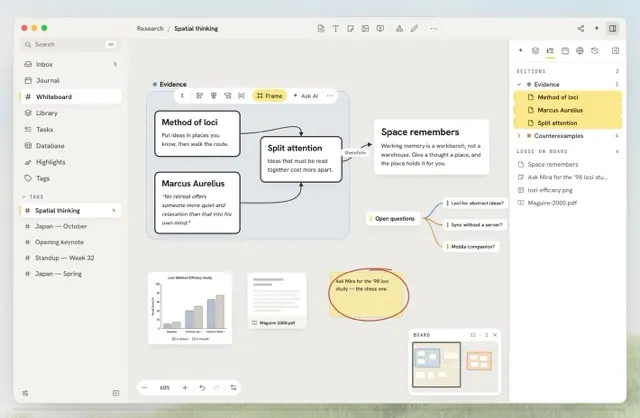
What does Acres do?
Acres is a local-first visual Markdown workspace for macOS and Windows, built for keeping your notes in a folder you own. Use an infinite canvas of Markdown cards connected with links, mind maps, tags, and properties—so planning, research, and writing stay visually organized without leaving your files behind.
Agents build on your board. Over MCP, Claude Code, or Cursor-style workflows, agents can read your graph, draft structured plans, and land edits directly onto your open board. Changes arrive as word-level diffs for you to review, and board updates are merged with your own work rather than replacing it.
Bring your own AI key or run locally, then use the board intelligence tools to turn wall-of-text notes into cards, sections, and connections. Every agent session is recorded so you can review what changed and revert supported edits using the app’s undo history. After a 14-day free trial, it offers a $59 USD lifetime early-adopter license (or $9/month) and supports other platforms.
Are my notes stored locally, or on a server?
Your boards live in a local folder you choose. Cards are plain Markdown and boards are readable JSON, so your content remains accessible as files.
What kinds of edits can AI agents make in Acres?
Agents can create new cards, write and revise content in cards, group frames/sections, and wire connections between items on your board.
How do I stay in control of agent changes?
Agent edits land as reviewable diffs, and board changes use the app’s undo history. You can inspect what changed in a session digest and revert supported edits.
Can I connect other tools or agents to my local Acres boards?
Yes—Acres supports agent workflows over MCP/CLI, where tools can search your graph and write cards, connections, and framed sections.
Can I import from my existing notes apps?
You can import from an Obsidian vault (including folders as boards and notes as cards) and from a Heptabase backup, preserving highlights and journal content.
What happens after the free trial?
After 14 days, you can continue with an early-adopter one-time $59 lifetime license or $9/month, depending on the option you choose.
This listing is claimed
Own Acres? Sign in with the email used to claim it to manage this listing, or upgrade to Pro for featured-first placement and a newsletter feature.