
Vantaige LLM VRAM Calculator
Machine Learning AI Tools
Estimate LLM VRAM needs—weights, KV cache, and overhead—to quickly see which models fit your GPU or Mac.
- Pricing
- Free
- Category
- ML
- Listed
- Oct 3, 2026
- Updated
- Oct 3, 2026
Promoted
 KurodyneSell the tools from your AI side projects. Listing is free.
 Sidrune AI85% off. Stable Claude API for agent developers. Pay as you go. Invoices & refunds available.
 Pixmax.aiPixmax.ai is an all-in-one AI workspace for videos, visual stories, and marketing content.
 SEOify - Improve your SEO & rankingsBuild links to rank in Google. Improve your DR with links you can start building now.Advertise here270,000+ people visit Dang.ai every month.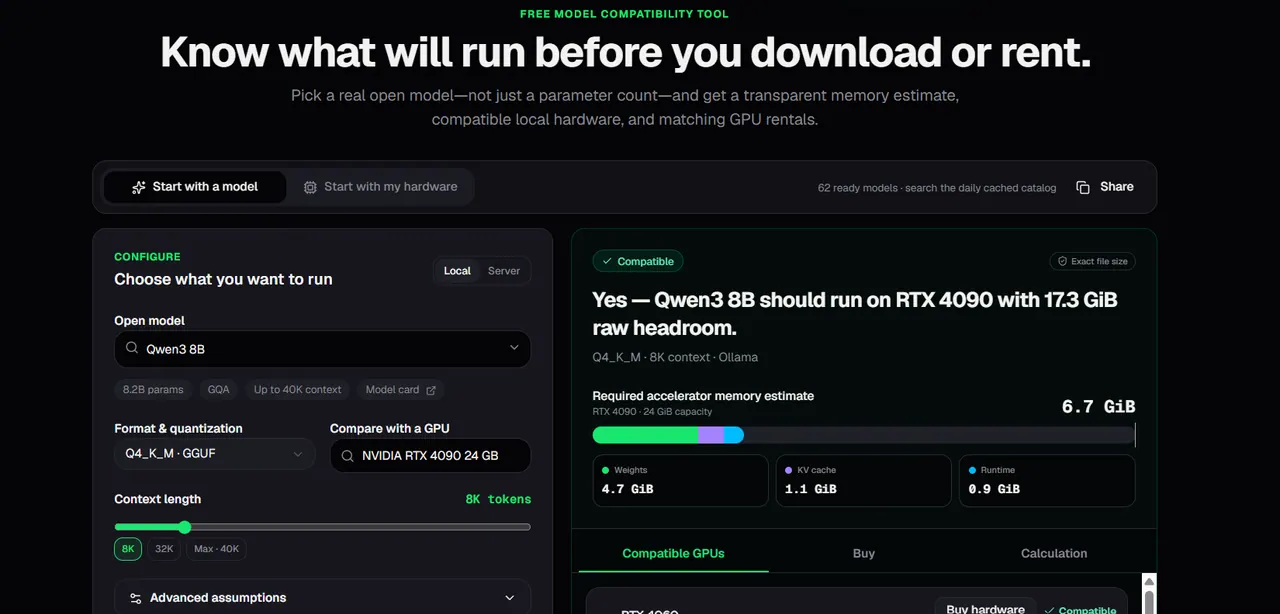
What does Vantaige LLM VRAM Calculator do?
Vantaige LLM VRAM Calculator is a free model-compatibility tool for planning local LLM runs with real memory sizing instead of rough parameter-count guesses.
It breaks down required memory into model weights (including specific quantization formats like GGUF Q4_K_M, Q5_K_M, Q8_0, plus AWQ, EXL2, FP16, and BF16), the dynamic KV cache that grows with context length (up to 128K+ tokens, including attention variants like GQA/MLA), and runtime/activation overhead to help avoid unexpected out-of-memory crashes.
Use two ways to explore: start with a model (search the cached catalog or enter an open model/Hugging Face repo, then choose quantization and context) or start with your hardware (select your GPU/unified memory and filter models that fit). Results include fit headroom, compatibility status, and ready-to-use terminal commands for popular local inference runtimes, plus matching GPU rental configurations when a model doesn’t fit your machine.
What does the calculator estimate besides the model’s weight size?
It estimates total required accelerator memory by adding model weights, the KV cache for your chosen context length, and runtime/activation overhead to reflect real execution—not just the GGUF/safetensors file size.
How does context length affect VRAM usage?
Longer context increases the KV cache, so a model that fits at 4K can run out of memory at 32K or 128K. Choose the context you’ll actually use (and keep batch/concurrency in mind).
Does quantization (Q4/Q5/Q8/FP16/BF16) change VRAM needs?
Yes—quantization changes the memory used by the model weights, which is typically the biggest lever. KV cache memory may still be a major portion, especially at long contexts.
Is the calculator’s “fit” based on raw VRAM capacity alone?
No. Fit results include reserved headroom for OS/framework/runtime needs, so you should treat “raw VRAM” as insufficient by itself and rely on the compatibility outcome for safe planning.
Can I use it for Apple Silicon Macs, not just NVIDIA GPUs?
Yes. You can check compatibility against Apple Silicon unified memory configurations and see how memory/headroom affects whether a model run is practical.
What should I do if the calculator suggests a model might only barely fit?
Reduce context length, try a tighter quantization that still meets your needs, or adjust KV cache assumptions where available. Then confirm with the model running locally and watch for OOM as you test real prompts.
This listing is claimed
Own Vantaige LLM VRAM Calculator? Sign in with the email used to claim it to manage this listing, or upgrade to Pro for featured-first placement and a newsletter feature.