ClearMeet
AI Meeting Assistant Tools
ClearMeet is a Windows AI meeting assistant that listens on your PC to generate live answers, notes, and summaries—without a bot joining the call.
Promoted
 AI Checker PlusAI detector that highlights which passages AI wrote. Free check, no sign-up. Plagiarism too.
 RewindType any X/Twitter handle. Get their year back as a narrated video story. Then ask it anything.
 KurodyneSell the tools from your AI side projects. Listing is free.
 Sidrune AI85% off. Stable Claude API for agent developers. Pay as you go. Invoices & refunds available.
 Pixmax.aiPixmax.ai is an all-in-one AI workspace for videos, visual stories, and marketing content.
 SEOify - Improve your SEO & rankingsBuild links to rank in Google. Improve your DR with links you can start building now.Advertise here330,000+ people visit Dang.ai every month.
What does ClearMeet do?
ClearMeet is an AI meeting assistant built for Windows 10 and 11 that helps you capture what’s happening and respond in the moment—without a bot joining your meeting. It listens through your own PC to the audio from your computer and your microphone, so nothing needs to enter the call.
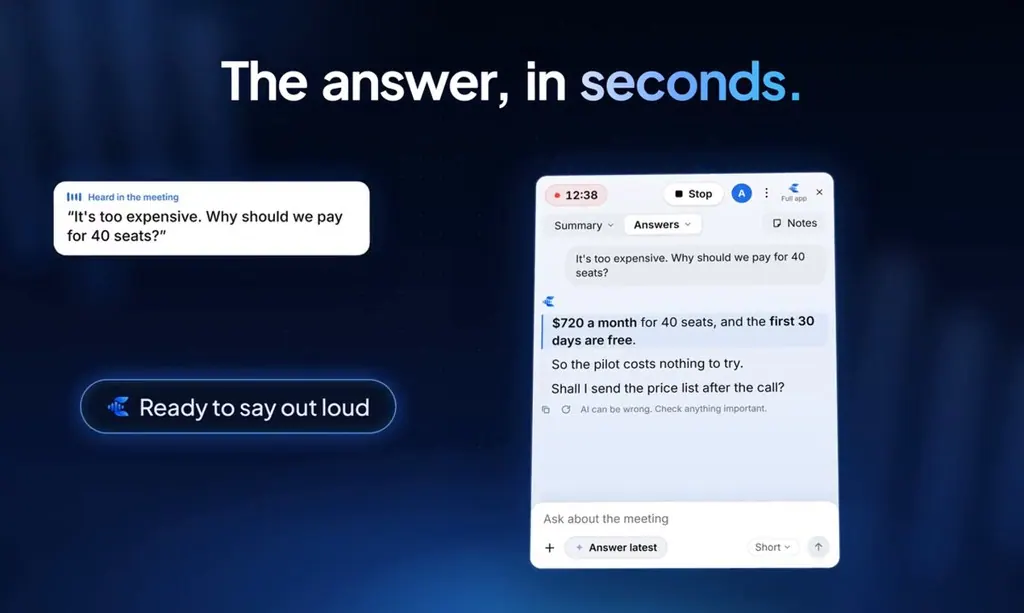
During the meeting, ClearMeet provides live transcription and turns it into meeting notes, a summary, and action items with clear ownership. If someone asks you a question, you can click “Answer latest” to show a short answer within seconds based on the call plus your own notes and files. If it doesn’t know, it won’t guess.
ClearMeet also works across common meeting apps and formats, including Zoom, Microsoft Teams, Google Meet, Webex, and Slack huddles—plus calls running in your browser or on your desktop.
After the call, your meeting is saved so you can search through it, ask questions, and export it as a PDF, Word document, or slides. ClearMeet is designed for people who need accurate notes and quick, on-the-spot answers—like client-facing teams, sales, recruiting, and team check-ins.
Pricing: Free for 5 meetings per month (up to 2 hours each), with paid plans starting at $20/month on Windows only, English only.
Does ClearMeet join my meeting as a bot?
No. ClearMeet listens through your PC, so no bot joins the call.
How does ClearMeet keep audio from leaving my computer?
Real-time transcription runs on your own PC, so your audio stays on your computer.
Which meeting apps does ClearMeet support?
ClearMeet works with Zoom, Microsoft Teams, Google Meet, Webex, Slack huddles, and other calls that play through your computer (including in-browser and desktop calls).
How do I get an answer while the meeting is still happening?
Click “Answer latest” to show a short answer to say, drawn from the call and your own notes/files.
Can other participants see ClearMeet during screen sharing?
ClearMeet is hidden from most screen shares, so other people generally can’t see it while you share your screen.
What plans and limits are available for ClearMeet?
You can start with a Free plan for 5 meetings per month (up to 2 hours each). Paid plans start at $20/month, and ClearMeet is Windows-only and English-only.
This listing is claimed
Own ClearMeet? Sign in with the email used to claim it to manage this listing, or upgrade to Pro for featured-first placement and a newsletter feature.