
TranslateBuff
Verified
AI Assistant Tools
TranslateBuff is a browser extension that delivers AI translations using 20+ models, with full-page bilingual views, instant highlights, and bilingual subtitles.

Promoted
 AI Checker PlusAI detector that highlights which passages AI wrote. Free check, no sign-up. Plagiarism too.
 RewindType any X/Twitter handle. Get their year back as a narrated video story. Then ask it anything.
 KurodyneSell the tools from your AI side projects. Listing is free.
 Pixmax.aiPixmax.ai is an all-in-one AI workspace for videos, visual stories, and marketing content.
 SEOify - Improve your SEO & rankingsBuild links to rank in Google. Improve your DR with links you can start building now.Advertise here330,000+ people visit Dang.ai every month.
What does TranslateBuff do?
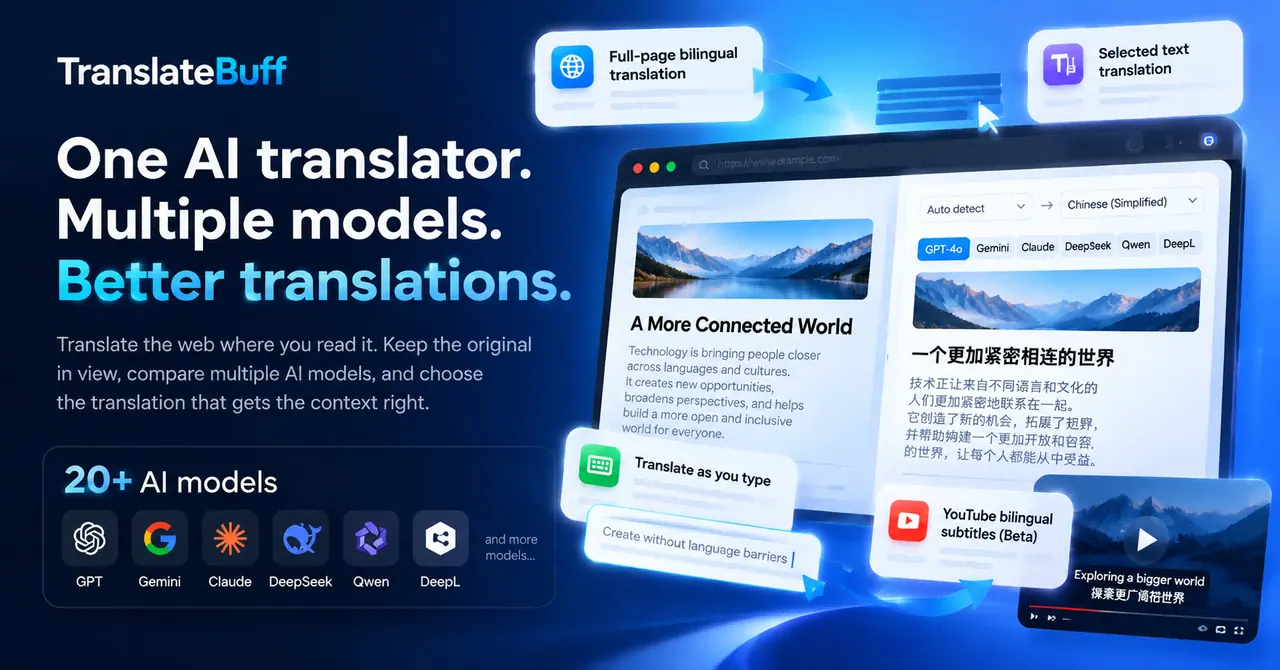
TranslateBuff is an AI translation extension built for translating content as you read and write. It brings multiple translation AI models into one workflow so you can compare outputs and choose the result that best matches context, tone, terminology, and proper names.
Use TranslateBuff to translate entire web pages with a full-page bilingual layout or switch to translation-only viewing. It also supports quick, on-page translations: highlight any text to get an instant translation in a lightweight pop-up, or translate inside text boxes using a keyboard shortcut (triggered by pressing the space bar three times). For longer, complex passages, full-page context helps preserve industry terms, resolve ambiguous wording, and keep key names and terminology consistent.
TranslateBuff also includes a Translation Hub for running the same source text through multiple models (e.g., GPT, Gemini, DeepSeek, and others) with a live preview, making it easy to compare wording and nuance side by side. In addition, it offers bilingual video subtitles in beta, pairing original and translated subtitles with AI-powered sentence segmentation to make tutorials, interviews, and talks easier to follow.
Designed for students, professionals, researchers, and language learners who regularly work with multilingual content, TranslateBuff offers a Free plan for unlimited webpage translation with Google and Microsoft, full-page bilingual reading, and instant translation for selected text. Pro unlocks access to advanced AI models and model comparison.
What does TranslateBuff do?
TranslateBuff translates web content directly in your browser using AI models. It supports full-page bilingual viewing, instant translation for highlighted text, translation as you type, and a Translation Hub for comparing multiple model outputs.
How does model comparison work?
You can run the same source text through multiple AI models and compare the results side by side. This helps you pick the translation that best matches context, tone, and terminology.
Does TranslateBuff translate full web pages or just selected text?
Both. You can read any webpage in bilingual or translation-only mode, and you can also highlight specific text to see an instant translation without leaving the page.
Which browsers and AI models are supported?
TranslateBuff works with Chrome, Edge, and Firefox, and supports 20+ AI models and translation engines, including GPT, Gemini, Claude, DeepSeek, Qwen, Kimi, Doubao, Google, Microsoft, and DeepL.
What’s included in the Free plan?
The Free plan includes unlimited webpage translation with Google and Microsoft, full-page bilingual reading, and instant translation for selected text. Advanced AI models and model comparison are available with Pro.
Are there any video subtitle features?
Yes—bilingual video subtitles are available in beta. You can watch supported YouTube videos with original and translated subtitles, plus AI-powered sentence segmentation.
This listing is claimed
Own TranslateBuff? Sign in with the email used to claim it to manage this listing, or upgrade to Pro for featured-first placement and a newsletter feature.