
WanaiDev
AI Video Generator
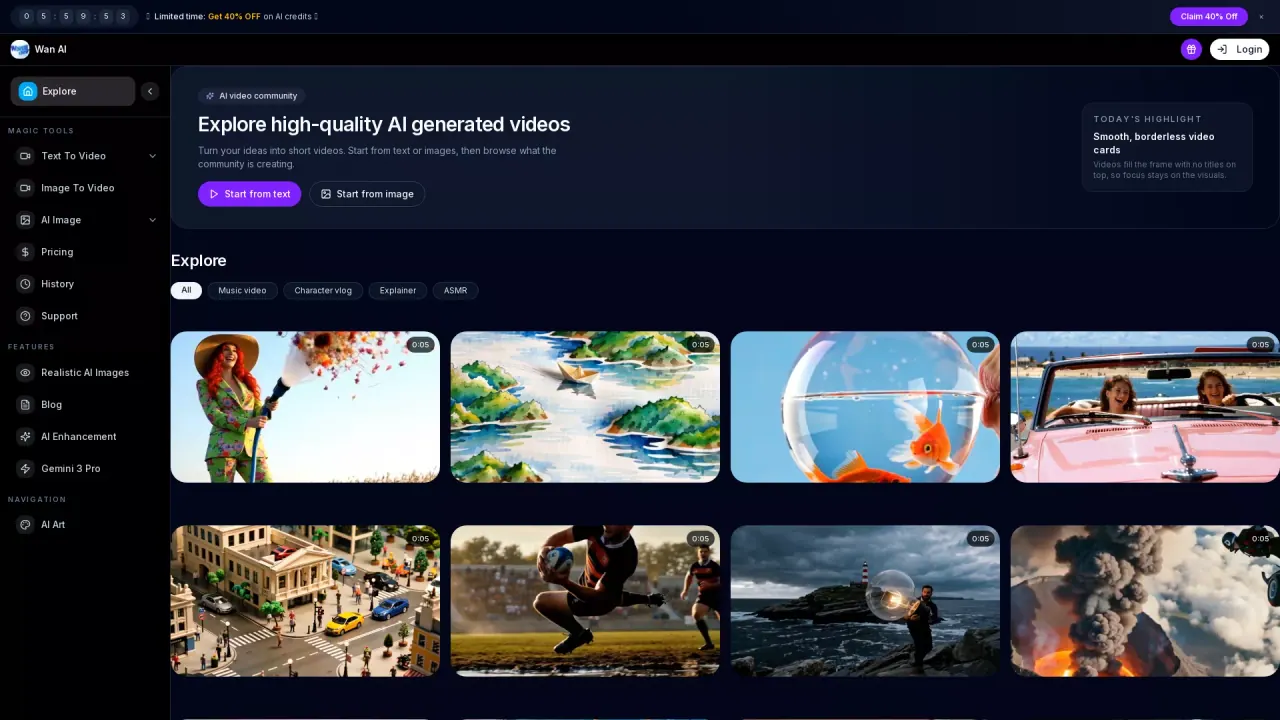
Wan AI is a free AI video generator that turns text prompts or images into cinematic 1080p videos and voiceover-ready content.
- Pricing
- Paid
- Category
- AI Detector
- Listed
- Nov 23, 2025
- Updated
- Oct 21, 2026
Promoted
 AI Checker PlusAI detector that highlights which passages AI wrote. Free check, no sign-up. Plagiarism too.
 RewindType any X/Twitter handle. Get their year back as a narrated video story. Then ask it anything.
 KurodyneSell the tools from your AI side projects. Listing is free.
 Sidrune AI85% off. Stable Claude API for agent developers. Pay as you go. Invoices & refunds available.
 Pixmax.aiPixmax.ai is an all-in-one AI workspace for videos, visual stories, and marketing content.
 SEOify - Improve your SEO & rankingsBuild links to rank in Google. Improve your DR with links you can start building now.Advertise here270,000+ people visit Dang.ai every month.
What does WanaiDev do?
Wan AI helps you create cinematic videos online from text prompts, images, and voiceover-ready workflows. Use it to turn an idea, product concept, or scene description into motion, or animate a still image into a video with smooth cinematic movement.
Key creation paths include text-to-video and image-to-video. You can optionally provide a first frame via a public image URL (PNG, JPG, or WebP up to 8 MB) to guide the opening shot, and then generate a standard preview video. The platform also offers model pages to help you choose workflows such as Wan 2.7 and Wan 2.6, plus a “Preview” direction for 4K-oriented output with multi-shot direction, camera control, and audio sync.
It’s a good fit for creators and teams working on marketing videos, product demos, social ads, and cinematic concept scenes—especially when you want a prompt-driven workflow that can be previewed and iterated quickly.
Pricing is available directly in the platform: you can start with a free standard preview (no card required). There’s also a “Standard Trial” described as 20 credits each, and you can move to Pro for more capable generation (HD output, longer clips, and advanced creative controls).
What can I create with Wan AI?
You can create videos from text prompts (text-to-video), animate still images into motion (image-to-video), and use voiceover-ready creation workflows to plan narration pacing alongside your video.
Does Wan AI support text-to-video?
Yes. Write a prompt describing your scene, product, or campaign idea, then generate an AI video directly from that text.
Can I animate my own image into a video?
Yes. Upload a still image and use the image-to-video workflow to turn it into motion with cinematic movement.
Is there a way to control the first frame of the video?
Yes. You can provide an optional first frame using a PNG, JPG, or WebP image URL (up to 8 MB), including public image URLs as references.
What output quality do I get for the free preview?
The platform supports generating 1080p videos, and it offers a free standard preview option so you can test your idea before upgrading.
How does Pro differ from the free preview?
Pro is for when you need more—HD output, longer clips, and advanced creative controls after you’ve tested an idea.
This listing is claimed
Own WanaiDev? Sign in with the email used to claim it to manage this listing, or upgrade to Pro for featured-first placement and a newsletter feature.