
Ptero
AI Code Writers & Generator Tools
Ptero is a free AI chat platform in your browser, letting you switch between multiple models without signing up.
- Pricing
- Free
- Category
- Code
- Listed
- Aug 18, 2026
- Updated
- Oct 18, 2026
Promoted
 Sidrune AI85% off. Stable Claude API for agent developers. Pay as you go. Invoices & refunds available.
 Pixmax.aiPixmax.ai is an all-in-one AI workspace for videos, visual stories, and marketing content.
 SEOify - Improve your SEO & rankingsBuild links to rank in Google. Improve your DR with links you can start building now.Advertise here270,000+ people visit Dang.ai every month.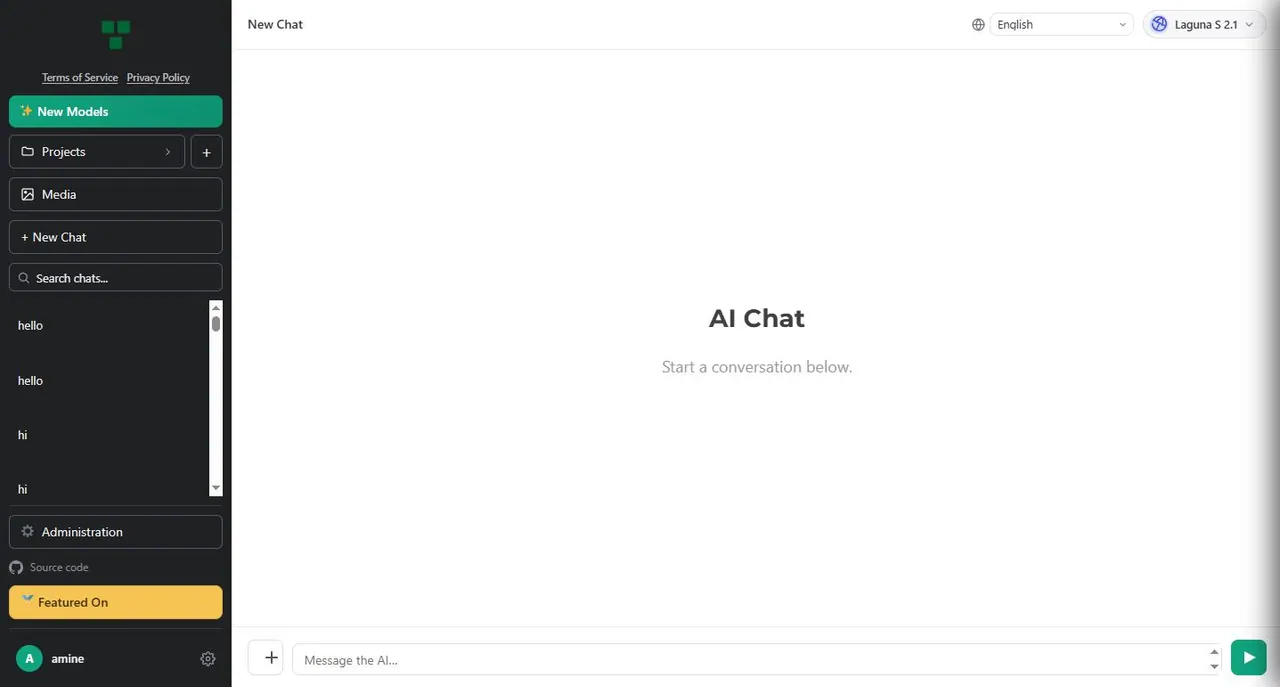
What does Ptero do?
Ptero is an AI chat experience built to help you work with multiple language models from one place. You can enter a prompt and quickly compare how different models respond to the same input.
A single interface keeps your workflow simple, with quick model switching so you can iterate on prompts and see which outputs best match your needs. Ptero also includes features for organizing your work: a projects area for separating chats into workspaces and a media library for uploading and managing files within conversations.
This makes it useful for developers, students, and researchers who want a convenient environment to test prompts, debug code, or generate content across different models. Whether you’re doing quick comparisons or organizing longer sessions, you can stay in the browser without downloading or installing anything.
Core usage is free and doesn’t require account registration or payment. The platform is intended to be accessible directly in your web browser.
Do I need an account to use Ptero?
No—Ptero’s core chat access does not require account registration.
Can I switch between multiple AI models in the same chat?
Yes—model switching is available with a single click, so you can compare responses to the same prompt.
Does Ptero work in the browser, or do I need to install anything?
Ptero is accessible through a web browser and does not require downloads or installations.
How can I organize different conversations or work sessions?
Use the projects area to organize chats into separate workspaces.
Can I upload files as part of my chat?
Yes—Ptero includes a media library where you can upload and manage files within chat conversations.
Are there usage limits or payments for the main experience?
No payments are required to use the core functionality, and the platform does not impose usage limits for that access.
This listing is claimed
Own Ptero? Sign in with the email used to claim it to manage this listing, or upgrade to Pro for featured-first placement and a newsletter feature.