PHORM
3D Modeling AI Tools
Turn a photo into a print-ready 3D figure, with automatic mesh repair and slicer-ready STL or 3MF downloads.
Promoted
 AI Checker PlusAI detector that highlights which passages AI wrote. Free check, no sign-up. Plagiarism too.
 RewindType any X/Twitter handle. Get their year back as a narrated video story. Then ask it anything.
 KurodyneSell the tools from your AI side projects. Listing is free.
 Sidrune AI85% off. Stable Claude API for agent developers. Pay as you go. Invoices & refunds available.
 Pixmax.aiPixmax.ai is an all-in-one AI workspace for videos, visual stories, and marketing content.
 SEOify - Improve your SEO & rankingsBuild links to rank in Google. Improve your DR with links you can start building now.Advertise here330,000+ people visit Dang.ai every month.
What does PHORM do?
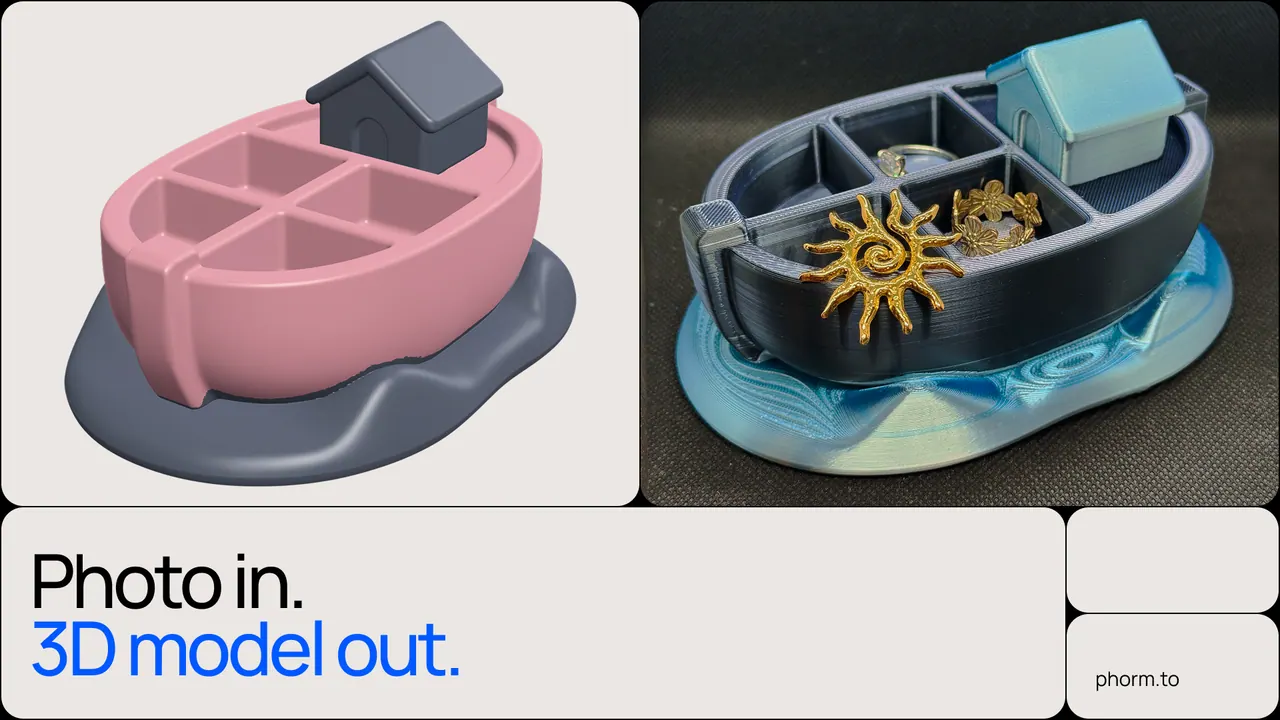
PHORM converts a single photo into a print-ready 3D figure without requiring modeling skills or file preparation. Upload a picture of the object you want to print—or generate a photo from a short prompt if you don’t have one. In just a few minutes, PHORM reconstructs the 3D geometry and prepares it for slicing.
The workflow doesn’t stop at generation. PHORM automatically repairs the mesh to make it watertight by closing holes, fixing normals, and resolving non-manifold geometry. The result is checked for printability so you can focus on printing instead of troubleshooting broken models.
Download your finished model as STL or 3MF. STL is widely supported across slicers, while 3MF preserves more scene metadata such as units and (for supported cases) print settings. PHORM also targets common workflows with Bambu Studio, Cura, PrusaSlicer, and Orca Slicer, and can output multicolor files for Bambu Lab AMS. A built-in editor lets you engrave or emboss text in any font and add a logo onto the model.
PHORM is designed for home 3D printer users and small sellers creating custom figurines, gifts, and decor. It works best for figurines and organic shapes; precise mechanical parts still typically require CAD. Pricing includes a free plan with 2 models per month, with paid plans starting from $9.
Can PHORM turn a single photo into a 3D model I can print?
Yes. Upload a clear photo of the object and PHORM generates print-ready 3D geometry in a few minutes, then prepares it for slicing.
What if I don’t have a good photo—can PHORM generate one from a prompt?
Yes. You can provide a short prompt, and PHORM will generate a photo to use as the input for the 3D model.
Does PHORM do anything to fix models so they slice correctly?
PHORM repairs the mesh to make it watertight by closing holes, fixing normals, and resolving non-manifold geometry, and it checks printability before you download.
What file formats can I download for printing?
You can download STL or 3MF. Both are compatible with popular slicers like Bambu Studio, Cura, PrusaSlicer, and Orca Slicer.
Can PHORM add text or logos to the 3D model?
Yes. Use the built-in editor to engrave or emboss any text in any font, and add a logo to the model.
What does PHORM cost?
There’s a free plan that includes 2 models per month. Paid plans start from $9.
This listing is claimed
Own PHORM? Sign in with the email used to claim it to manage this listing, or upgrade to Pro for featured-first placement and a newsletter feature.