Narqo AI Image Checker
AI Detector & Detecting Tools
Narqo AI Image Checker inspects an image’s embedded evidence to confirm AI generation or AI editing—without uploading your file.
- Category
- AI Detector
- Listed
- Oct 15, 2026
- Updated
- Nov 2, 2026
Promoted
 Pixmax.aiPixmax.ai is an all-in-one AI workspace for videos, visual stories, and marketing content.
 AI Checker PlusAI detector that highlights which passages AI wrote. Free check, no sign-up. Plagiarism too.
 RewindType any X/Twitter handle. Get their year back as a narrated video story. Then ask it anything.
 KurodyneSell the tools from your AI side projects. Listing is free.
 Sidrune AI85% off. Stable Claude API for agent developers. Pay as you go. Invoices & refunds available.
 SEOify - Improve your SEO & rankingsBuild links to rank in Google. Improve your DR with links you can start building now.Advertise here270,000+ people visit Dang.ai every month.
What does Narqo AI Image Checker do?
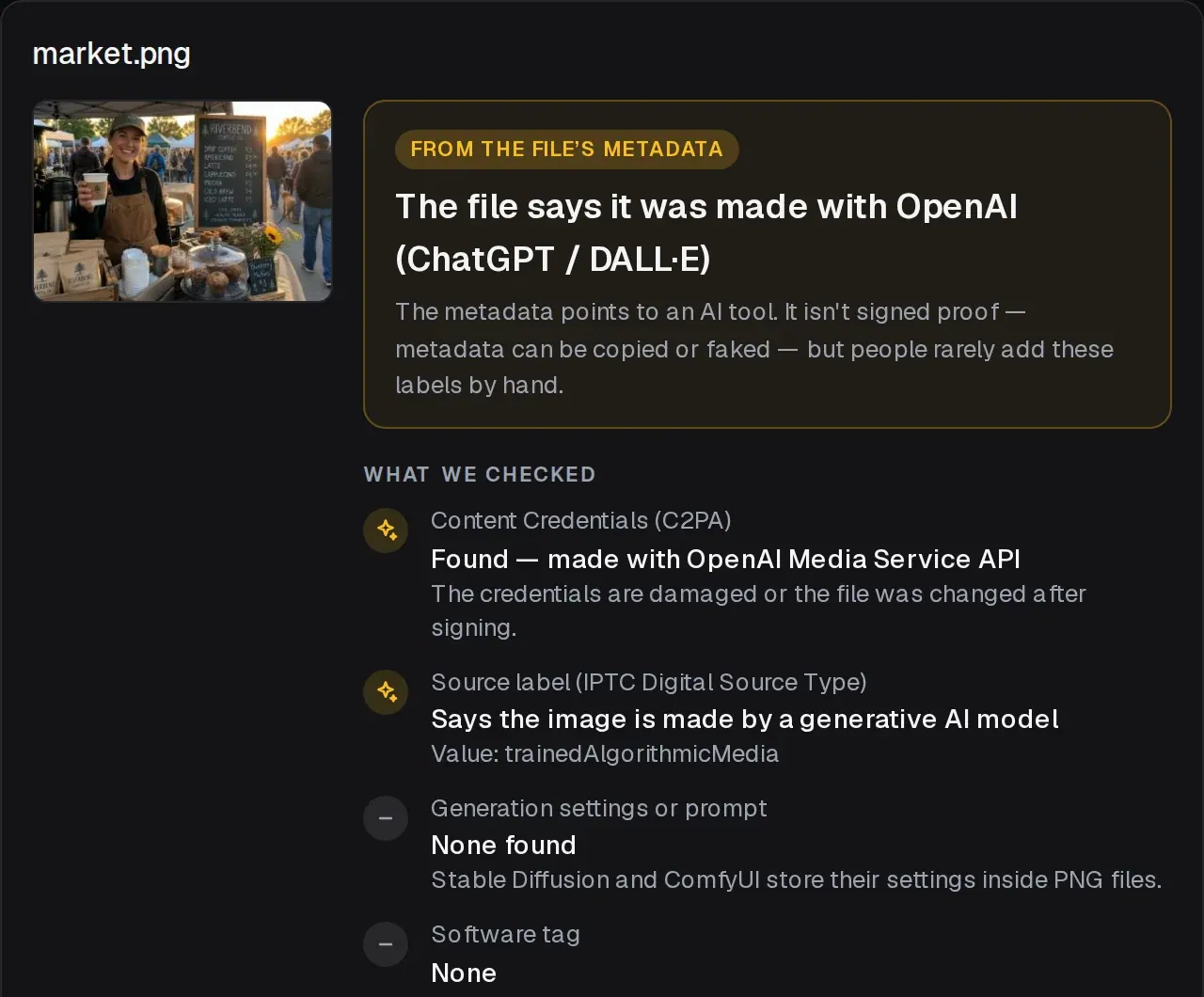
Narqo AI Image Checker helps you verify whether an image contains proof of AI generation or AI editing by reading what’s embedded inside the original file. Instead of relying on visual guesses, it checks for Content Credentials (C2PA), IPTC “trained algorithmic media” / “made by AI” style labels, generator settings (including formats where they persist), and camera-related details when available.
You can see whether the file carries signed Content Credentials associated with tools such as ChatGPT, Gemini, or Firefly, plus AI labels or generation settings tied to workflows like Midjourney and Stable Diffusion-family pipelines (including ComfyUI and others). If the strongest evidence isn’t present, the checker tells you it can’t decide—common when images are shared via social apps, messaging, or screenshots, which often strip metadata.
Key features include an in-browser workflow (no account required), support for common formats like JPG, PNG, WebP, HEIC, and AVIF, and verification of signed evidence when it exists. It’s designed for accuracy and defensiveness: pixel-based detectors can be unreliable as models change, so this tool focuses on signals stored in the file.
This is useful for journalists, fact-checkers, moderators, educators, photographers, and anyone who needs to inspect what an image claims about its origin. Your files never leave your device during the check.
Can Narqo AI Image Checker tell if an image is AI-generated?
It can confirm AI generation or AI editing when the original file contains embedded proof such as signed Content Credentials (C2PA) or AI labels/settings. If the evidence is missing—often after sharing or screenshots—it will report that it can’t decide rather than guessing.
What evidence does the checker look for inside the image?
It reads signed Content Credentials (C2PA), IPTC “trained algorithmic media” / “made by AI” labels, generation settings (when present in the file), and can surface camera-related details when available.
Why should I use the original file instead of a screenshot?
AI proof is commonly stored in metadata that many platforms and screenshot tools remove or alter. Using the original file preserves the signals the checker needs.
Does the tool upload my images somewhere online?
No. The image is read inside your browser, and your files never leave your device as part of the check.
What does “No AI signals found” mean?
It means the file doesn’t contain AI labels, Content Credentials, or generator settings that the checker can read. It doesn’t prove the image is real—just that the embedded AI evidence is missing.
Does it provide an “AI score” based on image pixels?
No. It focuses on evidence stored in the file rather than pixel-based scoring, which can become inaccurate as new generators and model changes arrive.
This listing is claimed
Own Narqo AI Image Checker? Sign in with the email used to claim it to manage this listing, or upgrade to Pro for featured-first placement and a newsletter feature.