
Nano Banana AI Image Generator
Verified
AI Design Tools
Create and edit AI images in your browser using Nano Banana 2, Lite, or Pro—start from text prompts or reference photos and export up to 4K.
Promoted
 Sidrune AI85% off. Stable Claude API for agent developers. Pay as you go. Invoices & refunds available.
 Pixmax.aiPixmax.ai is an all-in-one AI workspace for videos, visual stories, and marketing content.
 AI Checker PlusAI detector that highlights which passages AI wrote. Free check, no sign-up. Plagiarism too.
 RewindType any X/Twitter handle. Get their year back as a narrated video story. Then ask it anything.
 KurodyneSell the tools from your AI side projects. Listing is free.
 SEOify - Improve your SEO & rankingsBuild links to rank in Google. Improve your DR with links you can start building now.Advertise here270,000+ people visit Dang.ai every month.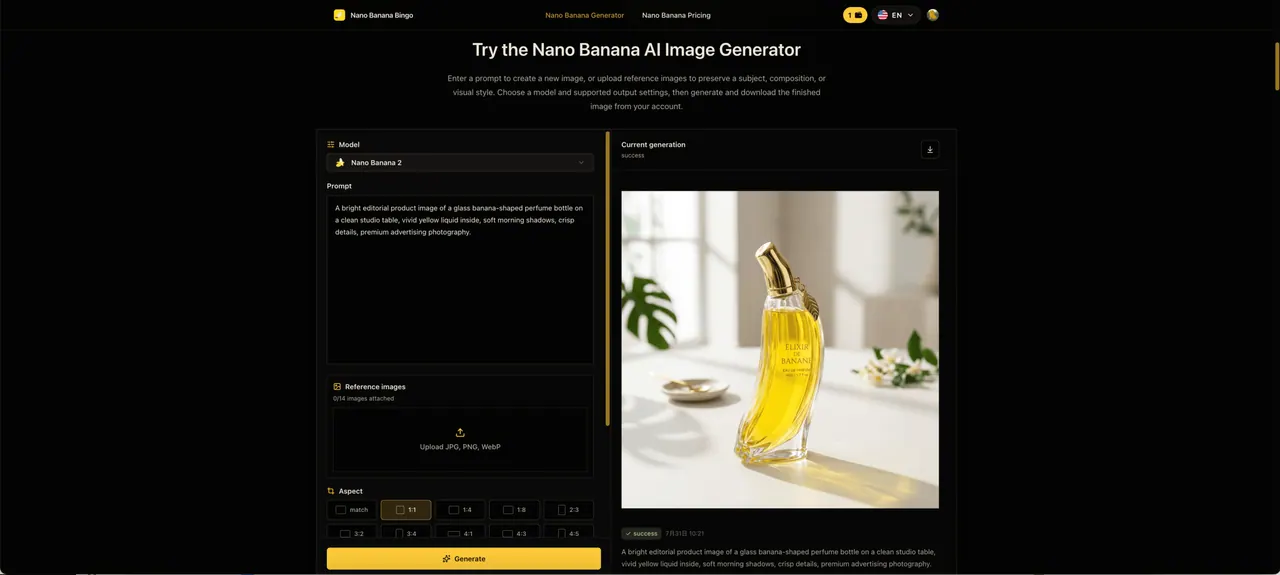
What does Nano Banana AI Image Generator do?
Nano Banana AI Image Generator & Image Editor (Nano Banana Bingo) helps you turn text prompts and reference photos into polished images, then refine them in an interactive workflow. Generate from a plain-language description, or upload reference images to preserve a subject, composition, or visual style.
Choose the Nano Banana model that fits your workflow: Nano Banana 2 for balanced generation with aspect, resolution, and output controls; Nano Banana 2 Lite for faster, lighter draft iterations; and Nano Banana Pro for higher-fidelity results and up to 4K output. Supported aspect ratios and resolution options appear within the generator so you can set up each run around your target format.
For editing, you can upload references and guide changes with follow-up instructions—such as swapping clothing colors, adjusting backgrounds, refining lighting, or modifying composition—without needing masks or layer work. The platform also supports multi-image reference fusion, combining multiple reference inputs to build coherent scenes for brand visuals, product-style compositions, posters, character concepts, and more. When your work needs readable on-image text, Nano Banana focuses on improved text rendering and multilingual support.
What can I make with Nano Banana Bingo?
You can create new images from text prompts or edit existing images using reference images. Common use cases include portraits, product visuals, posters, social content, and concept or editorial-style illustrations.
How do Nano Banana 2, Lite, and Pro differ?
Nano Banana 2 is the balanced option with flexible controls for day-to-day creation. Nano Banana 2 Lite is optimized for faster draft iterations, while Nano Banana Pro is geared toward higher-fidelity results and more demanding creative work.
How do I edit an existing image instead of generating from scratch?
Upload reference images to preserve a subject, composition, or style, then describe the changes you want. Use follow-up prompt instructions to refine elements like clothing, background, lighting, or layout while keeping other parts intact.
Can Nano Banana combine multiple reference images in one result?
Yes. Upload two or more references to guide the composition and fuse inputs into a single scene. With Nano Banana Pro, you can blend up to 14 images and keep up to 5 people consistent in the same scene.
What output sizes and file formats are supported?
You can generate up to 4K output, with JPG or PNG available for output. Supported aspect ratios and resolution choices depend on the selected model.
Is Nano Banana available in the browser?
Yes. Nano Banana runs in your browser, so you can sign in, generate or upload references, then download your finished image without installing software.
This listing is claimed
Own Nano Banana AI Image Generator? Sign in with the email used to claim it to manage this listing, or upgrade to Pro for featured-first placement and a newsletter feature.