
HappyHorseAIVideoGenerator
Verified
AI Video Generation Tool
Happy Horse AI Studio turns text, images, references, or clips into short, high-quality videos with 720p/1080p and flexible aspect ratios.
- Pricing
- Free
- Category
- AI Detector
- Listed
- Apr 11, 2026
- Updated
- Oct 17, 2026
Promoted
 Sidrune AI85% off. Stable Claude API for agent developers. Pay as you go. Invoices & refunds available.
 Pixmax.aiPixmax.ai is an all-in-one AI workspace for videos, visual stories, and marketing content.
 AI Checker PlusAI detector that highlights which passages AI wrote. Free check, no sign-up. Plagiarism too.
 RewindType any X/Twitter handle. Get their year back as a narrated video story. Then ask it anything.
 KurodyneSell the tools from your AI side projects. Listing is free.
 SEOify - Improve your SEO & rankingsBuild links to rank in Google. Improve your DR with links you can start building now.Advertise here270,000+ people visit Dang.ai every month.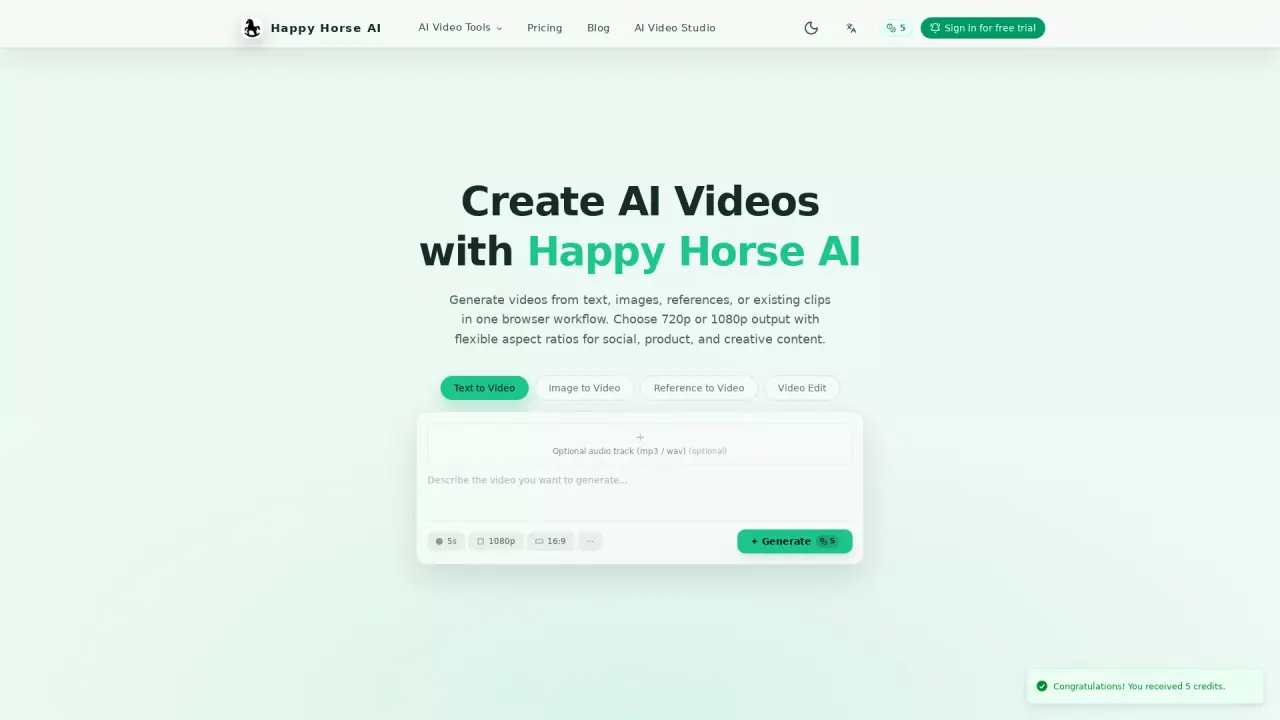
What does HappyHorseAIVideoGenerator do?
Happy Horse AI Studio is a browser-based AI video generator that helps you create short clips for social, product, and creative storytelling. You can generate videos from text prompts, animate a still image, guide the look and motion with reference images or videos, or edit an existing clip—all within one workflow.
Key workflows include Text-to-Video (turn prompts into short clips with duration controls), Image-to-Video (animate a still image by defining first and last frames or continuing motion from an existing clip), Reference-to-Video (steer style and subject direction using reference assets and voice input, plus first-frame guidance), and Video Edit (upload a clip and apply prompt-driven edits while choosing whether to keep original audio or switch to AI audio).
Production settings are built around export needs: choose 720p or 1080p output and use flexible aspect ratios such as 16:9, 9:16, 1:1, 4:3, and 3:4 for different publishing channels. If you’re moving from idea to exported video quickly, the workflow-specific controls help match the right inputs and settings to your task.
Happy Horse AI is credit-based. You can start for free with trial credits, then upgrade to paid plans for more credits and higher usage limits as you scale your generation.
What can I generate with Happy Horse AI Studio?
You can create videos from text prompts, animate still images, use reference images/videos (and voice input) to guide the result, or edit existing clips with prompt-driven changes.
Do I get control over resolution and aspect ratio?
Yes. You can export at 720p or 1080p and choose aspect ratios like 16:9, 9:16, 1:1, 4:3, and 3:4 to match your publishing channel.
How does the video edit workflow work?
Upload an existing clip, apply prompt-driven edits, then choose whether to keep the original audio or switch to AI audio for the output.
Can I use reference assets to guide the style and motion?
Yes. Reference-to-Video supports guidance from reference images, videos, first frames, and voice input so you can steer subject direction and style.
Is there a free option or trial credits?
Yes. You can start for free with trial credits to test core video generation features before upgrading.
How does pricing work?
Access is credit-based. Start with a suitable credit plan, and upgrade for more credits and higher usage limits as your workflow or team grows.
This listing is claimed
Own HappyHorseAIVideoGenerator? Sign in with the email used to claim it to manage this listing, or upgrade to Pro for featured-first placement and a newsletter feature.