ChillScan
AI Code Writers & Generator Tools
ChillScan scans any URL in ~30 seconds to flag leaked API keys, missing security headers, HTTPS/redirect issues, SEO gaps, and performance red flags.
- Category
- Code
- Listed
- Oct 16, 2026
- Updated
- Nov 2, 2026
Promoted
 AI Checker PlusAI detector that highlights which passages AI wrote. Free check, no sign-up. Plagiarism too.
 RewindType any X/Twitter handle. Get their year back as a narrated video story. Then ask it anything.
 KurodyneSell the tools from your AI side projects. Listing is free.
 Sidrune AI85% off. Stable Claude API for agent developers. Pay as you go. Invoices & refunds available.
 Pixmax.aiPixmax.ai is an all-in-one AI workspace for videos, visual stories, and marketing content.
 SEOify - Improve your SEO & rankingsBuild links to rank in Google. Improve your DR with links you can start building now.Advertise here330,000+ people visit Dang.ai every month.
What does ChillScan do?
ChillScan is a “chill pre-launch” website and app scanner that helps you catch common security, SEO, and performance issues before you ship. Built to work for any site—from marketing pages and WordPress/Shopify stores to static pages and AI-built web apps—it lets you paste a URL and get practical findings in about 30 seconds.
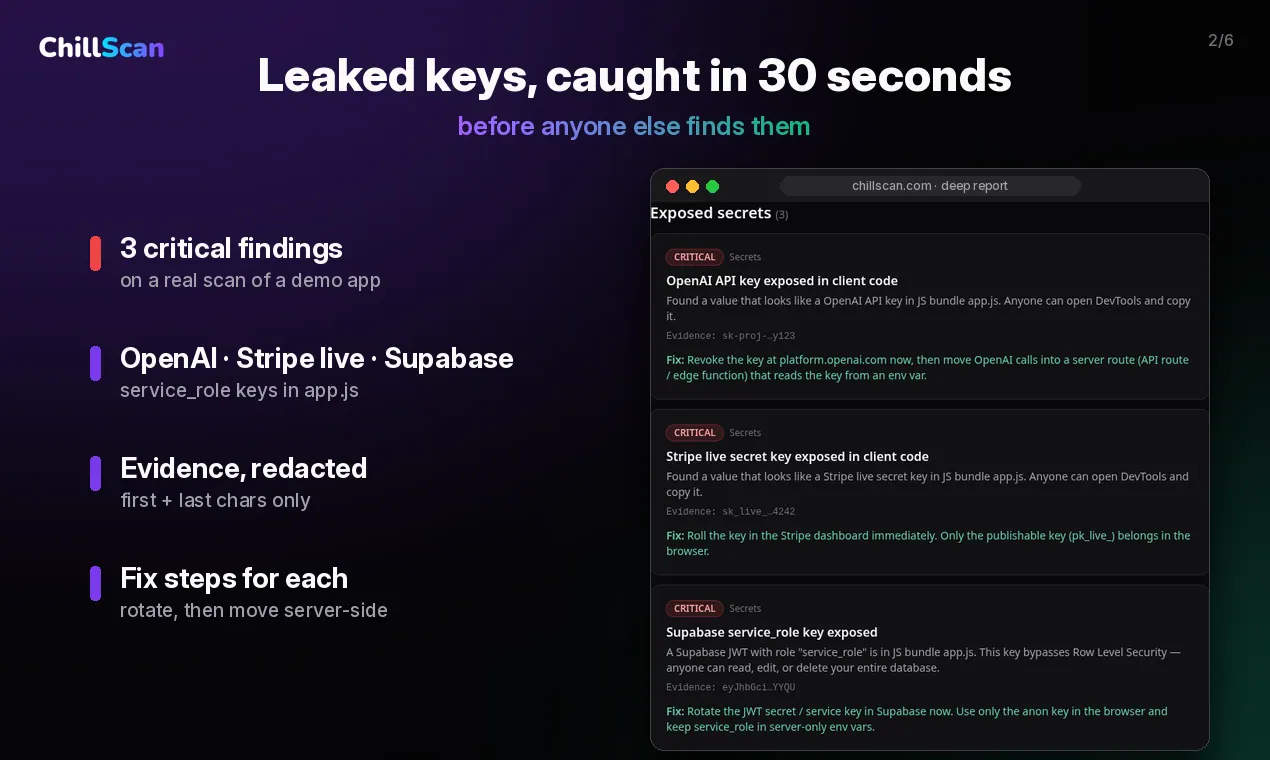
It performs passive checks by reading what a visitor’s browser can already see, so you can review what’s publicly exposed without logins or special access. ChillScan looks for leaked API keys and secrets hidden in client-side code, including OpenAI, Anthropic, Stripe, Supabase service_role, AWS, Firebase, and generic secrets in JavaScript bundles. It also checks important security headers like CSP, HSTS, X-Frame-Options, nosniff, and Referrer-Policy, and reviews HTTPS setup, redirect chains, mixed content, and insecure cookies.
Beyond security, ChillScan covers SEO basics such as titles, meta descriptions, Open Graph cards, robots.txt, sitemap.xml, and pages that are blank without JavaScript. It also highlights performance red flags using signals like server response time, page weight, and JavaScript bundle size—so you can address slowdowns early.
Pricing is straightforward: Free scan costs $0 with no signup and shows your top 3 issues. Deep scan is $12 one-time and includes every finding ranked by severity, with plain-English explanations, fix tips, evidence for each issue, and a copy-paste AI fix prompt you can use in tools like Cursor, Claude, Lovable, or Bolt.
How fast is a ChillScan scan?
A scan takes about 30 seconds.
What kinds of issues does ChillScan check?
It checks for leaked API keys/secrets in client-side code, missing security headers, HTTPS and redirect issues, SEO basics (titles/meta descriptions, Open Graph, robots.txt, sitemap.xml, and JS-dependent blank pages), and performance red flags (server response time, page weight, and JavaScript bundle size).
Do I need to log in to scan a site?
No. ChillScan uses passive checks and only reads what any visitor’s browser can already see.
What’s the difference between Free scan and Deep scan?
Free scan ($0) includes security/SEO/performance scores and your top 3 issues with names and severity, with no signup. Deep scan ($12 one-time) includes every finding ranked by severity, plus plain-English explanations, fix tips, evidence, and a copy-paste AI fix prompt for Cursor/Claude/Lovable/Bolt.
Does Deep Scan include a fix prompt I can use with my AI coding tool?
Yes. Deep Scan provides a copy-paste AI fix prompt designed for Cursor, Claude, Lovable, or Bolt to help you address findings in one go.
Can I scan a site I don’t own?
Scan sites you own or have permission to test. ChillScan is intended for passive checks only.
This listing is claimed
Own ChillScan? Sign in with the email used to claim it to manage this listing, or upgrade to Pro for featured-first placement and a newsletter feature.