
ViSearch
AI Productivity Tools
ViSearch turns any video or audio into searchable transcripts, summaries, chapters, quizzes, and instant in-video results.

- Pricing
- Free
- Category
- Productivity
- Listed
- Sep 22, 2026
- Updated
- Sep 23, 2026
Promoted
 Pixmax.aiPixmax.ai is an all-in-one AI workspace for videos, visual stories, and marketing content.
 AI Checker PlusAI detector that highlights which passages AI wrote. Free check, no sign-up. Plagiarism too.
 RewindType any X/Twitter handle. Get their year back as a narrated video story. Then ask it anything.
 KurodyneSell the tools from your AI side projects. Listing is free.
 Sidrune AI85% off. Stable Claude API for agent developers. Pay as you go. Invoices & refunds available.
 SEOify - Improve your SEO & rankingsBuild links to rank in Google. Improve your DR with links you can start building now.Advertise here270,000+ people visit Dang.ai every month.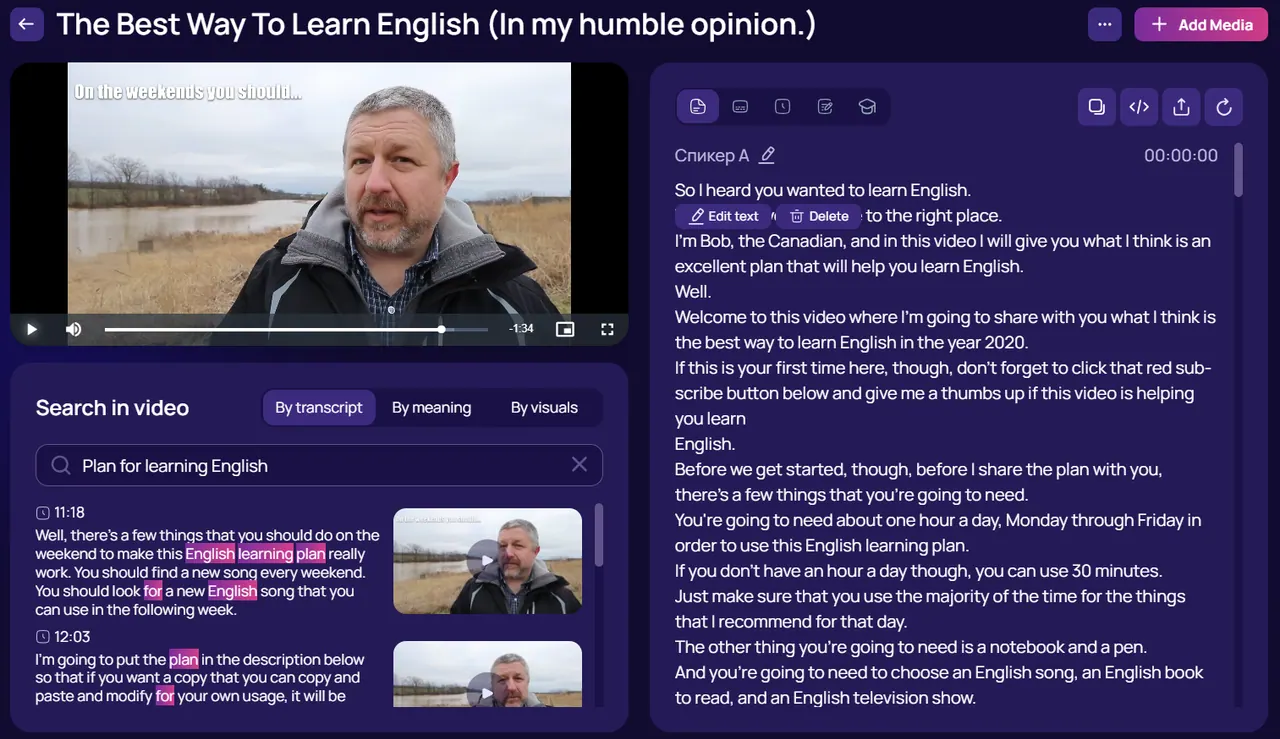
What does ViSearch do?
ViSearch is an AI video intelligence platform that converts uploads and YouTube links into a timestamped transcript with speaker labels. You can generate subtitles in SRT and VTT, translate into 90+ languages, and export your materials as TXT, DOCX, or PDF.
Once your content is processed, everything becomes searchable. Use full-text search to find exact words, semantic search to find meaning beyond keywords, or visual search to detect objects, scenes, and on-screen text (including search by an uploaded image and face/speaker across your library). Results include a timestamp, preview frame, and a short description of the moment.
ViSearch also creates auto-chapters for easy navigation, smart summaries that condense long recordings into structured notes, and quiz generation that builds multiple-choice, true/false, and open-ended questions linked to exact timestamps. It’s designed for educators, creators, researchers, and teams working with webinar, meeting, and training recordings.
How do I convert a video to text in ViSearch?
Upload a video file or paste a YouTube link. ViSearch creates a timestamped, speaker-labeled transcript (about 3 minutes per hour of content), and you can edit it, translate it, and export it as TXT, DOCX, or PDF.
Which subtitle formats can I generate?
ViSearch can auto-generate subtitles in SRT and VTT formats.
How does search inside a video work in ViSearch?
You can search by exact words (full-text), by meaning (semantic), or by what appears on screen (visual). Each match includes a timestamp and preview so you can jump to the precise moment.
Can ViSearch create chapters automatically?
Yes. ViSearch generates named, context-aware chapters with short descriptions, making content easier to navigate like a book. Chapters are clickable and can be shared or exported.
Can I generate quizzes from a video automatically?
Yes. ViSearch can auto-generate quiz questions with multiple-choice answers, correct-answer highlighting, and links to the exact video timestamps. You can edit, approve, and export the quiz.
What are the pricing options and free trial limits?
ViSearch uses pay-as-you-go pricing per minute. New users can start free with up to 20 minutes of video processed (no credit card required), and there are plans listed at $0.09/min (Basic), $0.15/min (Pro), $0.25/min (Visual).
This listing is claimed
Own ViSearch? Sign in with the email used to claim it to manage this listing, or upgrade to Pro for featured-first placement and a newsletter feature.