
Tripo AI
3D Modeling AI Tools
Tripo AI turns text and images into interactive 3D models you can preview in-browser and download as GLB files.
- Pricing
- Free
- Category
- 3D
- Listed
- Sep 19, 2026
- Updated
- Sep 19, 2026
Promoted
 RewindType any X/Twitter handle. Get their year back as a narrated video story. Then ask it anything.
 KurodyneSell the tools from your AI side projects. Listing is free.
 Sidrune AI85% off. Stable Claude API for agent developers. Pay as you go. Invoices & refunds available.
 Pixmax.aiPixmax.ai is an all-in-one AI workspace for videos, visual stories, and marketing content.
 SEOify - Improve your SEO & rankingsBuild links to rank in Google. Improve your DR with links you can start building now.Advertise here270,000+ people visit Dang.ai every month.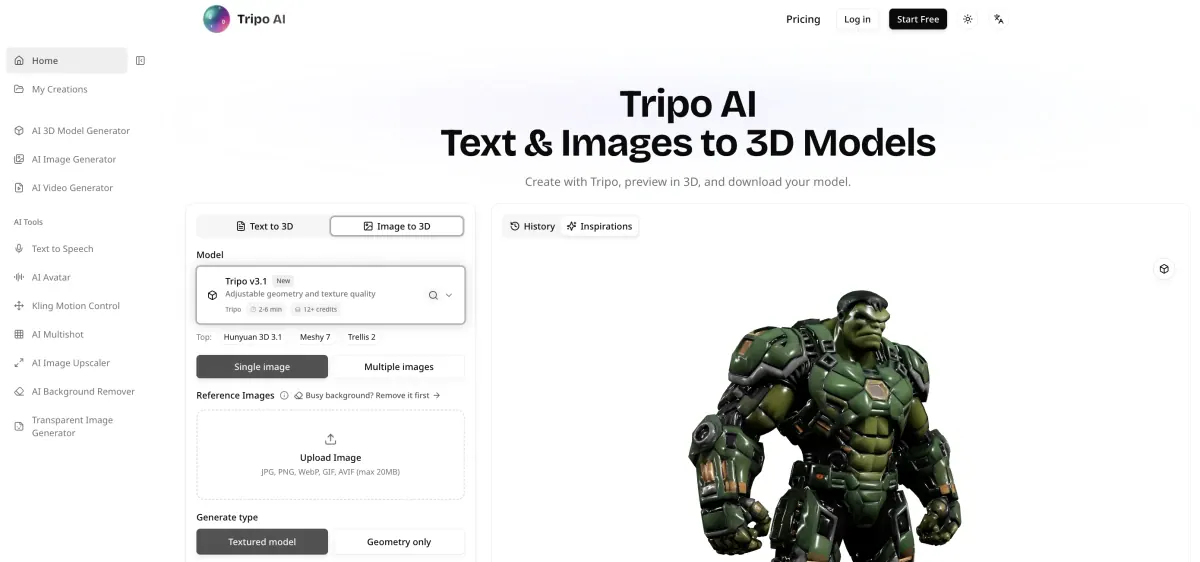
What does Tripo AI do?
Tripo AI is an AI 3D model generator that creates 3D assets from text prompts, single images, or multiple reference views. After generation, you can rotate and zoom the result in your browser to review form and surface details before moving on.
Use Text to 3D to describe an object’s proportions and defining features, or use Image to 3D with clear photos, drawings, or illustrations. If you have multiple angles, you can provide additional views so the model stays consistent across the set.
Tripo generation separates shape from appearance. Choose geometry-only output to focus on silhouette and proportions, or choose textured output for color and surface detail, with adjustable texture quality and optional PBR materials for compatible workflows. When you’re satisfied, download your model (including GLB and any additional files provided) and import it into tools like Blender to refine mesh, materials, or scale.
What can I create with Tripo AI?
You can generate 3D models from text and from images, including characters, props, object concepts, and more. Use clear references to get shapes you can explore from different angles.
Can Tripo AI create a 3D model from a single photo?
Yes. Upload a single image (JPG, PNG, WebP, GIF, or AVIF up to 20MB) and generate a model from it. A clear view of the whole object helps results hold up from multiple angles.
Can I use multiple views of the same object?
Yes. Provide additional images as reference views to capture details that might be missing from one angle, while keeping shape, colors, and details consistent across the set.
What is the difference between Geometry and Textured output?
Geometry-only output focuses on form so you can judge the silhouette and how parts connect. Textured output adds color and surface detail, with options to adjust texture quality and enable PBR materials for compatible 3D software.
What formats can I download from Tripo AI?
You can download your generated model as a GLB. If extra files are included with the result, download them alongside the GLB for your next step.
Can I edit the model in Blender?
Yes. Import the downloaded GLB into Blender to adjust the mesh, materials, or scale as part of your workflow.
This listing is claimed
Own Tripo AI? Sign in with the email used to claim it to manage this listing, or upgrade to Pro for featured-first placement and a newsletter feature.