
Revise
Verified
AI Writing Tools and Generators
Revise is a free AI-powered document editor that suggests edits in real time with a built-in AI agent.
Promoted
 Sidrune AI85% off. Stable Claude API for agent developers. Pay as you go. Invoices & refunds available.
 Pixmax.aiPixmax.ai is an all-in-one AI workspace for videos, visual stories, and marketing content.
 AI Checker PlusAI detector that highlights which passages AI wrote. Free check, no sign-up. Plagiarism too.
 RewindType any X/Twitter handle. Get their year back as a narrated video story. Then ask it anything.
 KurodyneSell the tools from your AI side projects. Listing is free.
 SEOify - Improve your SEO & rankingsBuild links to rank in Google. Improve your DR with links you can start building now.Advertise here270,000+ people visit Dang.ai every month.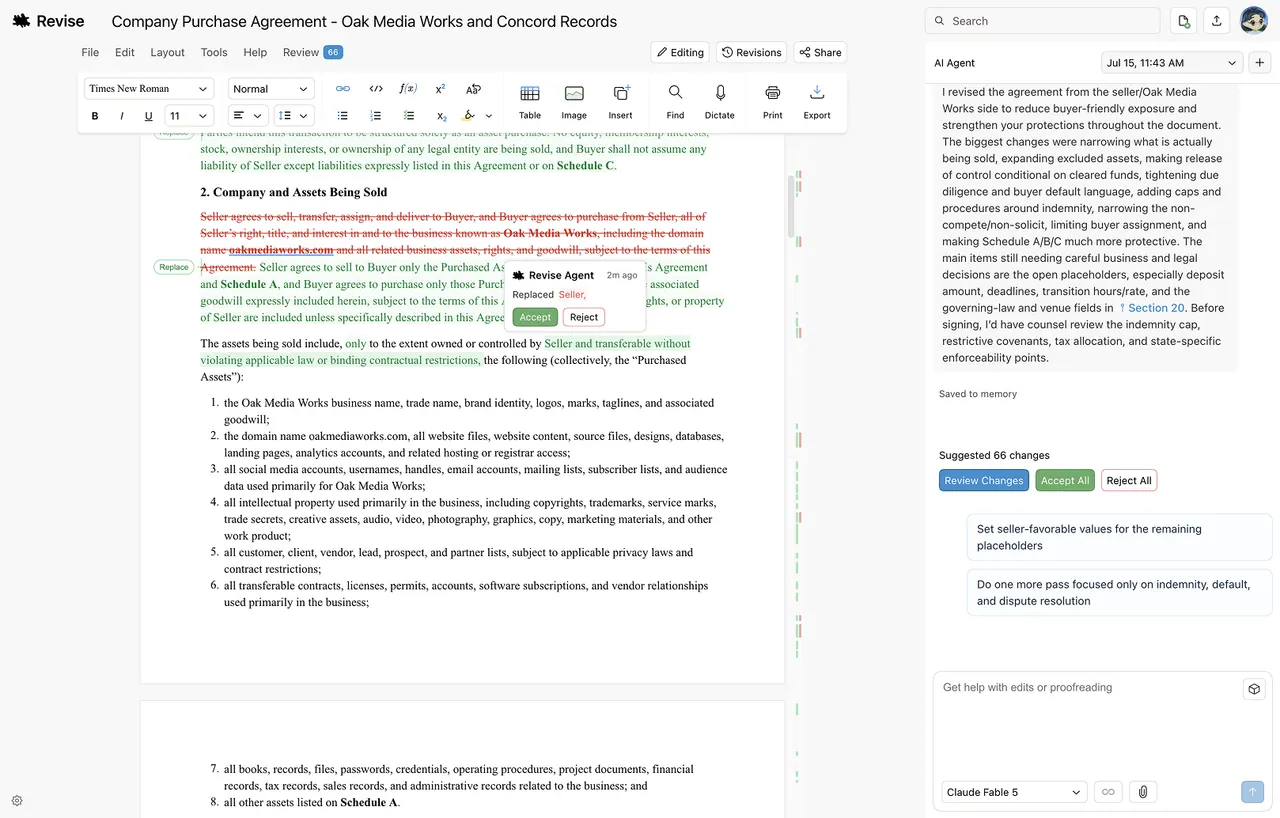
What does Revise do?
Revise is an online word processor with a built-in AI agent that helps you write, edit, proofread, and format documents while tracking every change. Paste in or upload a file to start, then prompt the agent to suggest improvements directly inside your document.
Go beyond small tweaks: describe what you want and watch the agent plan and apply complex edits across full documents. Review suggestions individually or accept them all at once, and use revision history to scrub through changes or recover earlier versions.
Revise supports real-time collaboration, and you can switch between writing yourself and prompting the AI in the same interface. It runs in your browser (no installation required) and lets you import documents and export to DOCX or PDF when you’re ready.
What is Revise?
Revise is a free online document editor with a built-in AI agent that drafts, edits, and proofreads alongside you while tracking changes for review.
Is Revise free to use?
Yes. The free plan includes the full editor and a daily allowance of AI usage. Paid plans increase AI usage limits.
Can Revise replace Microsoft Word or Google Docs?
For most documents, yes. Revise is a full word processor with rich formatting, tables, images, and real-time collaboration, plus an integrated AI agent.
Which AI models can I use in Revise?
Revise supports leading models in one editor—OpenAI GPT-5.6, Anthropic Claude, Google Gemini, and xAI Grok—and you can switch between them at any time.
How does accepting edits work?
The AI makes suggestions in real time inside your document. You can review and accept changes individually or accept them all at once.
How private are my documents and AI conversations?
Your documents and AI conversations are private by default and only visible to you unless you choose to share. Encryption is used in transit and at rest, and you can delete items at any time.
This listing is claimed
Own Revise? Sign in with the email used to claim it to manage this listing, or upgrade to Pro for featured-first placement and a newsletter feature.