
receipt-taxer.com
AI Finance Modeling Tools
Receipt Taxer helps you scan receipts with OCR and export organized tax-ready details to CSV, Excel, or PDF.
- Pricing
- Free
- Category
- Finance
- Listed
- Jun 3, 2026
- Updated
- Jun 4, 2026
Promoted
 Pixmax.aiPixmax.ai is an all-in-one AI workspace for videos, visual stories, and marketing content.
 Sidrune AI85% off. Stable Claude API for agent developers. Pay as you go. Invoices & refunds available.
 SEOify - Improve your SEO & rankingsBuild links to rank in Google. Improve your DR with links you can start building now.Advertise here270,000+ people visit Dang.ai every month.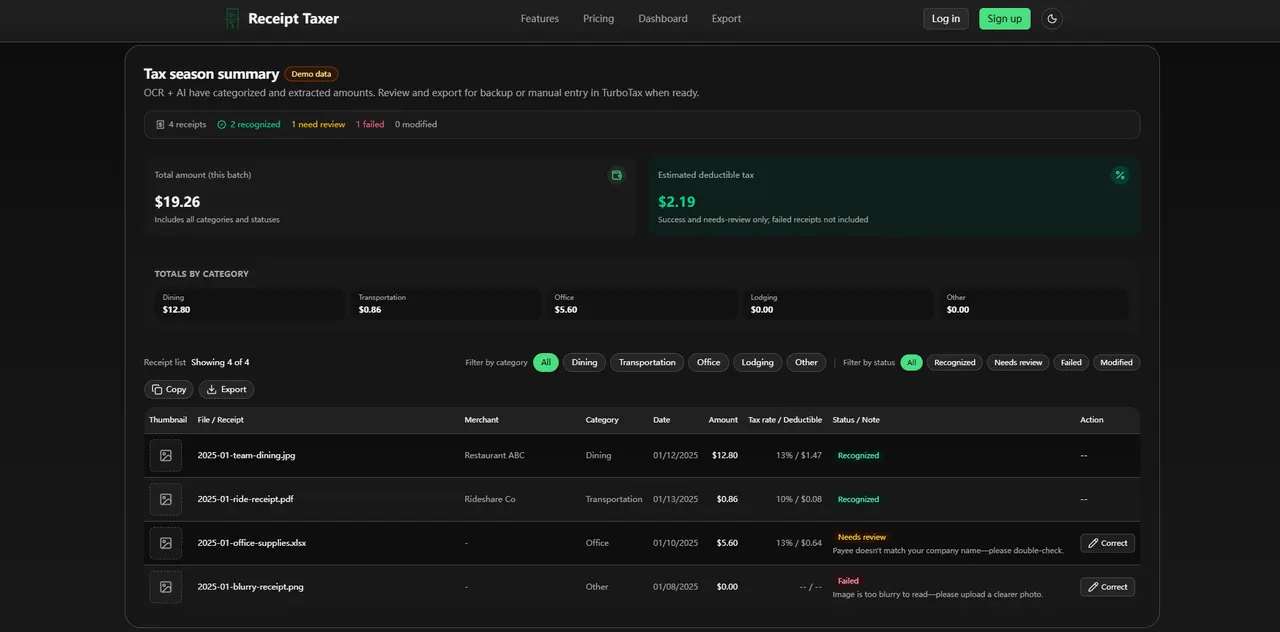
What does receipt-taxer.com do?
Receipt Taxer is a receipt-scanning and organization tool that uses OCR + AI to extract key details from your receipt images. Upload JPEG or PNG files (up to 10 MB each), then review parsed amounts and categories before exporting.
After parsing, you’ll get a batch overview with totals and tax/deductible estimates, plus a receipt-by-receipt list showing which items were recognized, need review, or failed. Use the filters to find receipts by category or status and correct any items that can’t be read clearly.
When you’re ready, export your receipts for TurboTax-style manual entry. Choose a date range and export format (CSV, Excel, or PDF) to generate a file you can use as backup and reference while you complete your taxes.
What kinds of receipt files can I upload?
You can add receipt images as JPEG or PNG, with a maximum size of 10 MB per file.
How does Receipt Taxer handle unreadable receipts?
Some receipts may be marked as failed if they’re too blurry to read. Re-upload a clearer image to try again.
What does “needs review” mean for a parsed receipt?
Recognized data is extracted automatically, but items that need review may have issues that require you to double-check the details (for example, payee mismatches).
Can I export receipt details for TurboTax?
Yes. Export by a selected date range in CSV, Excel, or PDF so you can use the file as backup and reference while entering details in TurboTax.
Does the export include totals?
You can choose whether to include a summary row. If you want only the data rows, turn off the summary row option.
Do I need to sign in to parse or export receipts?
Sign in to upload and parse receipts, and sign in again to export receipts.
This listing is claimed
Own receipt-taxer.com? Sign in with the email used to claim it to manage this listing, or upgrade to Pro for featured-first placement and a newsletter feature.