
Ramback
AI Development Tools
Ramback is a free Mac menu bar app that shows and stops the dev servers, simulators, and agents eating your RAM (without touching your database).
- Pricing
- Freemium
- Category
- Development
- Listed
- Nov 9, 2026
- Updated
- Nov 9, 2026
Promoted
 RewindType any X/Twitter handle. Get their year back as a narrated video story. Then ask it anything.
 KurodyneSell the tools from your AI side projects. Listing is free.
 Sidrune AI85% off. Stable Claude API for agent developers. Pay as you go. Invoices & refunds available.
 Pixmax.aiPixmax.ai is an all-in-one AI workspace for videos, visual stories, and marketing content.
 AI Checker PlusAI detector that highlights which passages AI wrote. Free check, no sign-up. Plagiarism too.
 SEOify - Improve your SEO & rankingsBuild links to rank in Google. Improve your DR with links you can start building now.Advertise here330,000+ people visit Dang.ai every month.
What does Ramback do?
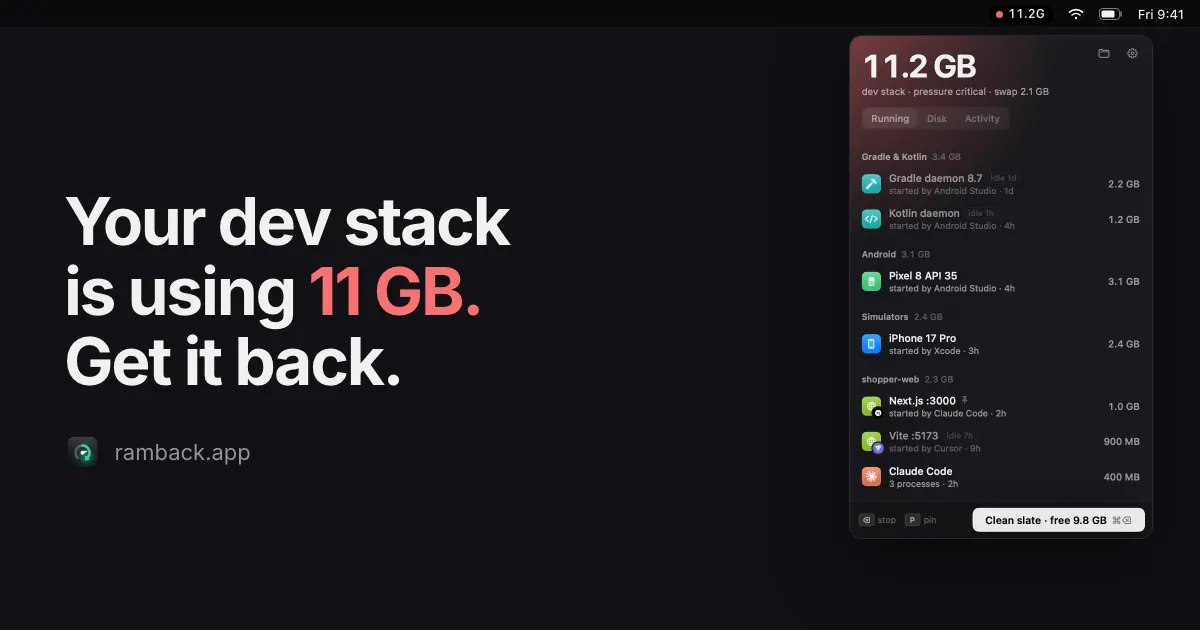
Ramback helps you reclaim memory from the dev tools you don’t notice anymore. Instead of listing raw processes, it groups your development stack into readable “things” like iOS simulators (including Xcode Previews), Android emulators, Gradle & Kotlin daemons, Docker/OrbStack/Colima containers, common dev servers and bundlers, tunnels, local databases, and AI coding agents (Claude Code, Cursor, Codex) along with the servers each agent started.
From the menu bar, each row shows how much RAM it’s holding, who started it, and how long it has been idle. You can stop a single item in one click, or use Clean slate to stop everything that’s safe to stop at once. Ramback stops each type the “right way” for that tool (for example, simctl shutdown for simulators, adb emu kill for emulators, docker stop for containers, and a gentle stop for command trees). It asks for confirmation instead of forcing, and it respects pinned rows and anything that’s mid-build.
AI agents are supported with an in-app CLI and MCP server (list_running, stop, free_memory, find_free_port). Agents can check what’s running, stop only the servers they started, and pick a free port—while still being prevented from stopping your database, pinned items, builds, or other agents’ servers.
Pricing: Ramback is free (no account, no card, macOS 14+). Pro is $19 once for 2 Macs and adds memory pressure warnings, simulator/emulator/daemon and sleep rules, Undo for what a rule stopped, disk cleanup, and an activity log. Pro includes 14 days with every install, then returns to Free automatically.
Is Ramback free to use?
Yes. Ramback is a free menu bar app that includes the full dev-stack list, stopping/pinning/Clean slate, the dev-server and agent rules, disk scan, and the CLI/MCP for agents.
What kinds of things can Ramback stop?
It can stop iOS simulators (including Xcode Previews), Android emulators, Gradle and Kotlin daemons, Docker/OrbStack/Colima containers, dev servers (like Next.js/Vite/Nuxt/Rails/Django, etc.), bundlers (Metro/Expo/flutter run), tunnels (ngrok/cloudflared/port-forward), and the servers started by AI coding agents (Claude Code, Cursor, Codex).
Does Ramback ever stop my database automatically?
No. Databases are locked, and Clean slate, rules, and agent actions won’t stop them. You can stop a database only after a confirmation.
What happens if something won’t stop right away?
Ramback doesn’t force-stop. It uses gentle stops appropriate to the tool and asks you when something is still running after the initial stop attempt.
What does Pro add beyond the free version?
Pro adds memory-pressure warnings, simulator/emulator/daemon and sleep rules, Undo for what a rule stopped, disk cleanup, and an activity log. Pro is $19 once for 2 Macs (no subscription).
How do the AI agents work with Ramback?
Ramback includes a CLI and an MCP server so an agent can list running items, stop only what it started, and find a free port. Agents can’t stop your database, pinned rows, builds, or servers started by other agents.
This listing is claimed
Own Ramback? Sign in with the email used to claim it to manage this listing, or upgrade to Pro for featured-first placement and a newsletter feature.