
PodText
AI Transcription Software Tools
PodText turns podcast episodes into searchable, timestamped transcripts with AI summaries, chapters, and export formats.
- Pricing
- Freemium
- Category
- Transcription
- Listed
- Oct 16, 2026
- Updated
- Oct 19, 2026
Promoted
 AI Checker PlusAI detector that highlights which passages AI wrote. Free check, no sign-up. Plagiarism too.
 RewindType any X/Twitter handle. Get their year back as a narrated video story. Then ask it anything.
 KurodyneSell the tools from your AI side projects. Listing is free.
 Sidrune AI85% off. Stable Claude API for agent developers. Pay as you go. Invoices & refunds available.
 Pixmax.aiPixmax.ai is an all-in-one AI workspace for videos, visual stories, and marketing content.
 SEOify - Improve your SEO & rankingsBuild links to rank in Google. Improve your DR with links you can start building now.Advertise here270,000+ people visit Dang.ai every month.
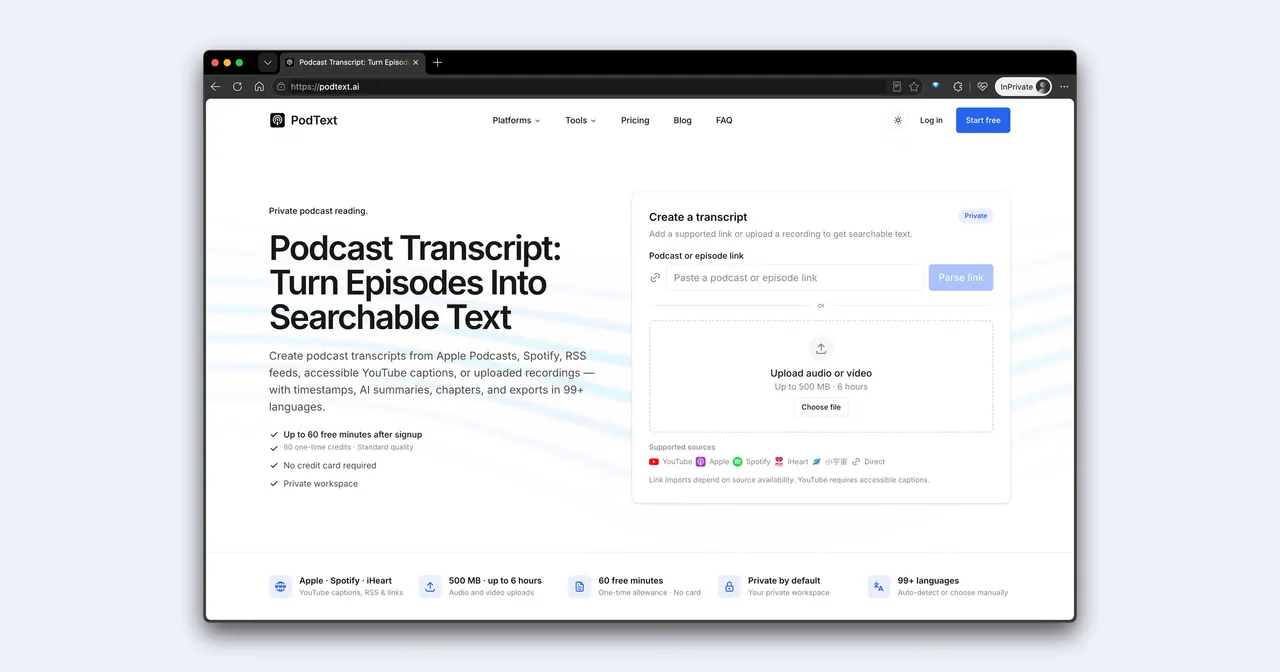
What does PodText do?
PodText is an AI transcription tool built for podcasts, turning episodes into readable, searchable text with timestamps. Import from major podcast platforms (Apple Podcasts, Spotify, iHeart, Xiaoyuzhou), RSS feeds, YouTube videos with accessible captions, or upload your own audio/video recording. Once transcribed, you can read along with the episode, jump to key moments, and quickly find the exact passage you need.
The transcript is more than plain text. PodText generates chapters and an AI-written set of highlights such as an episode summary, key points, and notable quotes. Every timestamp is clickable so you can move directly to the moment in the audio, while full-text search helps you locate topics without scrubbing through hours of playback.
PodText supports 99+ languages, with automatic language detection or manual selection. Exports are available for Markdown, SRT, VTT, or TXT, making it suitable for turning podcast content into show notes, subtitles, transcripts, or research notes.
Your workspace is private by default: transcripts are not published, indexed, or shared. Audio/video uploads support files up to 1 GB and up to 6 hours per file.
Pricing is credit-based. After signup, you get 60 one-time free minutes (60 one-time credits) with no credit card required. Then, each minute of audio uses 1 credit (rounded up), and you can choose monthly/yearly plans or purchase one-time credit top-ups (100 credits for $10 or 250 credits for $20).
What sources can I use to create a PodText podcast transcript?
You can paste podcast/episode links from Apple Podcasts, Spotify, iHeart, Xiaoyuzhou, and supported RSS feeds, import YouTube videos with accessible captions, or upload your own audio or video file.
What is included in a PodText transcript?
Each transcript includes timestamps, chapter headings, an AI-written episode summary, key points, and notable quotes, with searchable text throughout the episode.
Can I read the transcript while listening to the audio?
Yes. The transcript highlights in sync with playback, and timestamps are clickable so you can jump straight to the moment you want to revisit.
How many languages does PodText support?
PodText supports 99+ languages. The language can be detected automatically or selected manually.
How do credits and pricing work?
1 credit transcribes 1 minute of audio (rounded up). You get 60 one-time free minutes after signup with no credit card required, and you can choose subscription plans or buy one-time credit packs (100 for $10, 250 for $20).
Is my transcription workspace private?
Yes. Transcripts are private by default and are not published, indexed, or shared, with no public directory or social feed.
This listing is claimed
Own PodText? Sign in with the email used to claim it to manage this listing, or upgrade to Pro for featured-first placement and a newsletter feature.