InkCraft
AI Design Tools
See a tattoo on your own skin with instant 3D try-on and an AI design generator—free to use in your browser.

- Pricing
- Free
- Category
- Design
- Listed
- Sep 3, 2026
- Updated
- Sep 4, 2026
Promoted
 Sidrune AI85% off. Stable Claude API for agent developers. Pay as you go. Invoices & refunds available.
 Pixmax.aiPixmax.ai is an all-in-one AI workspace for videos, visual stories, and marketing content.
 AI Checker PlusAI detector that highlights which passages AI wrote. Free check, no sign-up. Plagiarism too.
 RewindType any X/Twitter handle. Get their year back as a narrated video story. Then ask it anything.
 KurodyneSell the tools from your AI side projects. Listing is free.
 SEOify - Improve your SEO & rankingsBuild links to rank in Google. Improve your DR with links you can start building now.Advertise here270,000+ people visit Dang.ai every month.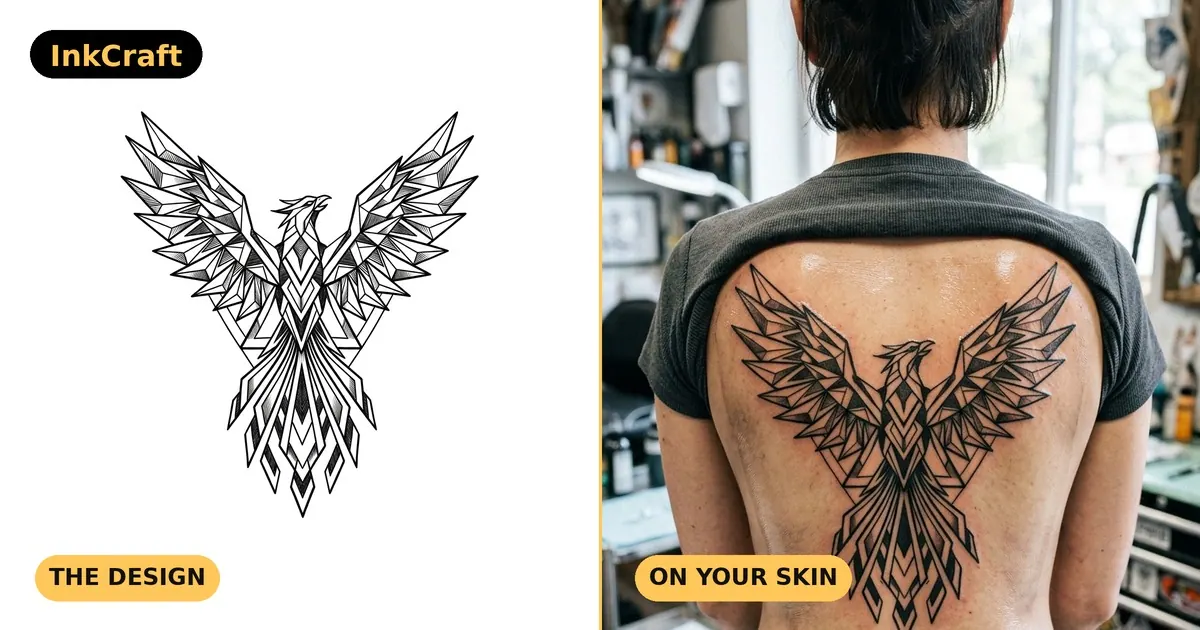
What does InkCraft do?
InkCraft helps you preview a tattoo on your own body before you book. Upload a photo, pick a placement and design, and watch it wrap in true 3D around your skin contours—so scale, curves, and perspective are easier to judge than with a flat overlay.
In the browser, try thousands of tattoo designs across styles like fine line, blackwork, traditional, geometric, watercolour, Japanese, and more. You can also generate new ideas from a text description, or place your own design on your photo if you already have artwork.
The app experience goes further with AI design generation, saved previews, and higher-resolution exports. InkCraft is a practical fit for first-timers finding the right placement, as well as existing tattoo collectors planning how a new piece will sit next to what you already have.
Is InkCraft free to try?
Yes—the live web try-on is free in your browser with no signup required. The iOS app also includes a free tier with unlimited tattoo previews on the main pose.
Can I try a tattoo on my photo without downloading an app?
Yes. Use the web try-on by uploading a photo, choosing a design, and previewing it in your browser—no download, account, or payment needed.
How accurate is the placement compared to a flat image overlay?
InkCraft wraps the design around your skin contours using true 3D placement, accounting for curves, folds, and perspective instead of pasting a flat sticker on top.
Do I need an account to try on designs in the web tool?
No. You can try on designs without creating an account. Signing up in the app is for saving previews and accessing additional features like the AI design generator.
Can I use my own drawing or generate a new design?
Yes. The app can import your own image and place it on your photo, and the AI design generator can create a tattoo concept from your description when you don’t already have artwork.
Which body areas are supported for the 3D preview?
The 3D body model supports many areas, including arms, forearms, wrists, upper back, chest, shoulders, ribs, ankle, calf, thigh, and more.
This listing is claimed
Own InkCraft? Sign in with the email used to claim it to manage this listing, or upgrade to Pro for featured-first placement and a newsletter feature.