
Influence
AI Social Media Marketing Tools
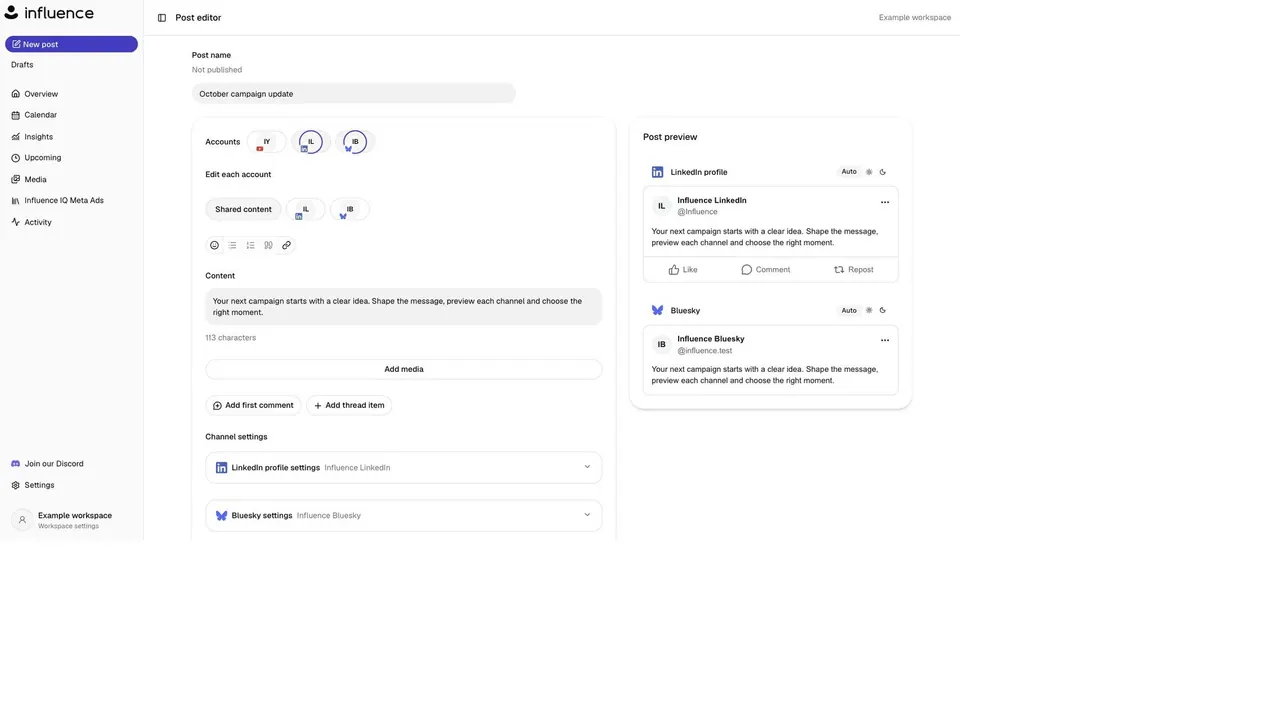
Influence IQ drafts and schedules on-brand social posts with account-by-account previews and a review step before publishing.
Promoted
 KurodyneSell the tools from your AI side projects. Listing is free.
 Sidrune AI85% off. Stable Claude API for agent developers. Pay as you go. Invoices & refunds available.
 Pixmax.aiPixmax.ai is an all-in-one AI workspace for videos, visual stories, and marketing content.
 AI Checker PlusAI detector that highlights which passages AI wrote. Free check, no sign-up. Plagiarism too.
 RewindType any X/Twitter handle. Get their year back as a narrated video story. Then ask it anything.
 SEOify - Improve your SEO & rankingsBuild links to rank in Google. Improve your DR with links you can start building now.Advertise here330,000+ people visit Dang.ai every month.
What does Influence do?
Influence helps you create and schedule social media posts across many channels from one calendar. It connects AI-assisted caption writing with the workflow decisions you need to actually publish—plan the week, review each channel’s version, and confirm the dates before anything goes live.
Influence IQ uses your campaign brief and Brand Guidelines to suggest posts and a schedule for you to review. You can work from an idea and tailor copy per platform, then review the caption alongside the photos or videos you plan to use. From there, choose which posts and publishing dates to approve, so your content stays consistent while still being adapted for each channel.
The product includes a dashboard for planning and composing, plus an insights view for checking performance (where available). Supported channels include TikTok, YouTube, X, Discord, Twitch, Telegram, Signal, LinkedIn, Threads, Slack, WordPress, Ghost, Discourse, Bluesky, Tumblr, Mastodon, Farcaster, Nostr, Dev.to, Hashnode, ListMonk, Pixelfed, Plurk, Misskey, Mattermost, Matrix, PeerTube, and more. It also supports engagement workflows like replying to messages and comments, reviewing tagged posts, and tracking link clicks.
Pricing is available in multiple monthly or annual plans: Starter at $19/month or $190/year (50 posts/month and 1,500 Influence IQ credits/month), Growth at $39/month or $390/year (150 posts/month and 3,750 credits/month), and Pro at $69/month or $690/year (unlimited posts and 7,500 credits/month). There’s also a 7-day trial that requires billing details and becomes paid unless canceled before it ends; there is no ongoing free plan.
What does Influence IQ do for my social posts?
Influence IQ helps create on-brand captions using your Brand Guidelines and campaign brief, and proposes posts and publishing dates for you to review before approval.
Can I review how a post will look on each connected platform before it’s scheduled?
Yes. You review the channel-specific versions with account previews and confirm the destination accounts and publication timing before anything is published.
Which platforms can I schedule posts to?
Influence supports scheduling to many platforms including TikTok, YouTube, X, LinkedIn, Threads, Slack, WordPress, Ghost, Bluesky, Mastodon, Nostr, Dev.to, Hashnode, Mattermost, and PeerTube, among others.
How do Influence IQ credits work?
You use credits to draft and revise posts with Influence IQ, and to create images where available. Usage varies by request.
Is there a free plan?
There is no ongoing free plan. You can start for $0, and there’s a 7-day trial that requires billing details and becomes paid unless canceled before it ends.
Can I change a campaign after it’s been scheduled?
You can review and confirm the posts you want to schedule as part of the workflow. For specific post-change behavior, check the in-app campaign/scheduling controls after you draft and propose dates.
This listing is claimed
Own Influence? Sign in with the email used to claim it to manage this listing, or upgrade to Pro for featured-first placement and a newsletter feature.