
Image2Layer
AI Design Tools
Image2Layer turns JPG, PNG, or WebP into editable layers and PSD-ready exports, separating subjects, shadows, text, and backgrounds.
- Pricing
- Free
- Category
- Design
- Listed
- Sep 2, 2026
- Updated
- Sep 4, 2026
Promoted
 Pixmax.aiPixmax.ai is an all-in-one AI workspace for videos, visual stories, and marketing content.
 AI Checker PlusAI detector that highlights which passages AI wrote. Free check, no sign-up. Plagiarism too.
 RewindType any X/Twitter handle. Get their year back as a narrated video story. Then ask it anything.
 KurodyneSell the tools from your AI side projects. Listing is free.
 Sidrune AI85% off. Stable Claude API for agent developers. Pay as you go. Invoices & refunds available.
 SEOify - Improve your SEO & rankingsBuild links to rank in Google. Improve your DR with links you can start building now.Advertise here270,000+ people visit Dang.ai every month.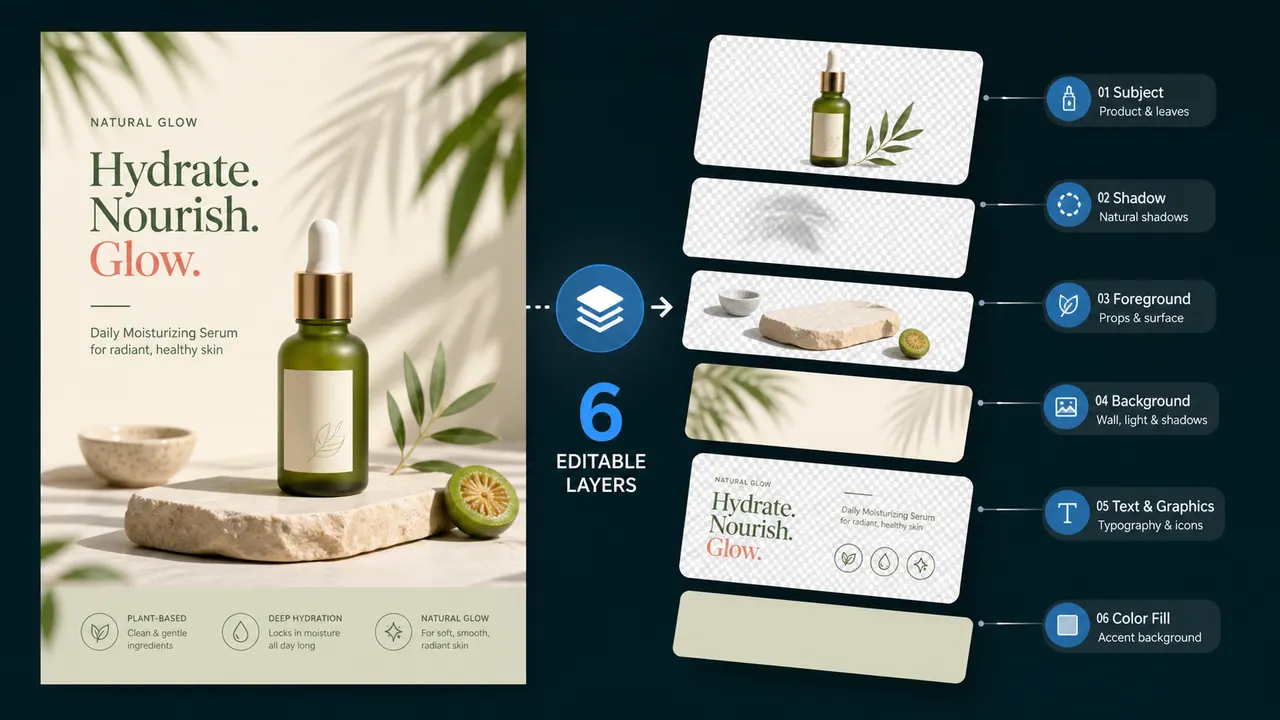
What does Image2Layer do?
Image2Layer converts a single flat image (JPG, PNG, or WebP) into editable layers you can export for production workflows. It separates major visual components like subjects, objects, text, logos, shadows, and background regions—then organizes them into layers for further refinement.
You can export transparent PNG layer files and a structured ZIP package for editing, or generate layered PSD output for use in Photoshop and compatible design tools. Layer generation is organized in two modes: Detailed Layers (auto layer separation) and Targeted Layer (up to 10 layers), helping you move from quick edits to more controlled results.
Image2Layer is especially useful when you need to repurpose flattened visuals—such as product photography, portraits, posters, thumbnails, and campaign creatives—without manually tracing masks. It’s also designed to reconstruct hidden background areas behind removed objects so edits don’t leave empty gaps.
What does Image2Layer do?
It turns one flat JPG, PNG, or WebP image into editable layers, then exports transparent PNG layers, a ZIP package, or a layered PSD for further editing.
What kinds of layers can Image2Layer generate?
It separates subjects, foreground objects, text, logos, shadows, and background regions so each element can be edited independently in your downstream workflow.
Which image formats are supported?
You can upload JPG, PNG, or WebP (up to 24MB) to create layer-ready exports.
Does Image2Layer reconstruct hidden background areas?
Yes. It rebuilds areas behind foreground elements so you can remove or move objects without leaving empty holes.
Can I export layered PSD files?
Yes. Image2Layer provides PSD export for Photoshop-style layer stacks, and it can also export transparent PNG layers and ZIP packages.
Is there a credits system?
New users receive 10 free credits after sign-up with no credit card required, and each generation uses 20 credits.
This listing is claimed
Own Image2Layer? Sign in with the email used to claim it to manage this listing, or upgrade to Pro for featured-first placement and a newsletter feature.