Fokus
AI Productivity Tools
Fokus builds a realistic, AI-scheduled day from your tasks and calendar—then keeps it updated as your day changes.

- Pricing
- Free
- Category
- Productivity
- Listed
- Sep 26, 2026
- Updated
- Sep 27, 2026
Promoted
 AI Checker PlusAI detector that highlights which passages AI wrote. Free check, no sign-up. Plagiarism too.
 RewindType any X/Twitter handle. Get their year back as a narrated video story. Then ask it anything.
 KurodyneSell the tools from your AI side projects. Listing is free.
 Sidrune AI85% off. Stable Claude API for agent developers. Pay as you go. Invoices & refunds available.
 Pixmax.aiPixmax.ai is an all-in-one AI workspace for videos, visual stories, and marketing content.
 SEOify - Improve your SEO & rankingsBuild links to rank in Google. Improve your DR with links you can start building now.Advertise here270,000+ people visit Dang.ai every month.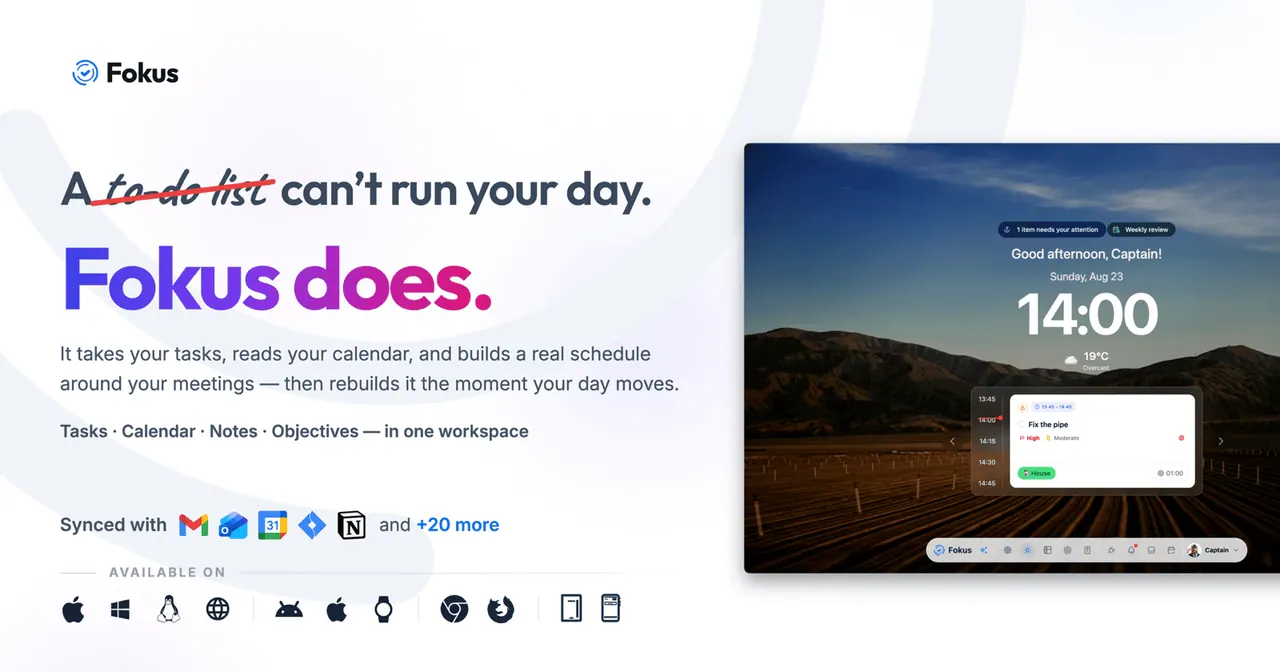
What does Fokus do?
Fokus is an AI daily planner that brings tasks, calendar events, notes, and objectives into one workspace. It reads your calendar, turns tasks into a practical schedule around your meetings, and rebuilds your plan the moment your day moves.
To keep your day plannable, Fokus rolls unfinished tasks into tomorrow with higher priority and time-blocks work while respecting deadlines and your working style. You can also drag items to different times, adjust durations, or push work back to your backlog—or off your schedule entirely.
Fokus includes a “crew” of AI agents for common workflow moments like a morning briefing, task enrichment, objective decomposition, meeting notes, inbox triage, voice capture, and booking pages. It’s available across desktop, mobile, web, Chrome extension, and Apple Watch-style usage, with integrations for calendars, email, chat, task managers, and project tools.
How does Fokus create my daily schedule?
Fokus takes your tasks and reads your calendar, then builds a schedule that fits around meetings. It can automatically rebuild when your day changes so the plan stays aligned.
What happens to tasks I don’t finish?
Incomplete tasks automatically roll into the next day and receive higher scheduling priority. You can also manually adjust or pin tasks to specific times.
Can I change the plan after Fokus generates it?
Yes. You can drag work to different hours (even to resolve overlaps), change how long tasks take, pull items in from your backlog or connected tools, or push tasks to tomorrow or off the schedule.
What AI agents are included in Fokus?
Captain Fokus coordinates a set of agents such as morning briefings, end-of-day reviews, task enrichment, objective decomposition, data ingestion/knowledge graph building, meeting scribe, email assistant, voice agent, and booking pages. Add-ons can be enabled per workspace.
Which tools can Fokus integrate with?
Fokus integrates with calendars and scheduling, communication and meetings, task and project management, and note/work tools. Examples include Google Calendar, Outlook/Apple Calendar, Gmail/Outlook Mail, Slack/MS Teams, Zoom/Google Meet, Todoist/Trello/Asana, Jira/Linear, Notion/Obsidian, and more (including additional apps via Zapier).
Where can I use Fokus?
Fokus is available on macOS, Windows, Linux desktop apps, the web, Android, iOS, a Chrome Extension, and watch/other companion options mentioned on the product page.
This listing is claimed
Own Fokus? Sign in with the email used to claim it to manage this listing, or upgrade to Pro for featured-first placement and a newsletter feature.