
editcanvas.ai
AI Design Tools
EditCanvas turns menu images and PDFs into editable designs you can publish to QR codes, print-ready PDFs, and digital screens.
- Pricing
- Free
- Category
- Design
- Listed
- Jun 3, 2026
- Updated
- Jun 3, 2026
Promoted
 Pixmax.aiPixmax.ai is an all-in-one AI workspace for videos, visual stories, and marketing content.
 Sidrune AI85% off. Stable Claude API for agent developers. Pay as you go. Invoices & refunds available.
 SEOify - Improve your SEO & rankingsBuild links to rank in Google. Improve your DR with links you can start building now.Advertise here270,000+ people visit Dang.ai every month.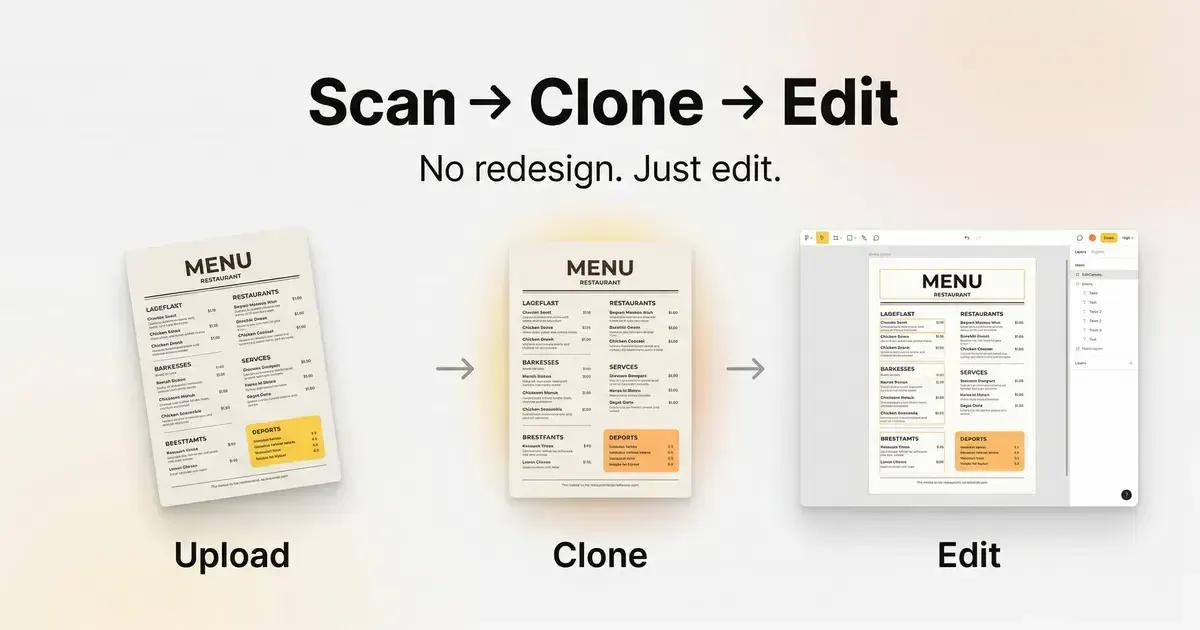
What does editcanvas.ai do?
EditCanvas helps you create and maintain restaurant menus from images or PDFs. Upload a menu, convert it into a fully editable layout, and update items, prices, and formatting without redesigning everything from scratch.
Once your menu is ready, publish it across multiple channels in sync—QR codes, print-ready PDFs, and digital screens. That way, you can manage one menu source and keep every format consistent.
Edit and publish fast with an editing workflow designed for real-world menu updates, including basic templates and premium templates depending on your plan.
What can I upload to create an editable menu in EditCanvas?
You can upload a menu image or a PDF. EditCanvas converts it into a fully editable menu layout you can modify.
Do I need design skills to edit my menu?
No design skills are required. The editor lets you update menu items, prices, and layout directly without starting over.
Can I update my menu anytime after publishing?
Yes. You can edit once and have your menu update across QR codes, print-ready PDFs, and digital screens so everything stays aligned.
Where can I publish my menu?
You can publish to QR codes, print-ready PDFs, and digital screens from the same updated menu.
Do I need a credit card to get started?
No credit card is required to start creating your first menu.
This listing is claimed
Own editcanvas.ai? Sign in with the email used to claim it to manage this listing, or upgrade to Pro for featured-first placement and a newsletter feature.