
DeVoice
AI Transcription Software Tools
DeVoice turns audio, video, and YouTube links into accurate, editable transcripts with speaker labels, summaries, and exports.

- Pricing
- Free
- Category
- Transcription
- Listed
- Aug 21, 2026
- Updated
- Aug 21, 2026
Promoted
 Sidrune AI85% off. Stable Claude API for agent developers. Pay as you go. Invoices & refunds available.
 Pixmax.aiPixmax.ai is an all-in-one AI workspace for videos, visual stories, and marketing content.
 SEOify - Improve your SEO & rankingsBuild links to rank in Google. Improve your DR with links you can start building now.Advertise here270,000+ people visit Dang.ai every month.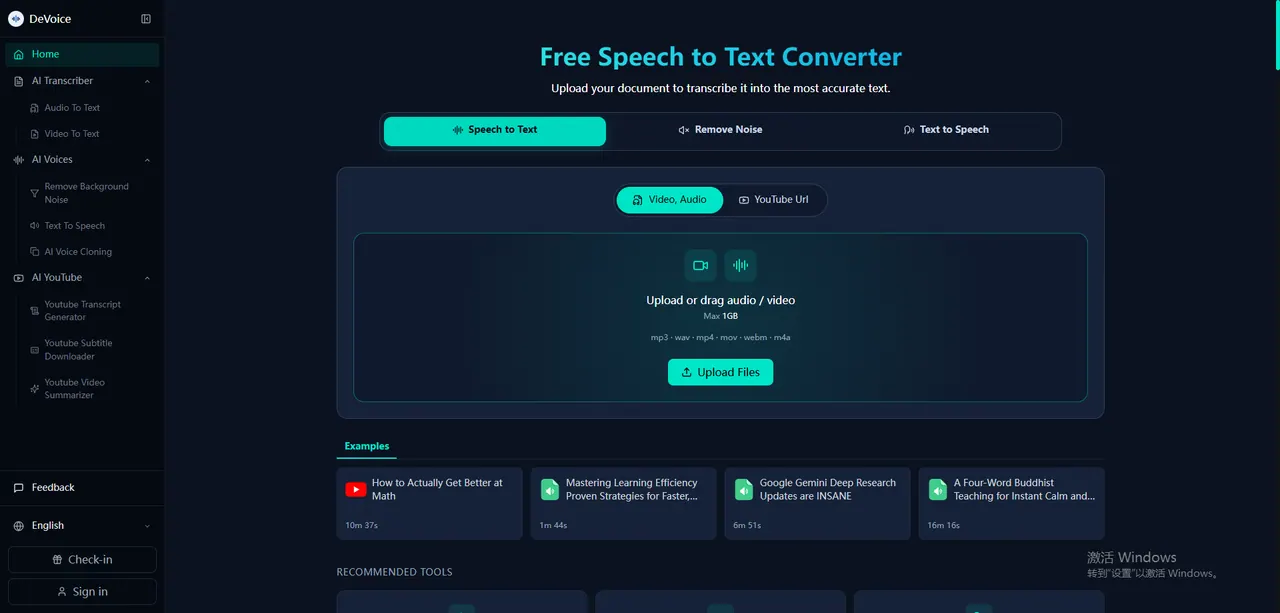
What does DeVoice do?
DeVoice is an AI transcription platform that converts audio and video into clean, editable text. Upload MP3, WAV, M4A, MP4, MOV, or paste a YouTube link to generate structured transcripts quickly.
Transcripts include speaker labels for multi-speaker recordings, and AI summaries are available to help you review key takeaways without rewatching. You can also remove filler words for a cleaner reading experience.
Export your results in common formats like TXT and SRT (subtitles), and use the transcript for notes, accessibility, or repurposing spoken content into articles and social media.
What can I transcribe with DeVoice?
You can transcribe audio and video files and paste a YouTube link. It also supports social video links such as TikTok, Instagram, X (Twitter), and Facebook.
Which file formats does DeVoice support?
Upload MP3, WAV, M4A, MP4, MOV, and additional formats. Using higher-quality audio can improve transcription results.
Does DeVoice include speaker labels for multiple people?
Yes—speaker labels are available to separate different speakers in the transcript.
Can I get an AI summary of my transcript?
Yes. AI summaries are available alongside the transcript to help you quickly understand the main points.
What export options are available?
You can download or export your transcript, including TXT and SRT formats for subtitles. Other document exports (like DOCX) are also available.
Is my transcription private?
Uploaded files are encrypted during processing and are automatically deleted after processing to help protect privacy.
This listing is claimed
Own DeVoice? Sign in with the email used to claim it to manage this listing, or upgrade to Pro for featured-first placement and a newsletter feature.