
Cloneify/Kopy‑fy Import & Copy Products
AI Ecommerce Tools
Cloneify imports products into Shopify from almost any store in seconds, preserving images, variants, and formatting, with optional AI enhancements and translations.
- Pricing
- Free
- Category
- Ecommerce
- Listed
- Sep 5, 2026
- Updated
- Sep 6, 2026
Promoted
 Pixmax.aiPixmax.ai is an all-in-one AI workspace for videos, visual stories, and marketing content.
 AI Checker PlusAI detector that highlights which passages AI wrote. Free check, no sign-up. Plagiarism too.
 RewindType any X/Twitter handle. Get their year back as a narrated video story. Then ask it anything.
 KurodyneSell the tools from your AI side projects. Listing is free.
 Sidrune AI85% off. Stable Claude API for agent developers. Pay as you go. Invoices & refunds available.
 SEOify - Improve your SEO & rankingsBuild links to rank in Google. Improve your DR with links you can start building now.Advertise here270,000+ people visit Dang.ai every month.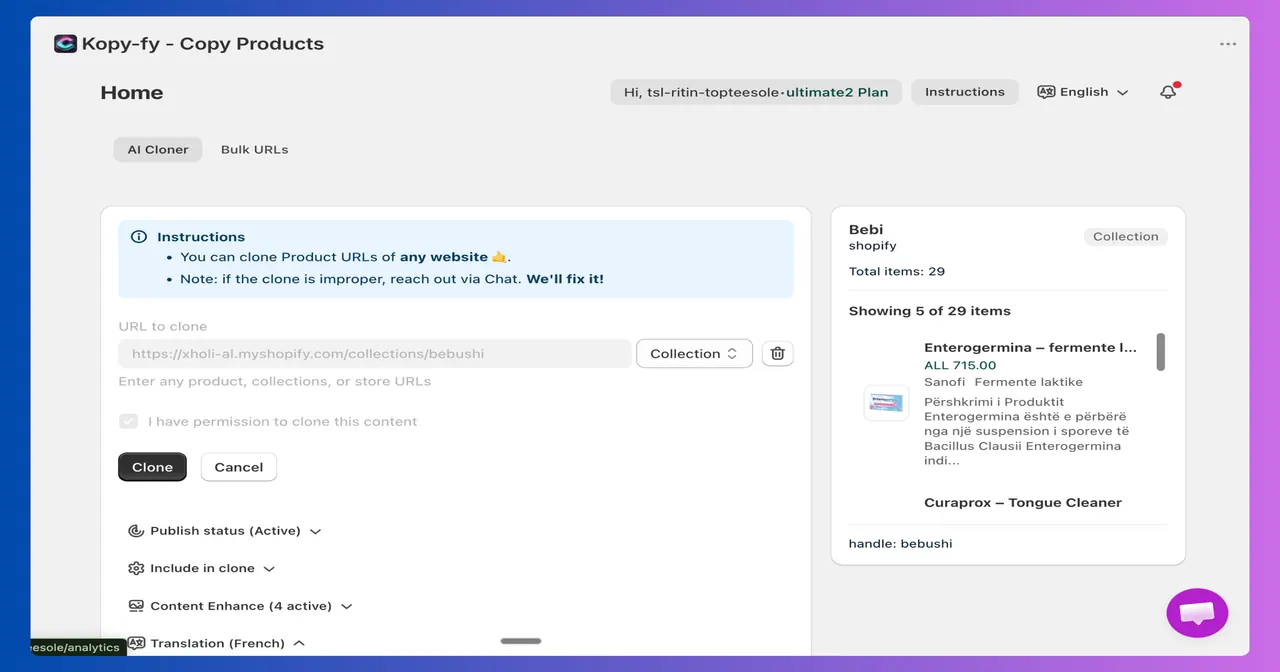
What does Cloneify/Kopy‑fy Import & Copy Products do?
Cloneify (Cloneify/Kopy‑fy Import & Copy Products) is a Shopify product importer designed to help you build or expand your Shopify catalog without copying fields one by one. Paste a product URL (or pick products with the Chrome extension), and Cloneify brings the product into your store with its details intact—images, descriptions, price, and full variant structures.
It supports bulk workflows so you can clone many products at once, including from collection pages. Before anything is saved, you get a preview step and can choose which fields to import (such as vendor, product type, and tags) and whether to publish immediately or keep cloned items as drafts for review.
Cloneify also includes optional AI to go beyond importing: AI-enhanced description rewriting (with SEO-oriented options) and AI translation into 55+ languages. You can choose exactly which listing fields to process with AI. Additional import controls include price adjustments, adding products to existing or new collections, and setting starting inventory quantities during the import flow.
Start free (no credit card required) and upgrade as your catalog grows, with product imports and AI usage metered per billing cycle.
What products and stores can I import with Cloneify?
You can import products from almost any website with product listings, including Amazon, Etsy, AliExpress, Walmart, and niche supplier or catalog sites without official integrations.
Will Cloneify recreate variants and images or only basic text?
Cloneify imports product details with full fidelity, including images and complete variant structures (such as size, colour, and material) rather than only grabbing a title and one image.
Can I preview and control what gets saved in Shopify?
Yes. Imports include a preview before anything is saved. You can also toggle which fields to import (like vendor, product type, tags) and decide whether the product is published immediately or kept as a draft.
How does the bulk import workflow work?
You can paste a whole list of product URLs and import hundreds at once with parallel processing. You can also bulk-clone from collection pages to pull multiple products in one action.
What AI features are included?
Cloneify offers AI-enhanced description rewriting and AI translation into 55+ languages. Both are opt-in and field-selectable so you control what gets AI treatment.
Does Cloneify help with pricing, collections, or starting inventory?
Yes. During import you can apply price adjustments, add cloned products to a collection, and set a starting stock quantity so new listings aren’t left out-of-stock by default.
This listing is claimed
Own Cloneify/Kopy‑fy Import & Copy Products? Sign in with the email used to claim it to manage this listing, or upgrade to Pro for featured-first placement and a newsletter feature.