Blur & Unblur AI
AI Design Tools
Blur and unblur selected faces in photos online with local browser processing and clean PNG exports.
- Pricing
- Free
- Category
- Design
- Listed
- Jul 18, 2026
- Updated
- Jul 19, 2026
Promoted
 RewindType any X/Twitter handle. Get their year back as a narrated video story. Then ask it anything.
 KurodyneSell the tools from your AI side projects. Listing is free.
 Sidrune AI85% off. Stable Claude API for agent developers. Pay as you go. Invoices & refunds available.
 Pixmax.aiPixmax.ai is an all-in-one AI workspace for videos, visual stories, and marketing content.
 SEOify - Improve your SEO & rankingsBuild links to rank in Google. Improve your DR with links you can start building now.Advertise here270,000+ people visit Dang.ai every month.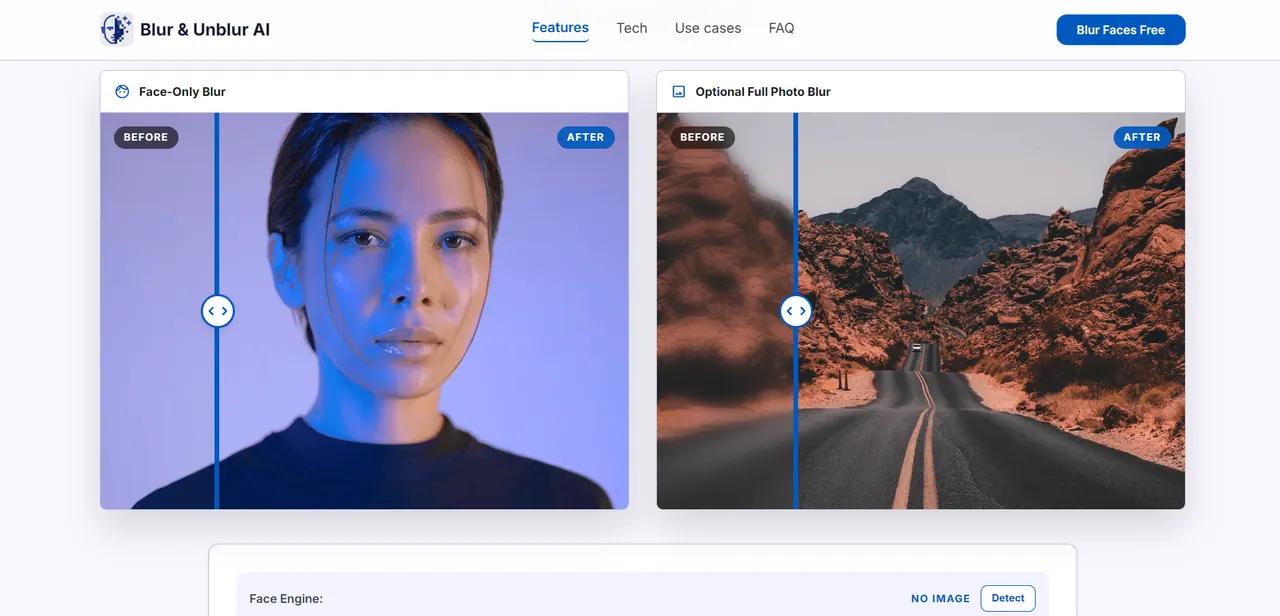
What does Blur & Unblur AI do?
Blur & Unblur AI is a face privacy tool for hiding identities in photos before you share them online. It detects faces, lets you remove incorrect detections, and supports manual lasso selection for faces the detector misses. You can also adjust blur strength live and export a clean PNG for posting.
In Face-Only mode, the blur effect is applied to selected face regions rather than softening the entire image, helping keep backgrounds and context readable. If automatic detection adds the wrong box, you can delete that selection; if it misses someone, use Lasso to draw a custom mask around the face.
Processing happens in your browser: the photo is decoded, edited, and exported using browser APIs without uploading your source image to a server for processing. Start by loading a JPG, PNG, or WebP, review the blurred result, then download the final image without editor-only overlays.
Is Blur & Unblur AI mainly for blurring faces?
Yes—it's focused on detecting faces, letting you select which faces to hide, adjusting blur strength, and exporting a clean PNG.
What if face detection misses a face in my photo?
Switch to Lasso and draw a manual mask around the missed face. This lets you precisely blur faces even when automatic detection isn’t perfect.
Can I remove a wrong face detection box?
Yes. If a detected face is incorrect, you can remove that selection before exporting the final PNG.
Can I blur the entire photo instead of only faces?
Yes—extra modes for Full Blur are available alongside face-only face redaction.
Are my photos uploaded to a processing server?
No. The editor decodes, edits, and exports the image locally in your browser.
What file types can I use and what do I download?
You can load JPG, PNG, or WebP images, and export the result as a clean PNG.
This listing is claimed
Own Blur & Unblur AI? Sign in with the email used to claim it to manage this listing, or upgrade to Pro for featured-first placement and a newsletter feature.