
Backdrop
Verified
AI Coaching Apps List
Backdrop is a live in-call sales enablement platform that guides reps with real-time prompts and answers from your sales knowledge.
Promoted
 Sidrune AI85% off. Stable Claude API for agent developers. Pay as you go. Invoices & refunds available.
 Pixmax.aiPixmax.ai is an all-in-one AI workspace for videos, visual stories, and marketing content.
 SEOify - Improve your SEO & rankingsBuild links to rank in Google. Improve your DR with links you can start building now.Advertise here270,000+ people visit Dang.ai every month.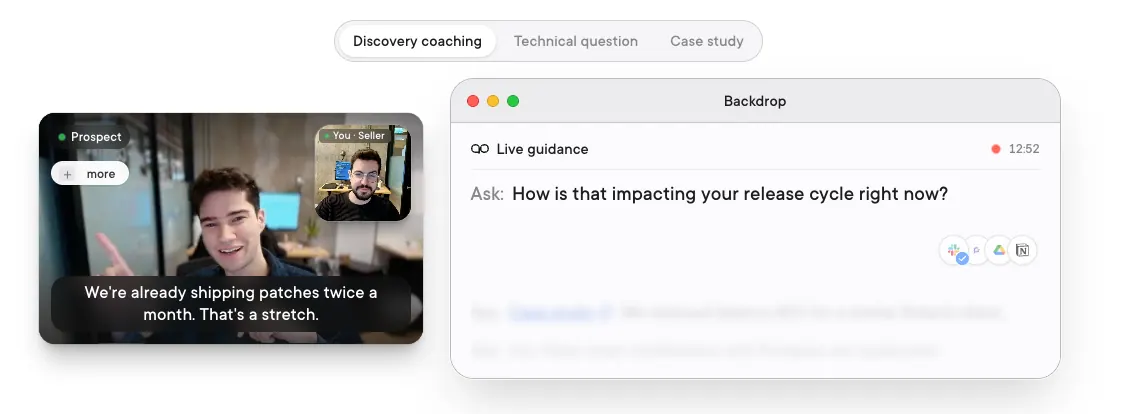
What does Backdrop do?
Backdrop delivers live guidance during sales calls, helping reps know what to ask and how to respond right as the conversation unfolds. It joins silently to your meeting audio, listens in real time, and matches the moment to your battlecards, product docs, and other internal knowledge.
Backdrop is designed for complex B2B sales scenarios like tough discovery, technical objections, competitor mentions, and deep product questions. It can surface the right question or answer before you need to ask for it, so you spend less time searching mid-call and more time leading the conversation.
It also supports training and continuous improvement workflows, including real-time coaching through discovery and objection handling, plus post-call support such as notes, recaps, and next steps. With Backdrop, you can extend top-rep performance across prospects, even when you don’t have a sales engineer available.
What does Backdrop do during a sales call?
Backdrop provides live in-call guidance by surfacing the next best question or response based on what’s being discussed. It’s intended to help reps stay on track through discovery, objections, and technical moments.
How does Backdrop listen in a meeting?
Backdrop joins silently by listening to your computer’s audio directly. It does not rely on bots or visible notifications to the participants.
What sources does Backdrop use to generate guidance?
Backdrop learns from your best sellers and absorbs your internal tribal knowledge, including docs, battlecards, competitor intel, case studies, and other materials you provide.
Can Backdrop help with technical questions and objections?
Yes. Backdrop can surface answers drawn from your product docs and guide language for price, timeline, and trust pushback, especially during deeper technical discussions.
Does Backdrop work across different devices and operating systems?
Backdrop is available for Windows and also available for macOS. It listens to meeting audio regardless of what you’re using for the call.
Is Backdrop only useful during the call, or can it support post-call work too?
It supports both. During calls it provides real-time guidance, and after calls it can help with notes, recaps, and next steps.
This listing is claimed
Own Backdrop? Sign in with the email used to claim it to manage this listing, or upgrade to Pro for featured-first placement and a newsletter feature.