
Room AI
AI Room Design Tool
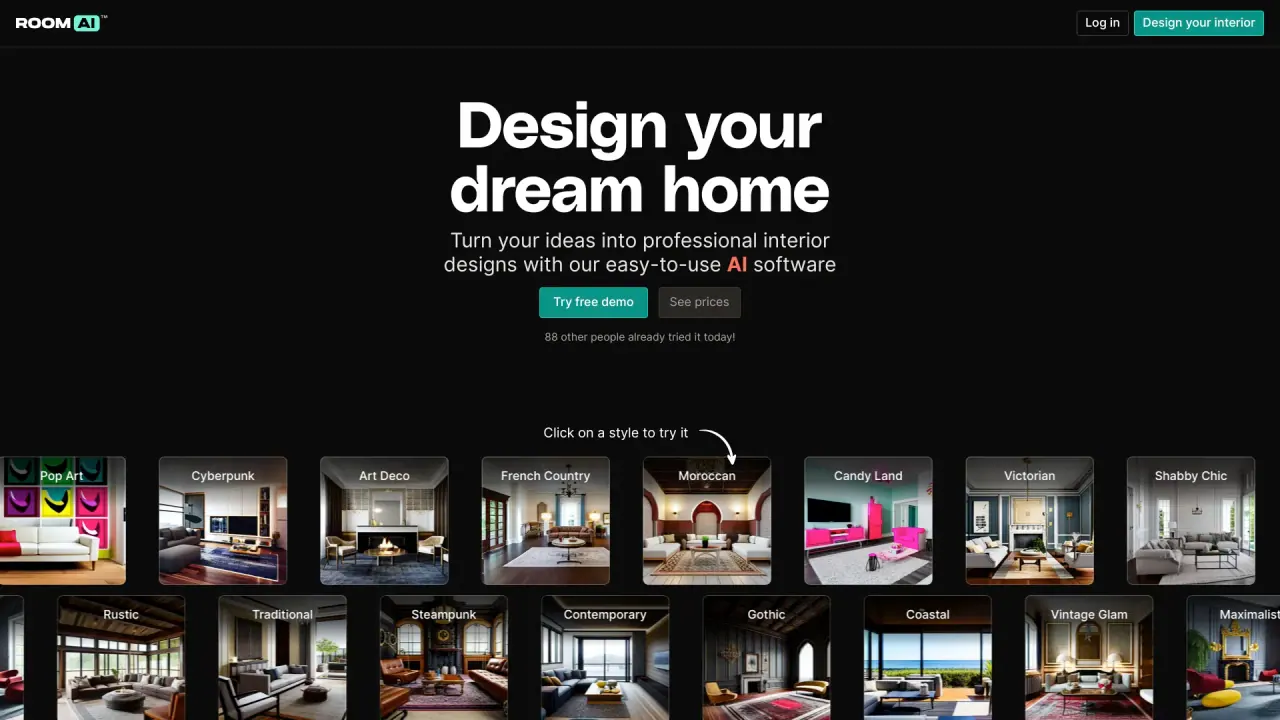
Redesign your space effortlessly with Room AI, the innovative AI room design tool. Explore over 40 interior design styles and visualize your dream room.
Promoted


What does Room AI do?
Can I use these designs commercially?
Yes. Commercial use is allowed on paid plans that include a commercial license. The Personal plan is for personal use only (includes a watermark). Pro and Team plans include a commercial license (no watermark; Team plan supports up to 5 users).
How much does Room AI cost?
- Personal Plan: $29 per month, 250 images per month, for 1 user, personal use only, small watermark.
- Pro Plan: $99 per month, 1,000 images per month, commercial license, no watermark, 1 user.
- Team Plan: $299 per month, 5,000 images per month, commercial license, no watermark, up to 5 users.
In addition, you can explore over 40 interior design styles for free without downloads or installations before subscribing.
Can I try Room AI for free before purchasing a plan?
Yes. Room AI offers a free trial to explore capabilities without downloads or installations. Free-trial designs are for personal use only and do not include commercial licenses. You can also browse and experiment with over 40 styles at no cost.
How can I start designing my home with Room AI?
- Visit the Room AI website.
- Explore over 40 interior design styles and choose one to try.
- Restyle an existing room by uploading an image and specifying your design preferences.
- Or generate a new room from scratch by specifying colors and materials to create photo-realistic renders.
- All this requires no downloads or installations.
What interior design styles are offered by Room AI?
Room AI offers a diverse set of styles, including Mid-Century Modern, Post-Apocalyptic, Art Deco, Minimalist, Vintage Glam, Japanese Zen, Farmhouse, Steampunk, Cyberpunk, Scandinavian, Shabby Chic, Contemporary, Hollywood Regency, Maximalist, Candy Land, Tropical, Industrial, Traditional, Victorian, and many more (over 40 styles in total).
What can I design with Room AI?
- Restyle: Upload a photo of your existing room and have the AI restyle it according to your chosen style.
- Generate from scratch: Specify your design preferences (colors, materials) to create dozens of photo-realistic renders of new rooms.
- Visual variety: Work across various room types (e.g., Living Room, Bedroom, Kitchen, Bathroom, Dining Room, Home Office, Kids’ Room, Media Room, Mudroom, Patio, Laundry Room, Home Gym) and experiment with colors and materials.
- Outputs: Photo-realistic renders to help you preview designs before making changes.
Who can use Room AI?
Room AI serves Homeowners, Interior Designers, Real Estate Agents, and Architects. It’s designed to help these groups generate ideas, present options, and streamline visualizations.
What are the limitations of Room AI?
- Limited control over some room layout options (AI-generated designs may offer less manual control compared with some other tools).
- The Free Trial does not include designs for commercial use (commercial licenses require a paid plan).
Who created Room AI?
Room AI is from Killbridge Ventures Pte. Ltd. Room AI is a registered trademark.
How do you handle my data and privacy?
Room AI provides a Privacy Policy outlining how data is collected, used, and protected. For specifics about data handling and privacy, please refer to the Privacy Policy on the site.
Is payment secure?
The site does not specify payment-security details in the available content. For information about payment security, please review the Terms of Service, Privacy Policy, or contact Support.
Is this your tool?
Claim Room AI to manage this listing, or upgrade to Pro for featured-first placement and a newsletter feature.