Videoswapface
Verified
AI Facial Replacement Tool
VideoSwapFace delivers state-of-the-art facial replacement technology for your video content.
- Pricing
- Free
- Category
- AI Detector
- Listed
- Jun 9, 2025
- Updated
- May 25, 2026
Promoted
 AI Checker PlusAI detector that highlights which passages AI wrote. Free check, no sign-up. Plagiarism too.
 RewindType any X/Twitter handle. Get their year back as a narrated video story. Then ask it anything.
 KurodyneSell the tools from your AI side projects. Listing is free.
 Sidrune AI85% off. Stable Claude API for agent developers. Pay as you go. Invoices & refunds available.
 Pixmax.aiPixmax.ai is an all-in-one AI workspace for videos, visual stories, and marketing content.
 SEOify - Improve your SEO & rankingsBuild links to rank in Google. Improve your DR with links you can start building now.Advertise here270,000+ people visit Dang.ai every month.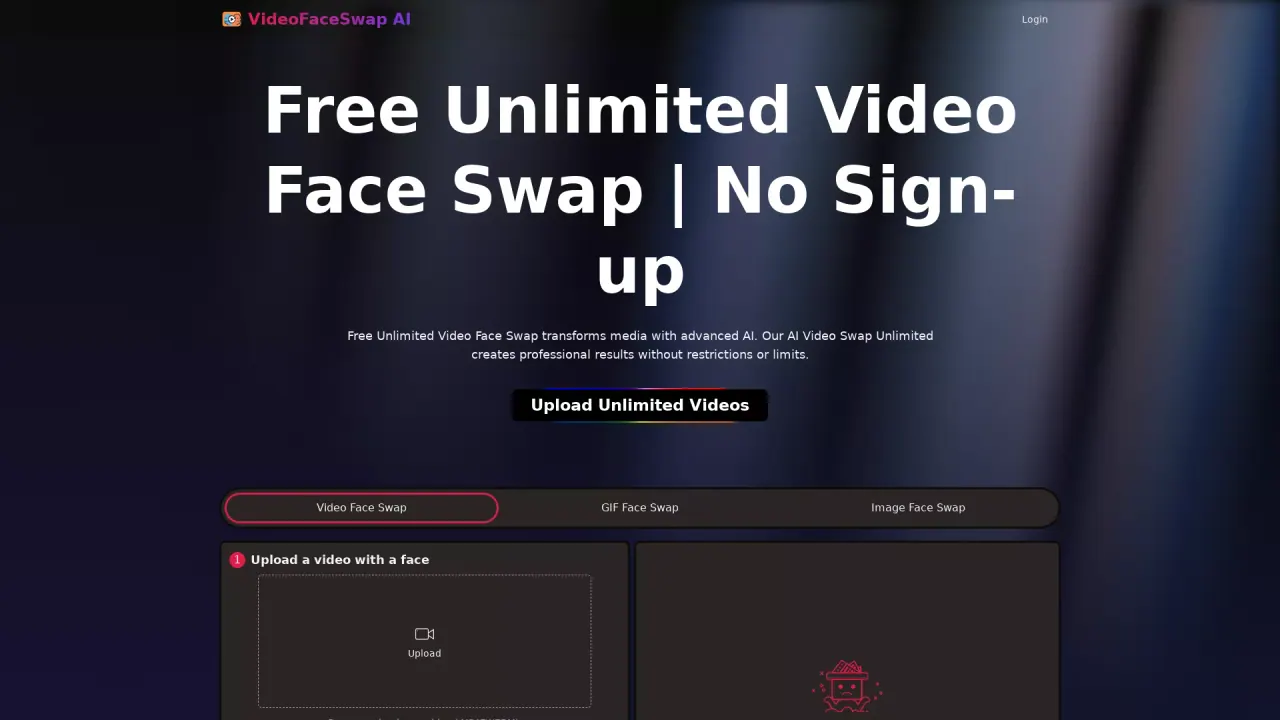
What does Videoswapface do?
How do I perform a face swap on a video?
- Upload a video with a face.
- Upload the face photo (JPG, PNG, WEBP; up to 20 MB for the image).
- Choose a model: Swap Face (Model 1.0) or Swap Face (Model 2.0). HD Model 2.0 delivers more realistic results but may take longer and be less stable.
- Click Swap Face Now to start.
- View or access your results in My Creations / History.
Do I need to sign up or log in to use Free Unlimited Video Face Swap?
No sign-up is required. The service is described as free and accessible without mandatory account creation.
What are the input requirements and file size limits?
- Video: you can upload a video up to 100 MB.
- Face photo: accepted formats are JPG, PNG, WEBP, with a maximum size of 20 MB.
- Sample Images are provided to guide input; you can upload your own photo in JPG, PNG, or WEBP formats.
What model options are available and how do they differ?
- Swap Face (Model 1.0)
- Swap Face (Model 2.0) — HD Model 2.0 delivers more realistic and higher-quality swaps, especially for complex or partially blocked faces, but processing takes longer and may be less stable.
Are the output videos watermark-free?
Yes. Outputs are watermark-free and provided as high-quality exports suitable for sharing on various platforms.
Can I share the swapped videos directly to social media?
Yes. The service advertises instant sharing capabilities and exports that are ready for major platforms, including Instagram, TikTok, and YouTube.
Can I swap multiple faces in a single video?
Yes. The tool supports unlimited creative control, including multiple face swaps within a video.
How long does processing take, and does it vary by model?
Processing time varies by model. HD Model 2.0 delivers higher realism but may take longer and be less stable than Model 1.0.
Where can I see or manage my results?
Your swapped videos appear in My Creations; the interface shows a History section (initially it may display No history).
Who uses Free Unlimited Video Face Swap?
The tool is positioned for varied creators and professionals, including Social Media Managers, Content Creators, Educators, Event Planners, and Marketing Professionals, who use it to create engaging, personalized clips.
This listing is claimed
Own Videoswapface ? Sign in with the email used to claim it to manage this listing, or upgrade to Pro for featured-first placement and a newsletter feature.