3d-design.ai
3D Modeling AI Tools
Generate textured or geometry-only 3D models from text or images, preview them in-browser, then download a GLB to continue in your tools.
- Pricing
- Free
- Category
- 3D
- Listed
- Sep 19, 2026
- Updated
- Sep 19, 2026
Promoted
 RewindType any X/Twitter handle. Get their year back as a narrated video story. Then ask it anything.
 KurodyneSell the tools from your AI side projects. Listing is free.
 Sidrune AI85% off. Stable Claude API for agent developers. Pay as you go. Invoices & refunds available.
 Pixmax.aiPixmax.ai is an all-in-one AI workspace for videos, visual stories, and marketing content.
 SEOify - Improve your SEO & rankingsBuild links to rank in Google. Improve your DR with links you can start building now.Advertise here270,000+ people visit Dang.ai every month.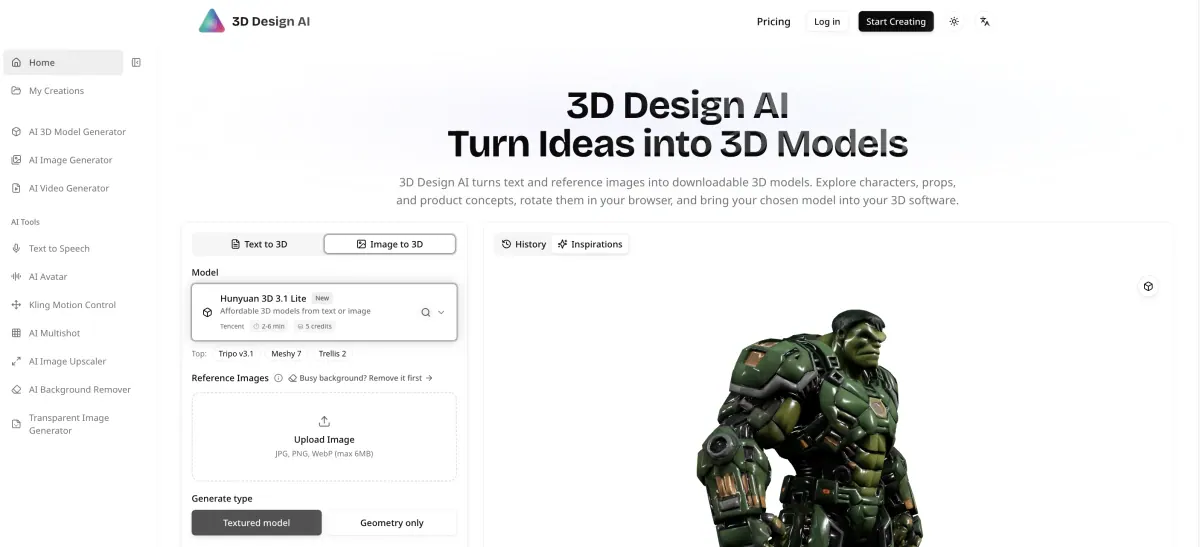
What does 3d-design.ai do?
3D Design AI helps you turn an idea into a 3D model using text-to-3D or image-to-3D workflows. Create character, prop, or product form studies, then rotate and inspect the result right in your browser before downloading.
Start with what you have: a single reference image (with background removal available) or a written prompt that focuses on the proportions and materials you care about. If you have consistent views of the same object, you can use multiple-image support to help align details across angles.
After generation, review the shape and surface details together, decide what to refine, and download the model. The downloadable asset can be used as a starting point in a 3D editor—such as importing a GLB into compatible software for mesh edits, scaling, or scene composition. Different generation models offer different controls for geometry vs. texture detail and how you guide the surface appearance.
What kinds of inputs can I use to generate a 3D model?
You can generate from text (text-to-3D) or from reference images (image-to-3D). If you have multiple consistent views of the same object, multiple-image support can help preserve alignment across angles.
What output types are available?
You can choose a textured model for surface colors/material detail, or generate geometry only when you want to focus on the form.
Do I need a transparent background for image-to-3D?
You don’t need transparency. If a background is distracting, you can remove the background first so the subject is easier to interpret for 3D generation.
How do I choose between the available generation models?
Pick based on what you want to control: explore shape from a written concept or reference (Hunyuan 3D 3.1), retain and tune detail from a single image (Trellis 2), guide both surface appearance and shape (Meshy 7), or work with separate control over shape and surface detail using multiple views (Tripo v3.1).
What can I do after downloading the model?
Preview and inspect first, then download the model and any supplied supporting files. You can import a GLB into compatible 3D software to edit the mesh, set scale, and compose a scene.
Can higher detail settings make the asset automatically better?
Not automatically. Higher detail may help, but it’s still better to choose settings based on your next step—like evaluating a silhouette, refining texture, or preparing a lighter mesh for downstream work.
This listing is claimed
Own 3d-design.ai? Sign in with the email used to claim it to manage this listing, or upgrade to Pro for featured-first placement and a newsletter feature.