
Zush
AI Productivity Tools
Zush is an AI file renamer and organizer for Mac and Windows that names files by their content and metadata with preview and undo.
- Pricing
- Free
- Category
- Productivity
- Listed
- Aug 15, 2026
- Updated
- Oct 17, 2026
Promoted
 Pixmax.aiPixmax.ai is an all-in-one AI workspace for videos, visual stories, and marketing content.
 AI Checker PlusAI detector that highlights which passages AI wrote. Free check, no sign-up. Plagiarism too.
 RewindType any X/Twitter handle. Get their year back as a narrated video story. Then ask it anything.
 KurodyneSell the tools from your AI side projects. Listing is free.
 Sidrune AI85% off. Stable Claude API for agent developers. Pay as you go. Invoices & refunds available.
 SEOify - Improve your SEO & rankingsBuild links to rank in Google. Improve your DR with links you can start building now.Advertise here270,000+ people visit Dang.ai every month.
What does Zush do?
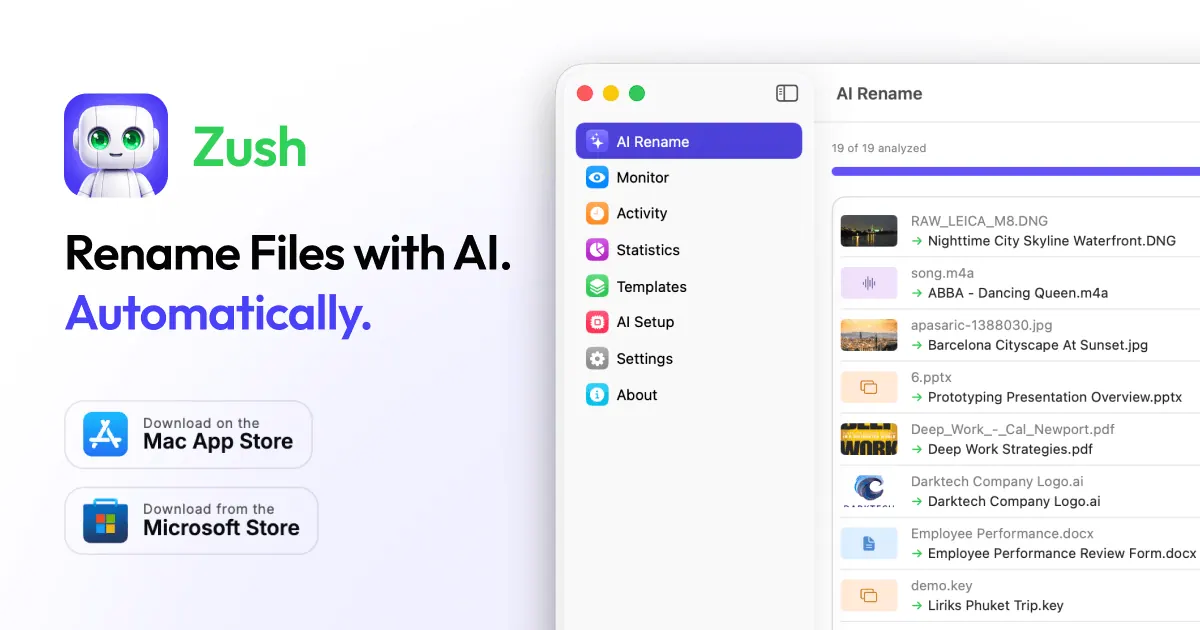
Zush is an AI file renamer and organizer for Mac and Windows. It creates clear, consistent filenames by reading the content and metadata of files (including PDFs, photos, video/audio, Office/iWork documents, design files, and more). Instead of guessing based on existing names, Zush helps you generate descriptive names you can review before applying.
Key features include AI batch renaming with a preview for every proposed change, plus rename history with one-click undo so you can roll back mistakes. You can automate repeat workflows using templates and Naming Blocks, and you can set your own custom AI prompts to shape how filenames and metadata are produced. Zush also supports smart metadata by adding Finder tags and Spotlight metadata for faster searching.
For organization, Zush can optionally sort files into folders using AI, including a review step before moves are applied. It can also monitor one or multiple folders and process new files automatically, including folders in iCloud Drive, Google Drive, Dropbox, and OneDrive.
Choose where AI runs: Zush Cloud, BYOK for bringing your own API key, or private local options using LM Studio or Ollama for offline mode after setup. Zush is designed for people who handle large volumes of mixed files and want searchable, consistently named results without changing their existing folder setup. Free is available with 50 AI renames and no registration or credit card required; PRO is offered as $10/month (plus VAT) or a $48 one-time (plus VAT) option.
What does Zush do for your files?
Zush renames files by reading their content and metadata, then generates descriptive filenames you can review before applying. It can also sort files into folders using AI (with optional preview and undo).
Which file types can Zush rename?
Zush supports a wide range of formats across images, RAW photos, PDFs/scans, documents, ebooks, videos, audio, subtitles, and design files, all within the same rename workflow.
How does the preview and undo work?
Zush shows you the proposed new filenames and (if enabled) folder moves before you apply changes. Every rename batch is tracked so you can roll back to the original filenames from Rename History.
Can I control the filename format?
Yes. Build filenames with reusable Templates and Naming Blocks, and use custom AI prompts to guide how names and metadata are generated to match your workflow.
Can Zush run AI locally or offline?
Yes. You can use private local AI options with LM Studio or Ollama; local modes work offline after setup for supported analysis workflows.
What does Zush cost?
Zush has a free tier with 50 AI renames (no signup, no credit card). PRO is available as $10/month + VAT or $48 one-time + VAT, and both remove the rename limit across AI modes.
This listing is claimed
Own Zush? Sign in with the email used to claim it to manage this listing, or upgrade to Pro for featured-first placement and a newsletter feature.