
VoiceFlow
Audio AI Tools
VoiceFlow is an AI voice workspace for text-to-speech and speech-to-text with 600+ voices and SRT subtitle export.
- Pricing
- Free
- Category
- Audio
- Listed
- Jun 17, 2026
- Updated
- Jun 17, 2026
Promoted
 AI Checker PlusAI detector that highlights which passages AI wrote. Free check, no sign-up. Plagiarism too.
 RewindType any X/Twitter handle. Get their year back as a narrated video story. Then ask it anything.
 KurodyneSell the tools from your AI side projects. Listing is free.
 Sidrune AI85% off. Stable Claude API for agent developers. Pay as you go. Invoices & refunds available.
 Pixmax.aiPixmax.ai is an all-in-one AI workspace for videos, visual stories, and marketing content.
 SEOify - Improve your SEO & rankingsBuild links to rank in Google. Improve your DR with links you can start building now.Advertise here330,000+ people visit Dang.ai every month.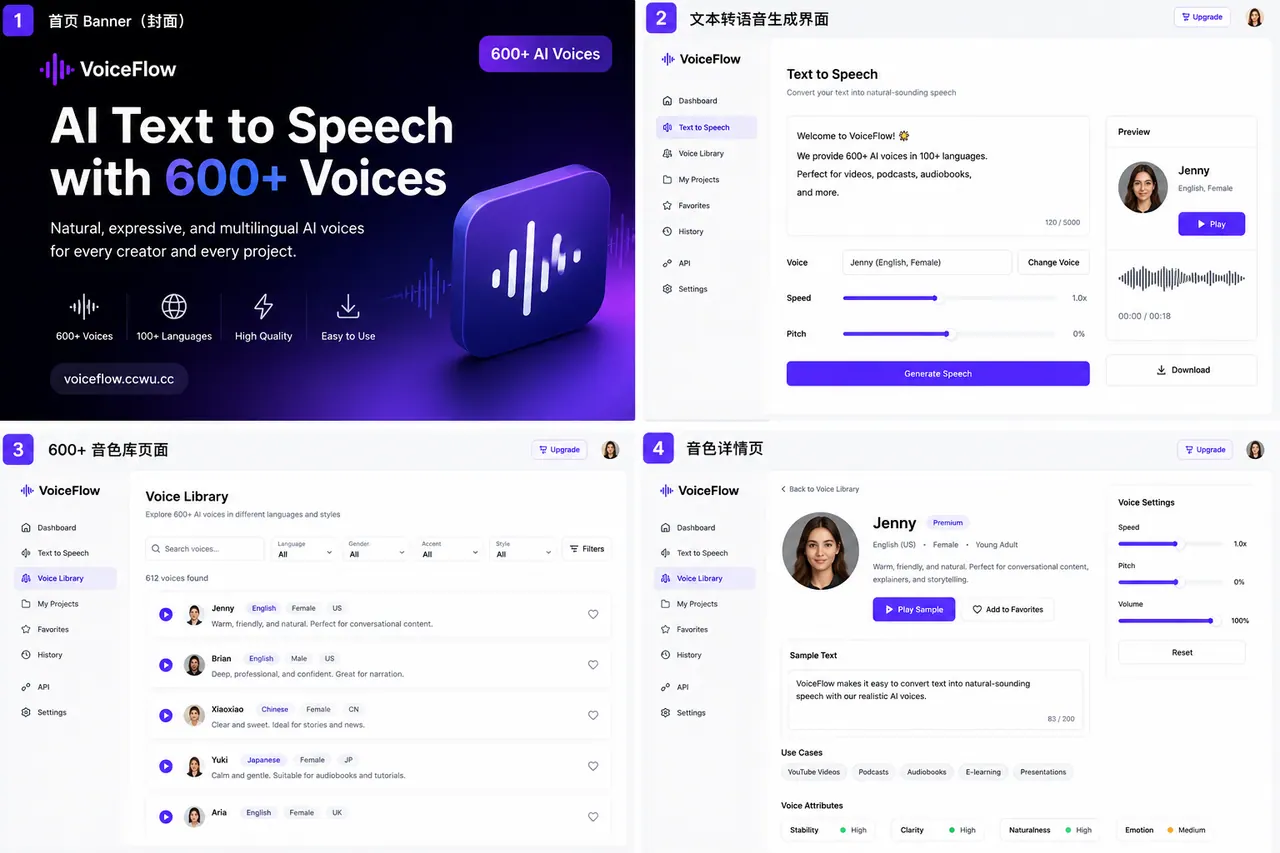
What does VoiceFlow do?
VoiceFlow is an all-in-one AI voice workspace for turning scripts into natural audio and converting speech or videos into editable text. Paste your text, choose from 600+ AI voices, preview the result online, and download MP3 audio.
For creators and teams, VoiceFlow also supports speech-to-text with subtitle workflows. Upload audio or video to transcribe and export TXT, SRT, or VTT for easy editing in common video toolchains.
Fine-tune playback with advanced controls like speed, pitch, volume, and timing helpers. You can also estimate voiceover duration with a words-to-time calculator and use subtitle tools (including SRT generation) for production-ready captions.
How do I generate AI speech in VoiceFlow?
Paste your text, select a voice, then generate audio. You can preview online and download the result as an MP3.
What are the VoiceFlow free limits for text-to-speech?
Text to speech is available on a free plan with a daily quota of 50,000 characters and up to 10,000 characters per synthesis.
What subtitle formats can I export?
VoiceFlow can export subtitles as SRT and VTT, and it can also provide plain text (TXT) results for transcripts.
Can VoiceFlow transcribe audio or video and label speakers?
Yes. Upload audio or video for transcription and speaker diarization so different speakers can be identified in the output.
How can I avoid robotic-sounding AI voiceovers?
Start with a clean script and generate a short preview first. Then adjust speed, pauses, and voice choice to better match your intended narration rhythm and clarity.
Is uploaded content used for AI training, and is it stored?
Uploaded content is used only to complete the current voice task, and processed files are cleaned after processing. It’s not used for AI training.
This listing is claimed
Own VoiceFlow? Sign in with the email used to claim it to manage this listing, or upgrade to Pro for featured-first placement and a newsletter feature.