Transpic
AI Translator & Translation Tools
Transpic is a private AI image translator that translates text inside photos, screenshots, and graphics while preserving the original layout.
- Pricing
- Free
- Category
- Translation
- Listed
- Aug 14, 2026
- Updated
- Oct 18, 2026
Promoted
 Sidrune AI85% off. Stable Claude API for agent developers. Pay as you go. Invoices & refunds available.
 Pixmax.aiPixmax.ai is an all-in-one AI workspace for videos, visual stories, and marketing content.
 AI Checker PlusAI detector that highlights which passages AI wrote. Free check, no sign-up. Plagiarism too.
 RewindType any X/Twitter handle. Get their year back as a narrated video story. Then ask it anything.
 KurodyneSell the tools from your AI side projects. Listing is free.
 SEOify - Improve your SEO & rankingsBuild links to rank in Google. Improve your DR with links you can start building now.Advertise here270,000+ people visit Dang.ai every month.
What does Transpic do?
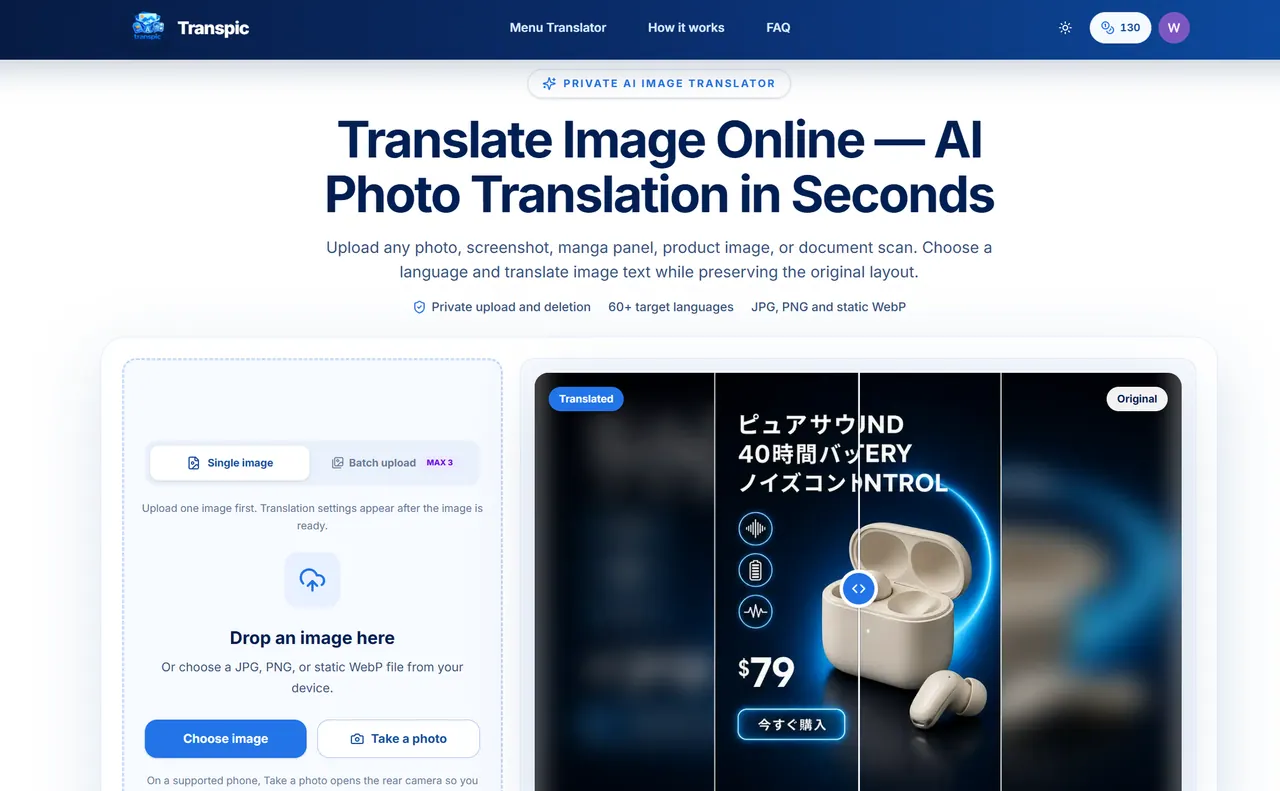
Transpic is a private AI image translator that converts text inside images into another language while keeping the translated text positioned where it belongs in the original design. Upload a photo, screenshot, manga panel, product graphic, poster, menu, or scanned document, select your target language, and generate a translated image you can review and export—without manually extracting, translating, and rebuilding the layout.
Unlike basic OCR that returns only plain text, Transpic is layout-aware. It detects text regions and preserves the visual relationship between each phrase and its original sign, label, speech bubble, table cell, or product callout. This makes it easier to localize complex visuals—menus with prices beside dishes, e-commerce ads with feature callouts near icons, and manga dialogue that stays within its speech bubbles.
After translation, you can compare the original and translated images, then open the translated result in an editor to correct wording, adjust text block placement, and fine-tune size and color before exporting. Supported formats include JPG, PNG, and static WebP, and the workflow focuses on image inputs (direct PDF and Word uploads are not supported). Some hard cases—tiny lettering, curved typography, heavy texture, or overlapping artwork—may require manual adjustments.
Transpic offers a free plan with 3 signup images (no sign-up). Paid plans are billed monthly or yearly and include different image capacities, batch sizes, target language counts, and OCR allowances, plus watermark-free output and commercial use on paid plans.
What types of images can I translate with Transpic?
You can upload photos, screenshots, manga panels/pages, product graphics, posters, restaurant menus, and document scans in JPG, PNG, or static WebP.
Does Transpic translate text while preserving the layout?
Yes. Transpic detects text regions and keeps translated phrases connected to their approximate original positions so the visual meaning stays in place.
Is my upload processed privately, or do images become public?
Uploads are stored privately rather than published as permanent public images, and access uses short-lived URLs for processing.
Can I edit the translated text before exporting?
Yes. After translation, you can review the before-and-after result and use the editor to adjust wording, resize/move text blocks, and change text color before downloading the final image.
Can I upload PDFs or Word documents?
No. Direct PDF and Word uploads are not supported; you’ll need to upload an image file (JPG, PNG, or static WebP).
How does pricing work for translation plans?
There’s a free option (3 signup images). Paid plans are available on monthly or yearly billing and offer different annual result limits, batch sizes, target-language counts, and included OCR allowances; paid plans also support watermark-free output and commercial use.
This listing is claimed
Own Transpic? Sign in with the email used to claim it to manage this listing, or upgrade to Pro for featured-first placement and a newsletter feature.