
TextToSpeechAI
AI Text To Speech Generator
Text to Speech AI turns any script into natural AI speech with celebrity/character voices, voice cloning, voice design, and multi-speaker dialogue.
- Pricing
- Freemium
- Category
- Voice changer
- Listed
- May 22, 2026
- Updated
- Oct 17, 2026
Promoted
 Sidrune AI85% off. Stable Claude API for agent developers. Pay as you go. Invoices & refunds available.
 Pixmax.aiPixmax.ai is an all-in-one AI workspace for videos, visual stories, and marketing content.
 AI Checker PlusAI detector that highlights which passages AI wrote. Free check, no sign-up. Plagiarism too.
 RewindType any X/Twitter handle. Get their year back as a narrated video story. Then ask it anything.
 KurodyneSell the tools from your AI side projects. Listing is free.
 SEOify - Improve your SEO & rankingsBuild links to rank in Google. Improve your DR with links you can start building now.Advertise here270,000+ people visit Dang.ai every month.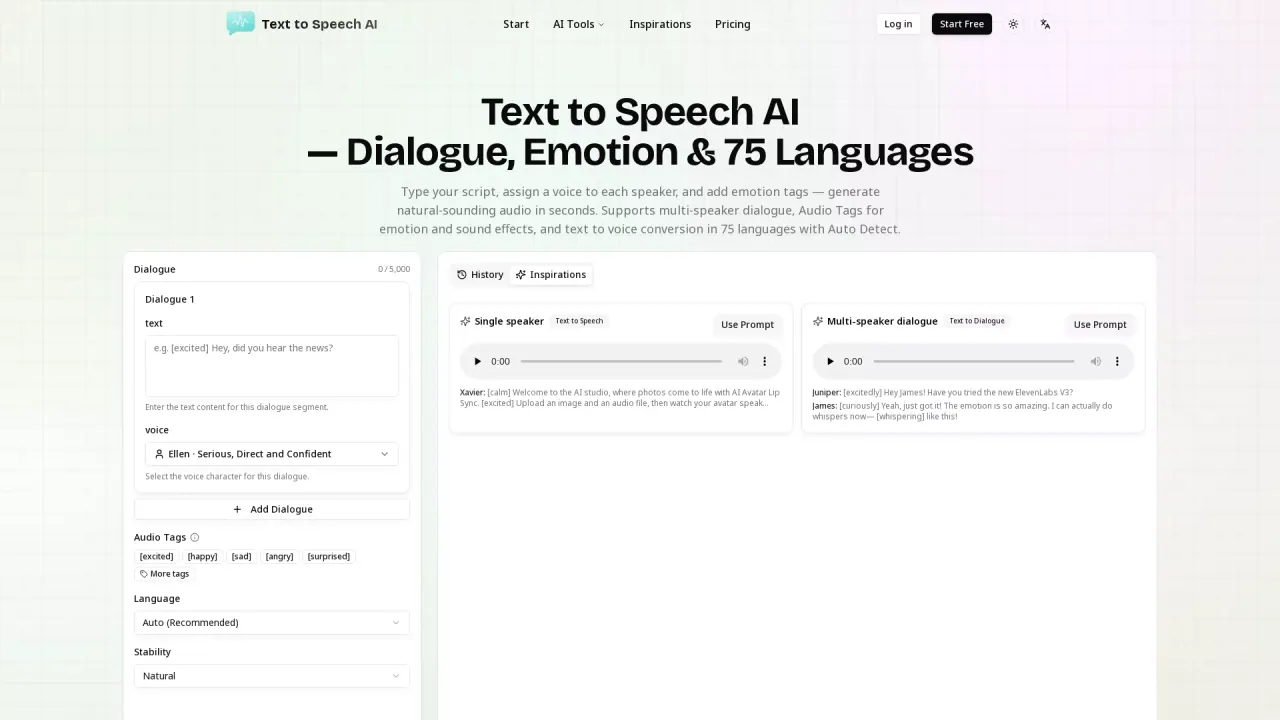
What does TextToSpeechAI do?
Text to Speech AI is an AI voice generator that converts your written scripts into spoken audio in real celebrity and character voices. Pick a voice, paste or type your text, and generate natural-sounding speech for videos, shorts, memes, podcasts, and more.
Beyond single-speaker narration, it supports multi-speaker dialogue for full conversations. Assign a different voice to each speaker and generate everything as one audio file. You can also control delivery and emotion using inline Audio Tags—like [excited], [whispers], [laughing], or [sad]—so the voice follows the emotional direction in your script.
You can also make your own voice workflows with voice cloning and voice design. Clone a voice by uploading a short recording for a reusable, consistent sound, or create a brand-new voice by describing the tone, age, gender, accent, and character you want in plain words.
After generating, you can preview your result in the browser and download the audio as MP3. There’s free generation to get started online, plus paid plans for higher-volume generation and commercial use.
What can I create with Text to Speech AI?
You can generate single-speaker narration and multi-speaker dialogue from scripts. You can also clone your own voice from a short recording or design a new voice from a text description.
How do Audio Tags work for emotion and delivery?
Insert tags directly in your script (for example, [excited], [whispers], [laughing], [shocked]). The AI uses the tag during speech generation to adjust delivery, pacing, and tone.
Can I make a conversation with different voices?
Yes. Use multi-speaker dialogue by writing the script line by line and assigning a voice per speaker; the tool generates the full conversation as one audio file.
Do I need to record audio to clone a voice?
To clone a voice, upload a short recording of the voice you want to reuse. That cloned voice can then be used in future generations.
Is there a free option?
Yes. You can start with free generation online without downloading or installing anything, and you can test features like multi-speaker dialogue and Audio Tags on the free tier.
Can I download the generated speech?
Yes. After generating, play it in the browser and download the audio file as MP3 for your content workflow.
This listing is claimed
Own TextToSpeechAI? Sign in with the email used to claim it to manage this listing, or upgrade to Pro for featured-first placement and a newsletter feature.