
FineVoice Text to Speech
Verified
AI Text to Speech Tool, Video Voiceovers,Audiobook Creation,Marketing & Advertising
FineVoice is a free online text-to-speech tool that generates natural AI voices and lets you customize emotion, speed, pitch, and style.
- Pricing
- Free trial
- Category
- Audio
- Listed
- Mar 16, 2026
- Updated
- Nov 9, 2026
Promoted
 RewindType any X/Twitter handle. Get their year back as a narrated video story. Then ask it anything.
 KurodyneSell the tools from your AI side projects. Listing is free.
 Pixmax.aiPixmax.ai is an all-in-one AI workspace for videos, visual stories, and marketing content.
 AI Checker PlusAI detector that highlights which passages AI wrote. Free check, no sign-up. Plagiarism too.
 SEOify - Improve your SEO & rankingsBuild links to rank in Google. Improve your DR with links you can start building now.Advertise here330,000+ people visit Dang.ai every month.
What does FineVoice Text to Speech do?
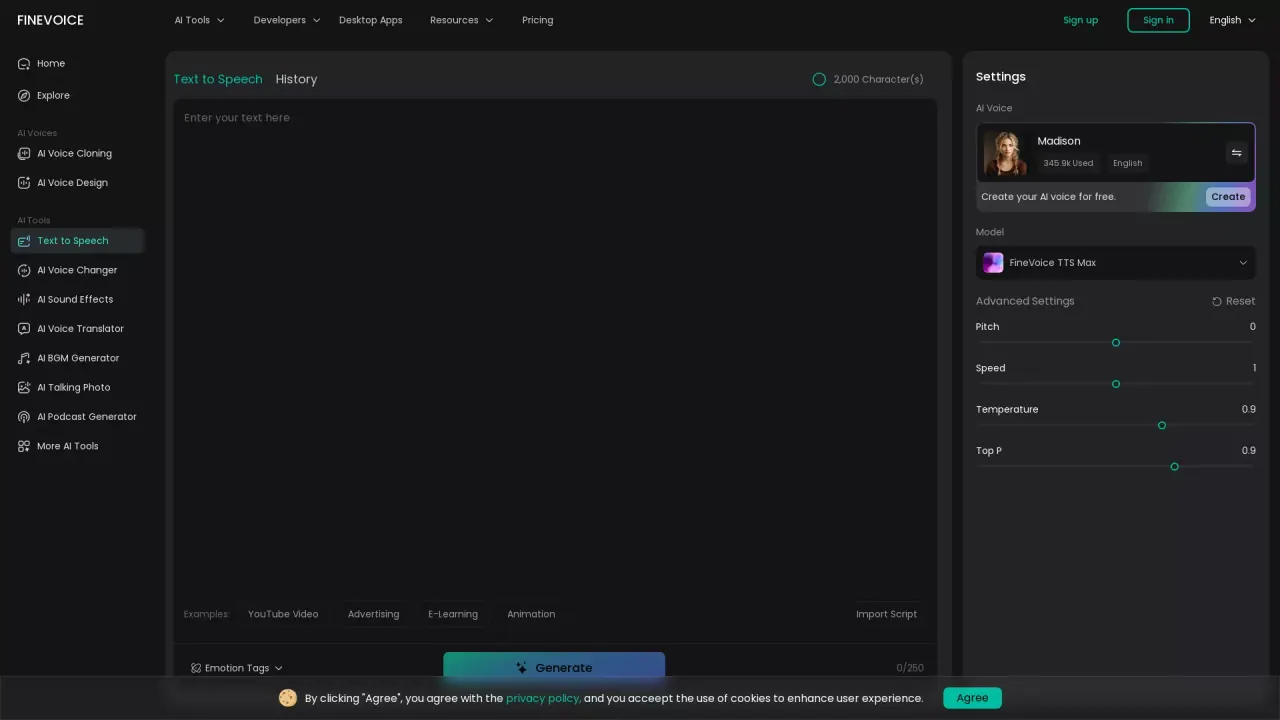
FineVoice Text to Speech turns written text into natural, expressive speech using AI voices. Paste your script, import a document, or use examples to quickly generate voiceovers suitable for many formats—YouTube narration, advertising voiceovers, animation, e-learning, and more.
Create with control: fine-tune the voice model and use emotion tags to shape how the speech sounds. Adjust pitch and speed, and use advanced parameters like temperature and Top P (with FineVoice TTS Max) to refine the delivery. If you’re building character voices or storytelling audio, emotion-enhanced output helps your narration feel more lifelike and intentional.
You can also work with flexible input types. FineVoice supports typing/pasting and importing scripts in .txt, .docx, and .srt formats, making it easier to convert existing content into speech. The voice library offers natural voices across many languages and accents, so you can generate multilingual audio projects without needing to record yourself.
Pricing: you can start for free with 2,000 free characters, and you can earn additional characters through daily coins in the Rewards center and by completing tasks.
How do I generate speech with FineVoice Text to Speech?
Enter or import your script, choose an AI voice, optionally add emotion tags and adjust settings, then click Generate. The conversion typically takes only a few seconds depending on input length.
Is FineVoice Text to Speech free to use?
Yes—FineVoice offers free usage with 2,000 characters. You can also claim daily coins in the Rewards center to exchange for more characters or earn rewards by completing tasks.
What can I customize in the generated voice?
You can select an AI voice and control parameters such as pitch and speed. FineVoice also provides advanced controls like temperature and Top P (available with FineVoice TTS Max), plus emotion enhancement.
Can I add pauses or emotion to the speech?
Yes. Use emotion tags to influence how the narration sounds, including options like happy, sad, whispering, clear_throat, and laugh. You can also include tags in your text to guide the delivery style.
What languages and accents are supported?
FineVoice Text to Speech supports natural voices across 154 languages and accents, including options like English, Spanish, Chinese, Japanese, French, German, Korean, Portuguese, Italian, Arabic, Russian, Turkish, and Thai.
What file formats can I import for text to speech?
You can import scripts in .txt, .docx, or .srt files, in addition to typing or pasting text directly.
This listing is claimed
Own FineVoice Text to Speech? Sign in with the email used to claim it to manage this listing, or upgrade to Pro for featured-first placement and a newsletter feature.