
subtitle.im
AI Productivity Tools
subtitle.im is a Chrome extension that automatically enables available YouTube captions and turns off confirmed duplicate burned-in subtitles.
- Pricing
- Freemium
- Category
- Productivity
- Listed
- Oct 11, 2026
- Updated
- Oct 16, 2026
Promoted
 Sidrune AI85% off. Stable Claude API for agent developers. Pay as you go. Invoices & refunds available.
 Pixmax.aiPixmax.ai is an all-in-one AI workspace for videos, visual stories, and marketing content.
 AI Checker PlusAI detector that highlights which passages AI wrote. Free check, no sign-up. Plagiarism too.
 RewindType any X/Twitter handle. Get their year back as a narrated video story. Then ask it anything.
 KurodyneSell the tools from your AI side projects. Listing is free.
 SEOify - Improve your SEO & rankingsBuild links to rank in Google. Improve your DR with links you can start building now.Advertise here270,000+ people visit Dang.ai every month.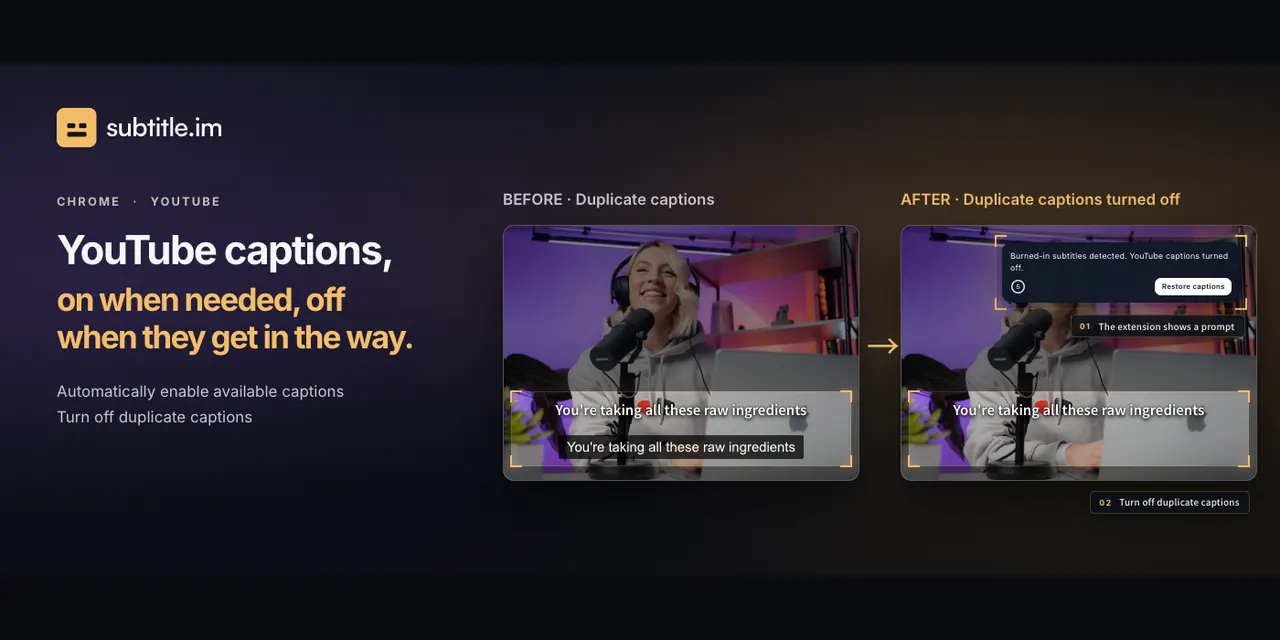
What does subtitle.im do?
subtitle.im is a Chrome extension for managing existing YouTube captions. It automatically turns on available YouTube caption tracks when they exist, and it detects when a video already has burned-in subtitles.
When burned-in subtitles are present, subtitle.im helps you handle duplicate captions so they don’t get in the way. You can choose how duplicates are treated, including closing them automatically, prompting you first, or keeping optional captions—especially when burned-in subtitles and YouTube captions use different languages.
The extension runs local OCR in your browser to recognize burned-in subtitle text and manage YouTube caption switching without uploading video frames or subtitle text. Video frames stay on your device, and you can restore captions if they were hidden by mistake, since the video and subtitle content aren’t changed.
subtitle.im also supports preferences at multiple levels: you can set a global choice and then apply rules per channel or per individual video (with video rules taking priority). It’s designed for viewers who want captions enabled when useful, but reliably handled when duplicates appear.
Pricing: Free ($0) with a limited allowance of 10 successfully handled videos total and no monthly reset. Pro subscription costs $17.99/year (billed annually) with unlimited videos. Pro Lifetime is $29.99/once with ongoing maintenance and major/minor updates and no automatic renewal.
Does subtitle.im generate or translate subtitles?
No—subtitle.im only manages existing YouTube caption tracks. It detects burned-in subtitles to help you handle duplicates, but it doesn’t generate or translate captions.
How does subtitle.im handle duplicate captions?
When burned-in subtitles are detected, it turns off duplicate YouTube captions based on your preference. You can close automatically, ask first, or keep optional captions.
What if burned-in subtitles and YouTube captions are in different languages?
You can pick how to handle them: close automatically, ask first, or keep optional captions. Detection only applies with supported languages and sufficient evidence.
Can I restore captions if they were hidden by mistake?
Yes. If captions are turned off due to duplicate handling, you can restore them whenever you need them.
Are my video frames uploaded for detection?
No. Frame sampling and OCR run locally in your browser, and the extension uses the results to manage YouTube captions without uploading video frames or subtitle text.
What are the differences between Free, Pro, and Pro Lifetime?
Free is $0 with 10 total successfully handled videos and no monthly reset. Pro is $17.99/year billed annually for unlimited videos and continued automatic handling. Pro Lifetime is $29.99 once for ongoing maintenance and all major/minor updates with no automatic renewal.
This listing is claimed
Own subtitle.im? Sign in with the email used to claim it to manage this listing, or upgrade to Pro for featured-first placement and a newsletter feature.