
Slide-Easy
AI Marketing Tools
Slide-Easy is a Mac app that turns your App Store reviews into an approved week of Instagram Reels and carousels with AI labeling.
- Pricing
- Free
- Category
- Marketing
- Listed
- Oct 6, 2026
- Updated
- Oct 23, 2026
Promoted
 Pixmax.aiPixmax.ai is an all-in-one AI workspace for videos, visual stories, and marketing content.
 RewindType any X/Twitter handle. Get their year back as a narrated video story. Then ask it anything.
 KurodyneSell the tools from your AI side projects. Listing is free.
 Sidrune AI85% off. Stable Claude API for agent developers. Pay as you go. Invoices & refunds available.
 SEOify - Improve your SEO & rankingsBuild links to rank in Google. Improve your DR with links you can start building now.Advertise here270,000+ people visit Dang.ai every month.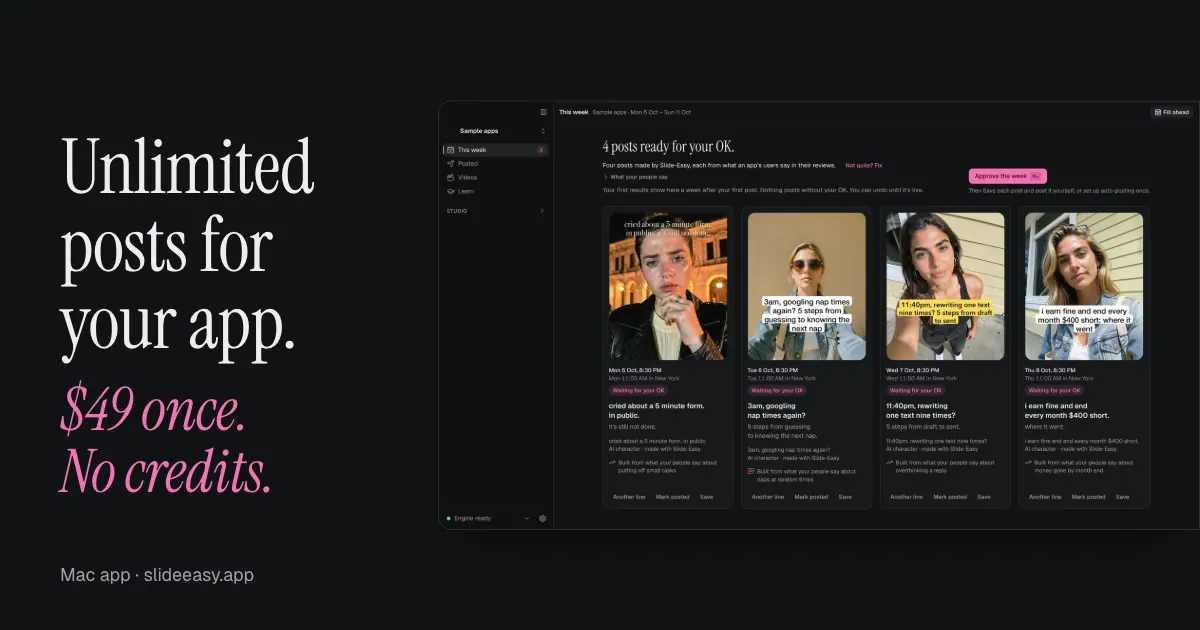
What does Slide-Easy do?
Slide-Easy helps indie app makers turn real customer reviews into a week of Instagram content. By pasting a link to your App Store page, you can generate Instagram Reels and carousel posts that start from what users actually say, then land on your app.
The workflow is simple: import your app link, let Slide-Easy read reviews and draft posts, then review the full week inside the app. Every post waits for your approval before it’s published. You can skip, undo, or ask for another line before anything goes out, so you’re not stuck with fully automated output.
Slide-Easy renders the visuals and voiced videos on your Mac and uses AI characters for the people shown in posts. Each published post is labeled as AI, with an “AI character” line included in the caption so viewers know the content is AI-generated. Posting is focused on Instagram—TikTok isn’t supported yet.
Pricing is straightforward: you get 7 posts free to start, then it’s $49 once for unlimited posts. It runs on Apple Silicon Macs (M1 or newer) with macOS 15+ and at least 16 GB memory, and it downloads required models during setup (about 14 GB).
What does Slide-Easy generate for my app?
It generates a week of Instagram content, including Reels and carousels, based on your App Store link and real reviews.
Do I need to approve posts before they publish?
Yes. Every post waits for your OK before it goes live, and you can skip, undo, or request changes before publishing.
How does Slide-Easy handle AI labeling in the posts?
Each post is labeled as AI when it’s published, and captions include an “AI character” line so viewers know the people shown are AI-generated.
Can Slide-Easy post to TikTok or does it support Windows/Intel Macs?
TikTok isn’t supported yet, and Slide-Easy can’t run on Windows or Intel Macs.
What’s the pricing for Slide-Easy?
You can try the first 7 posts free. After that, it’s $49 once for unlimited posts (no subscription and no credits).
What Mac do I need to run Slide-Easy?
You’ll need an Apple Silicon Mac (M1 or newer), macOS 15+, and 16 GB or more memory. Setup downloads models once and uses about 14 GB of free disk space.
This listing is claimed
Own Slide-Easy? Sign in with the email used to claim it to manage this listing, or upgrade to Pro for featured-first placement and a newsletter feature.