
SeenByLLMs
AI Marketing Tools
Run buyer-like AI prompts to see whether ChatGPT and other models name your brand (or a competitor) and what they cite instead.
Promoted
 AI Checker PlusAI detector that highlights which passages AI wrote. Free check, no sign-up. Plagiarism too.
 RewindType any X/Twitter handle. Get their year back as a narrated video story. Then ask it anything.
 KurodyneSell the tools from your AI side projects. Listing is free.
 Sidrune AI85% off. Stable Claude API for agent developers. Pay as you go. Invoices & refunds available.
 Pixmax.aiPixmax.ai is an all-in-one AI workspace for videos, visual stories, and marketing content.
 SEOify - Improve your SEO & rankingsBuild links to rank in Google. Improve your DR with links you can start building now.Advertise here270,000+ people visit Dang.ai every month.
What does SeenByLLMs do?
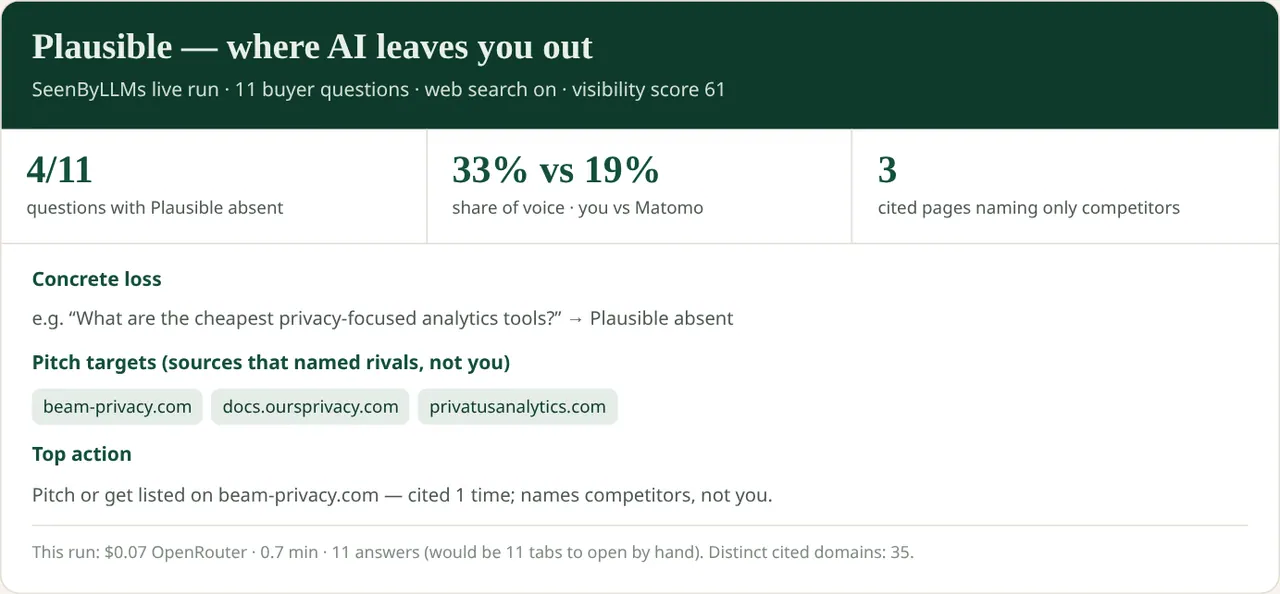
SeenByLLMs is an AI visibility checker for teams who want a concrete answer to a simple question: when real buyers ask “best X for Y,” does your brand get named, and what do the models recommend if you’re absent?
Paste your brand name or URL, add up to five competitor names, and enter the exact shortlist questions your buyers ask in assistants like ChatGPT, Claude, Gemini, Perplexity, and DeepSeek. SeenByLLMs runs those prompts and returns a report showing who got named and who didn’t—plus the cited pages behind each model’s response.
A standout diagnostic is “absent.” If an assistant names someone else, that visit never starts for you, so you can identify which specific questions omit your brand rather than relying on guesswork. The report helps you see where you’re being left out and which rivals are being recommended instead.
You can try a free check directly in your browser with no credit card and no SeenByLLMs account. The free run keeps a watermark and shows limited detail rows (stopping at the first 3). For full details, the checker costs $12/month or $49 lifetime. Model calls are billed separately by OpenRouter, so you should set a spend limit on your OpenRouter key. Your key stays in your browser—SeenByLLMs does not host it.
How do I check whether AI names my brand?
Run an AI visibility check by pasting your brand (or URL), up to five competitors, and the shortlist questions buyers ask. SeenByLLMs runs the questions across five models and shows which names appear in the answers and which don’t.
What does “absent” mean in the results?
“Absent” means the assistant did not name your brand for that specific question. It helps you pinpoint which buyer requests omit you and where competitors get recommended instead.
Do I need an account to run the free check?
No. You can run the free check directly in your browser with no SeenByLLMs account and no credit card.
Is my OpenRouter key hosted by SeenByLLMs?
No. You paste your OpenRouter key, and it stays in your browser. OpenRouter bills the model calls for the account that owns the key.
What’s the difference between the free check and the paid checker?
The free check keeps a watermark and limits the report detail to the first 3 rows. The $12/month or $49 lifetime checker removes the watermark and unlocks full details in the browser report.
How does model cost work for runs?
SeenByLLMs pricing is for the checker, but OpenRouter bills model calls on top. Set a spend limit on your OpenRouter key to control run costs.
This listing is claimed
Own SeenByLLMs? Sign in with the email used to claim it to manage this listing, or upgrade to Pro for featured-first placement and a newsletter feature.