renomee-ai
AI Productivity Tools
Renomee is an AI file renamer for Windows and macOS that batch-renames PDFs, photos, and MP3s using content-aware filename suggestions.
- Pricing
- Free
- Category
- Productivity
- Listed
- Sep 21, 2026
- Updated
- Oct 17, 2026
Promoted
 Sidrune AI85% off. Stable Claude API for agent developers. Pay as you go. Invoices & refunds available.
 Pixmax.aiPixmax.ai is an all-in-one AI workspace for videos, visual stories, and marketing content.
 AI Checker PlusAI detector that highlights which passages AI wrote. Free check, no sign-up. Plagiarism too.
 RewindType any X/Twitter handle. Get their year back as a narrated video story. Then ask it anything.
 KurodyneSell the tools from your AI side projects. Listing is free.
 SEOify - Improve your SEO & rankingsBuild links to rank in Google. Improve your DR with links you can start building now.Advertise here270,000+ people visit Dang.ai every month.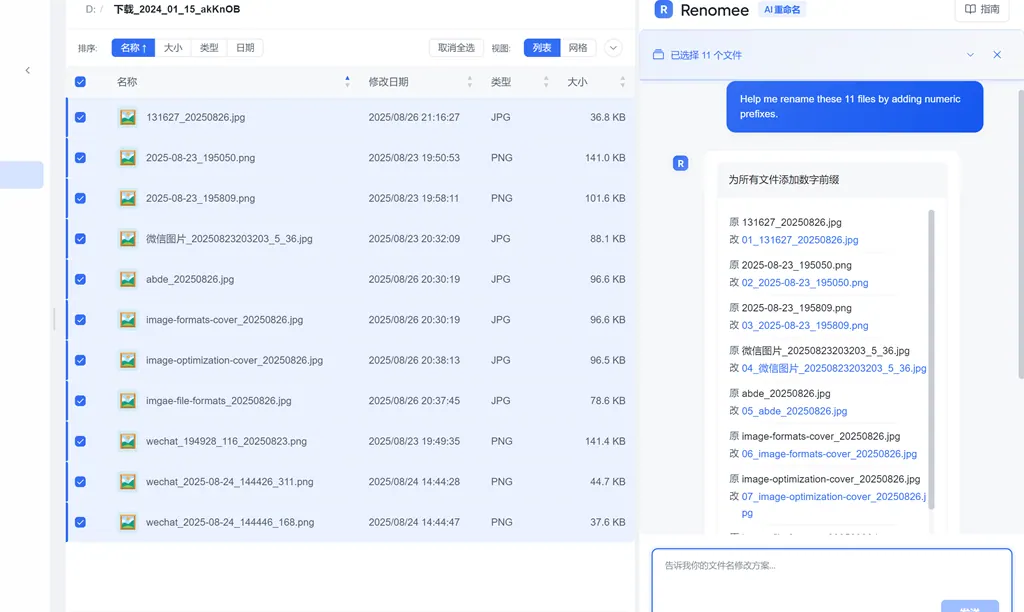
What does renomee-ai do?
Renomee is an AI-powered batch file renaming tool for Windows and macOS. Instead of relying only on fixed rules, it reads what’s inside each file and generates meaningful names automatically—so you can organize large collections faster without crafting regex or scripts.
Renomee supports content-aware extraction for multiple file types. It can pull PDF titles and author information, extract text from scanned PDFs via OCR (with your permission), and use photo EXIF data (including capture date and GPS) to form better filenames. For audio files, it extracts details such as artist and track information, helping you rename music collections with consistent, informative naming.
You guide Renomee using natural language instructions. Describe what you want in plain terms (for example, “rename by date taken + sequence number” or “extract contract party name to the front”), and Renomee determines which fields to use and how to format the result. You can preview changes before applying them, and the tool supports batch processing with pause and resume.
Renomee runs locally on your computer for metadata and content extraction. The free tier is 60 executed renames per day (80 files/day during the trial), with no signup required. Larger batches can be unlocked via a 7-day pass or a lifetime option, depending on your needs.
What does Renomee do?
Renomee batch-renames files by reading the content and metadata inside each file (like PDF titles, photo EXIF, and audio ID3 tags) and then generating filenames based on your instruction.
Can I rename scanned PDFs or images?
Yes. Renomee can use OCR for scanned PDFs or images, but it will ask for your permission first. You can decline that server-side OCR step.
How do I tell Renomee what filename format I want?
Use plain-language instructions (no regex, no scripts, and no coding). For example, you can ask it to rename by capture date, include sequence numbers, or move an extracted field to the front.
Does Renomee upload my files to its servers?
Most extraction happens on your machine, and files never leave your computer for PDF/Word/Excel and photo EXIF reading. The only exception is OCR for scanned PDFs/images, which requires a server call and asks for your permission.
What file types are supported?
Renomee supports PDFs, Word (.docx), Excel (.xlsx/.csv), images (JPG/PNG/HEIC/WEBP), audio (MP3/FLAC/WAV/M4A), video (MP4/MKV/MOV), plus 30+ text formats. It also applies metadata like modified date and size across formats.
How much is the free version?
The free tier includes 60 free renames per day, and 80 files/day during the trial. Execution is limited by that per-day quota, while preview can stay open.
This listing is claimed
Own renomee-ai? Sign in with the email used to claim it to manage this listing, or upgrade to Pro for featured-first placement and a newsletter feature.