Reimorph
AI Productivity Tools
Reimorph lets you edit photos and product images with one reference photo and a prompt, then compare multiple AI models and credit costs.
- Category
- Productivity
- Listed
- Nov 11, 2026
- Updated
- Nov 11, 2026
Promoted
 Sidrune AI85% off. Stable Claude API for agent developers. Pay as you go. Invoices & refunds available.
 Pixmax.aiPixmax.ai is an all-in-one AI workspace for videos, visual stories, and marketing content.
 AI Checker PlusAI detector that highlights which passages AI wrote. Free check, no sign-up. Plagiarism too.
 RewindType any X/Twitter handle. Get their year back as a narrated video story. Then ask it anything.
 KurodyneSell the tools from your AI side projects. Listing is free.
 SEOify - Improve your SEO & rankingsBuild links to rank in Google. Improve your DR with links you can start building now.Advertise here330,000+ people visit Dang.ai every month.
What does Reimorph do?
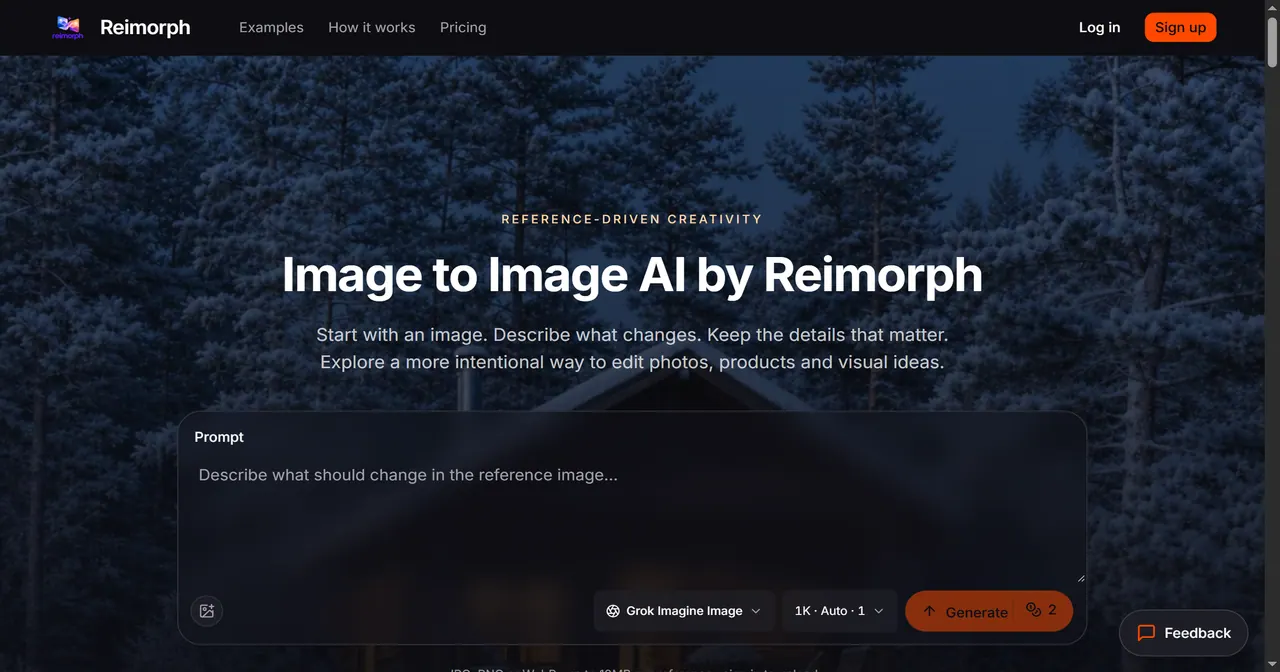
Reimorph is a browser-based image-to-image AI editor built for reference-driven changes—so you can transform an existing photo without starting from a blank canvas. Upload a reference image, write one focused prompt describing what should change, select an editing model, and generate a result that’s guided by the original composition.
Reimorph works best when you want to keep key details while exploring alternatives. For example, you can restage a product with new lighting or a new setting while preserving the item’s shape, glass color, cap, and label area; try an outfit or wardrobe change while keeping face, hair, pose, framing, and background; explore interior design scenarios while maintaining the camera angle and perspective; or shift seasons and atmosphere while requesting which surfaces and landmarks should stay.
The workspace includes multiple editing models so you can compare outputs side by side and evaluate how well each model preserves details and matches your intent. Before generating, you’ll see the credit cost for the chosen model and options, and failed generations return credits automatically.
You can use Reimorph with JPEG, PNG, or WebP reference files (up to 10MB each), and your uploads and results are kept in a private workspace with per-account access. Reimorph also screens prompts and reviews generated images before delivery, blocking flagged content and refunding credits.
Reimorph offers a free try of image generation without needing an account, including a preview you can view and download before signing up.
What does “image to image” editing mean in Reimorph?
You start with an uploaded photo and describe one specific change. The model rebuilds the scene around what should stay recognizable from the reference.
Do I get to compare different AI models for the same edit?
Yes—use the same reference and prompt across multiple models, then compare the results side by side to judge detail preservation and credit cost.
Is there a free way to test Reimorph?
You can try one image free without an account by using the preview workflow, generating, and viewing/downloading the result before signing up.
How much do generations cost in Reimorph?
Costs are shown before you generate, based on the selected model and options. Failed or timed-out generations return credits automatically, so you only pay for delivered images.
What kinds of files and reference sizes are supported?
Reimorph supports JPG, PNG, or WebP formats with up to 10MB per reference image.
Will the edit keep the same person, product shape, or room perspective exactly?
Reimorph aims to preserve important details you specify (like face, framing, or product shape), but generative edits aren’t guaranteed to keep every pixel unchanged. Review results and narrow your prompt if something important changes.
This listing is claimed
Own Reimorph? Sign in with the email used to claim it to manage this listing, or upgrade to Pro for featured-first placement and a newsletter feature.