
RecipeScan
AI Productivity Tools
Photograph your fridge or pantry to get dinner-ready recipe ideas and an instant grocery list for what’s missing—on iPhone and iPad.
- Pricing
- Free
- Category
- Productivity
- Listed
- Aug 25, 2026
- Updated
- Oct 16, 2026
Promoted
 Sidrune AI85% off. Stable Claude API for agent developers. Pay as you go. Invoices & refunds available.
 Pixmax.aiPixmax.ai is an all-in-one AI workspace for videos, visual stories, and marketing content.
 RewindType any X/Twitter handle. Get their year back as a narrated video story. Then ask it anything.
 KurodyneSell the tools from your AI side projects. Listing is free.
 SEOify - Improve your SEO & rankingsBuild links to rank in Google. Improve your DR with links you can start building now.Advertise here270,000+ people visit Dang.ai every month.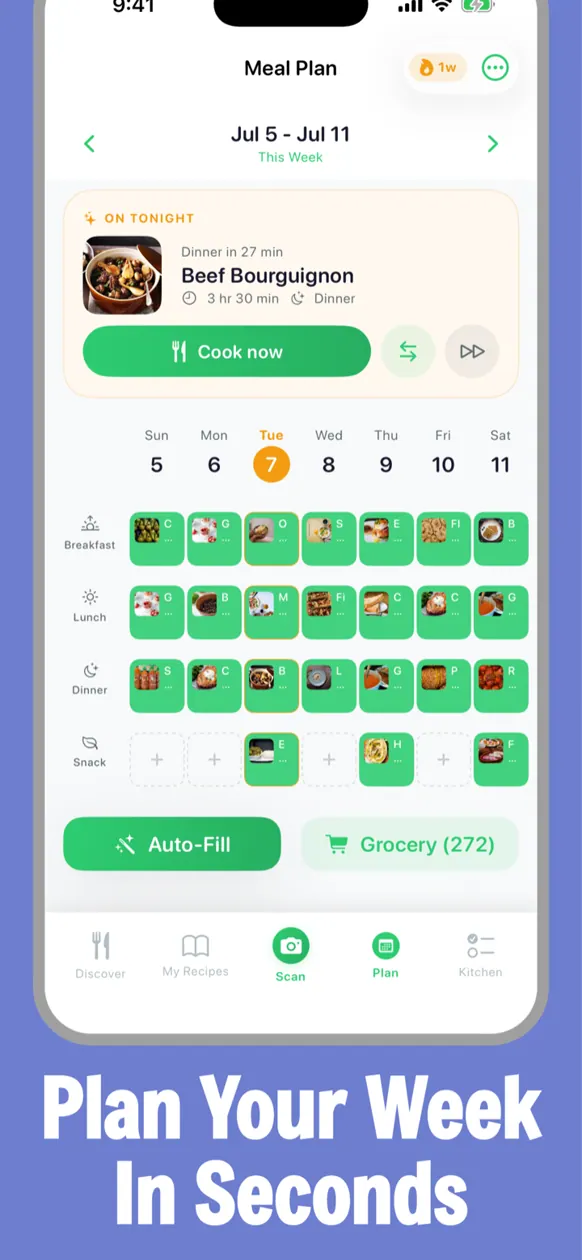
What does RecipeScan do?
RecipeScan is a meal-planning iPhone and iPad app that turns a photo of your fridge or pantry into dinner ideas you can cook tonight—plus a grocery list of the items you still need.
With Pantry Scan, you can photograph your shelves and AI identifies your ingredients quickly. Then, pick recipes and get a grocery list that accounts for what you already have, merges duplicates, and helps you share the list so everyone can add and check off items.
RecipeScan also lets you save recipes from social video and other sources. Share a TikTok, Instagram, YouTube, or Pinterest link into the app, import recipes from recipe websites, scan a cookbook page, paste plain text, or bring in a Paprika/JSON/CSV export. Website links and recipes you type are on the free plan, while social-video imports and scans require Premium.
Plan the week, get the list, and cook with guided steps. Premium includes features like AI calorie tracking (with Apple Health sync), Auto-Fill weekly planning, voice control in Cooking Mode, AI substitutions, and a Leftover Wizard that turns what you have into new recipes. RecipeScan is free to download with a 7-day Premium trial. Premium costs $4.99/month or $29.99/year.
How do I use Pantry Scan in RecipeScan?
Open the Scan tab, choose Pantry, and snap a photo of your fridge or shelves. AI identifies the items, then you can select recipes and get a grocery list for what’s missing.
Can I import recipes from TikTok, Instagram, or YouTube?
Yes—share links into RecipeScan to import recipes from social video. Social-video imports require Premium, while typed recipes and website links are available on the free plan (free keeps 3 saved recipes of your own).
What scans help me go from “what I have” to recipes?
With Premium, RecipeScan supports scans like a single ingredient, pantry shelves, a barcode, a plated meal photo, grocery receipts, and handwritten recipe cards.
Can RecipeScan help me cook multiple dishes at once?
Yes. The Multi-Dish Planner helps you coordinate when to start each dish so they finish in a similar time window.
How does the AI calorie tracker work?
You can log by hand or one-tap log a recipe you cooked using its nutrition. With Premium, you can also snap a meal for a per-item estimate with a range and a confidence level, and sync logged calories/macros to Apple Health via a switch inside the tracker.
Is RecipeScan free, and what does Premium add?
RecipeScan is free to download. The free plan never expires and includes the recipe catalogue, Cooking Mode, grocery and pantry lists, manual calorie logging, and up to 3 saved recipes of your own; Premium (trial available) unlocks additional scans, social-video imports/scans, AI features like substitutions, and more.
This listing is claimed
Own RecipeScan? Sign in with the email used to claim it to manage this listing, or upgrade to Pro for featured-first placement and a newsletter feature.