
Rankly Tier List Maker
AI Productivity Tools
Rankly Tier List Maker is a free, browser-based tool to drag images into custom tiers and export your ranking as a PNG.
- Pricing
- Free
- Category
- Productivity
- Listed
- Sep 2, 2026
- Updated
- Sep 6, 2026
Promoted
 Pixmax.aiPixmax.ai is an all-in-one AI workspace for videos, visual stories, and marketing content.
 AI Checker PlusAI detector that highlights which passages AI wrote. Free check, no sign-up. Plagiarism too.
 RewindType any X/Twitter handle. Get their year back as a narrated video story. Then ask it anything.
 KurodyneSell the tools from your AI side projects. Listing is free.
 Sidrune AI85% off. Stable Claude API for agent developers. Pay as you go. Invoices & refunds available.
 SEOify - Improve your SEO & rankingsBuild links to rank in Google. Improve your DR with links you can start building now.Advertise here270,000+ people visit Dang.ai every month.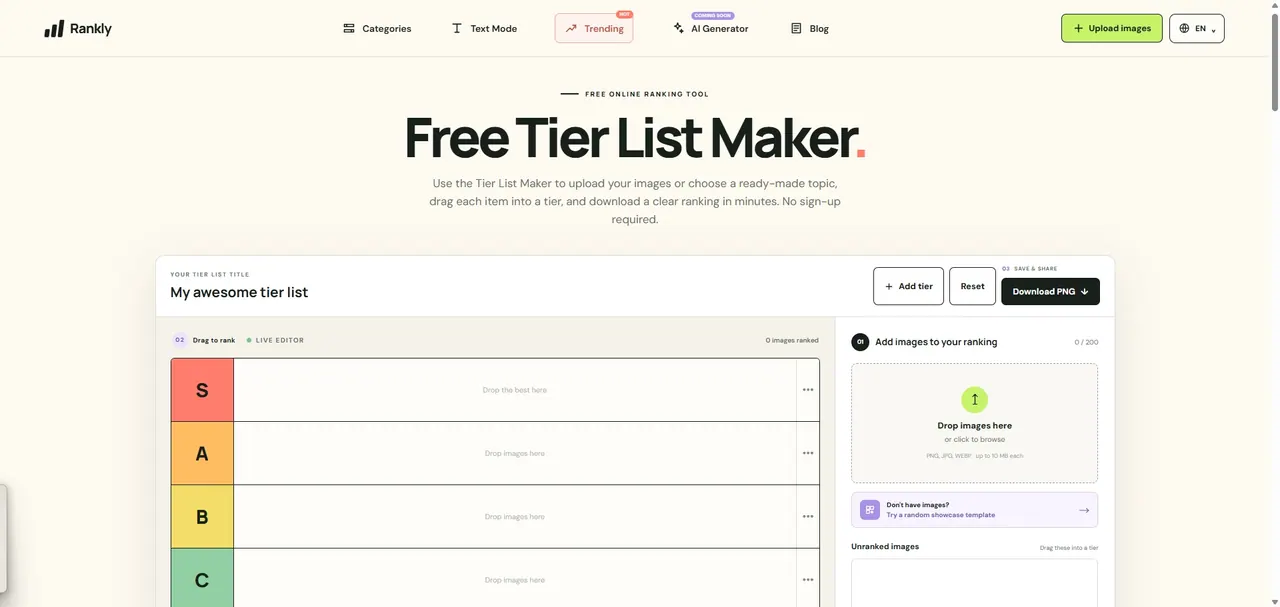
What does Rankly Tier List Maker do?
Rankly Tier List Maker is a free online tier list builder for making clear, visual rankings from your own images and ideas. Start with a ready-made topic or create a ranking from scratch, then drag items into tiers using the live editor—no sign-up required.
Customize your tiers as you go: rename tier labels, adjust tier layout/color styles, and keep refining until the board matches your criteria. You can upload JPG/PNG/WEBP images (up to 200 images, with file limits per image) or use templates to quickly get started.
When you’re done, export your finished tier list as a crisp PNG and share your take. Rankly is flexible enough for fandoms, games, movies, music, sports, food, books, and everyday comparisons—so you can turn personal opinions into an easy-to-read ranked graphic.
Is Rankly Tier List Maker free to use?
Yes—Rankly is free to use, and you can build a ranking, upload images, and download the result without creating an account.
Do I need an account to create and download tier lists?
No. You can create your tier list and download it as a PNG directly in your browser without signing up.
What kinds of files can I upload to make a tier list?
You can upload JPG, PNG, or WEBP images to build your ranking, and your images stay in your browser while you edit.
Can I create a tier list from a ready-made template instead of starting from scratch?
Yes. You can choose a ready-made topic or open a template editor, then customize tiers and export your own version.
How do I export my tier list?
After arranging items into tiers and setting your tier labels, download the finished ranking as a PNG.
What can I rank with a tier list maker like this?
You can rank games, characters, movies, songs, sports teams, foods, books, and other collections—any set of items where you want to organize your opinion into tiers.
This listing is claimed
Own Rankly Tier List Maker? Sign in with the email used to claim it to manage this listing, or upgrade to Pro for featured-first placement and a newsletter feature.