MobileStudio
AI Marketing Tools
MobileStudio turns mobile screen recordings into beautiful, professional app demo videos you can share.
- Category
- Marketing
- Listed
- Nov 25, 2026
- Updated
- Nov 25, 2026
Promoted
 MuzieCreate professional AI music videos starring you. Bring a song or make one, done in minutes.
 AI Checker PlusAI detector that highlights which passages AI wrote. Free check, no sign-up. Plagiarism too.
 Pixmax.aiPixmax.ai is an all-in-one AI workspace for videos, visual stories, and marketing content.
 SEOify - Improve your SEO & rankingsBuild links to rank in Google. Improve your DR with links you can start building now.Advertise here330,000+ people visit Dang.ai every month.
What does MobileStudio do?
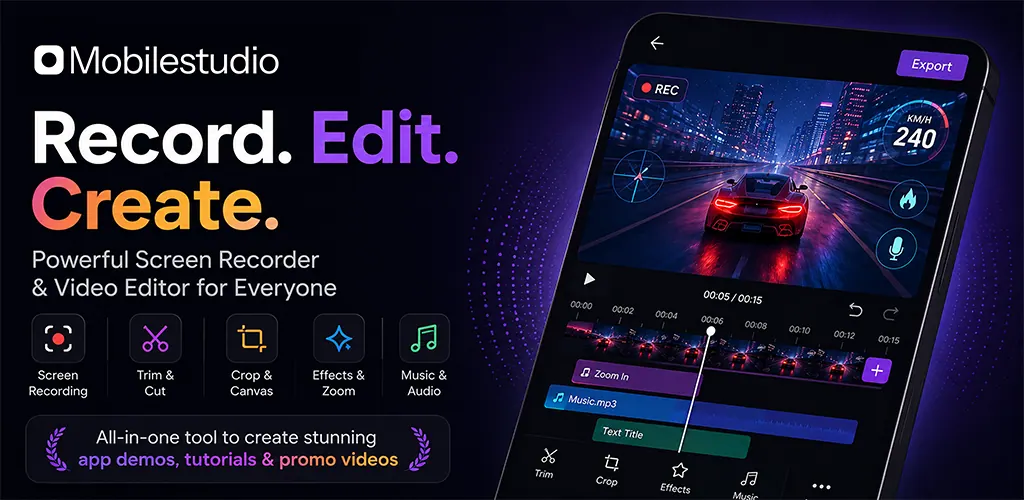
MobileStudio helps you transform raw mobile screen recordings into polished, professional-looking app demo videos. Instead of posting unedited captures, you can create presentation-ready videos directly from your phone.
The workflow is built around importing your screen recordings and refining them into shareable demos. You can edit your footage, add zoom effects, and customize backgrounds. MobileStudio also lets you present your app inside beautiful phone mockups, giving your walkthroughs a more product-focused, camera-ready look.
To help your videos fit the format you need, you can fine-tune visual details such as padding, corner radius, shadows, and aspect ratios. This makes it easier to produce demos that look good for social media, websites, product launches, and presentations—without relying on complicated desktop editing tools.
MobileStudio is a great fit for indie hackers and startup founders, app developers, UI/UX designers, product marketers, agencies, and creators who want to showcase app features, walkthroughs, or updates with a more professional polish. Use it to highlight a new feature, announce an app launch, or keep your audience engaged with high-quality demo content.
What does MobileStudio do?
MobileStudio converts mobile screen recordings into professional app demo videos with polished presentation elements like phone mockups and visual refinements.
Can I use my existing screen recordings?
Yes. You can import your mobile screen recordings and then edit them into demo-ready videos.
What editing and styling options are available?
You can edit your footage, add zoom effects, customize backgrounds, and adjust details like padding, corner radius, shadows, and aspect ratios.
Does MobileStudio help me display my app in phone mockups?
Yes. Your app can be presented inside phone mockups for a cleaner, more professional look.
Who is MobileStudio for?
Indie founders, app developers, UI/UX designers, product marketers, agencies, and creators who want to share app demos and walkthroughs.
Where can I use the videos I create?
MobileStudio is designed for demos and promotional videos across social media, websites, product launches, and presentations.
This listing is claimed
Own MobileStudio? Sign in with the email used to claim it to manage this listing, or upgrade to Pro for featured-first placement and a newsletter feature.