
Manifest
AI Productivity Tools
Manifest helps you build and manage a home inventory from photos, receipts, or voice notes—so you can track warranties, returns, recalls, and value.
- Pricing
- Free
- Category
- Productivity
- Listed
- Jun 2, 2026
- Updated
- Jun 2, 2026
Promoted
 Pixmax.aiPixmax.ai is an all-in-one AI workspace for videos, visual stories, and marketing content.
 Sidrune AI85% off. Stable Claude API for agent developers. Pay as you go. Invoices & refunds available.
 SEOify - Improve your SEO & rankingsBuild links to rank in Google. Improve your DR with links you can start building now.Advertise here270,000+ people visit Dang.ai every month.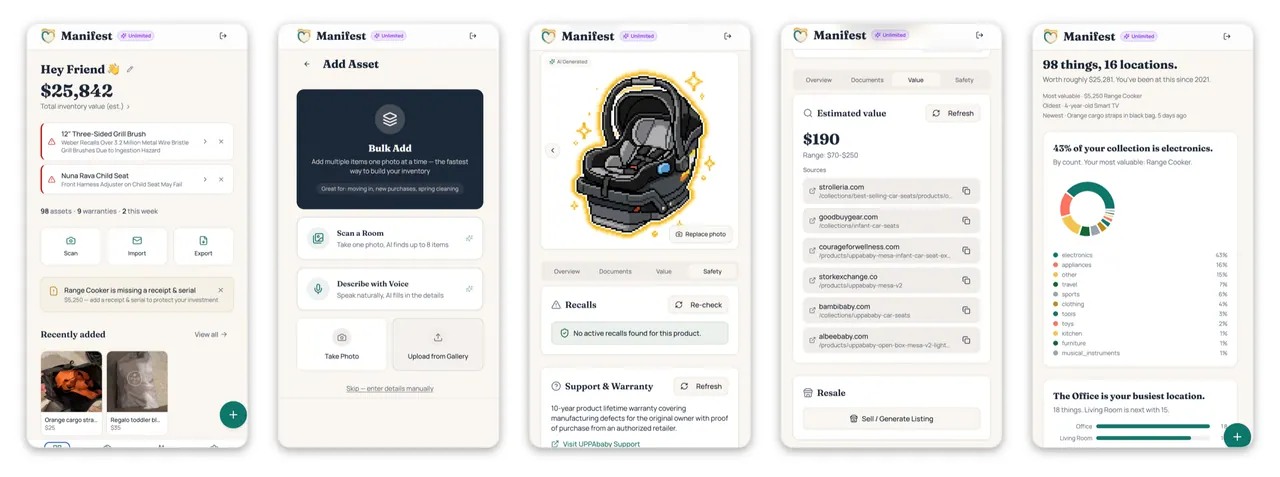
What does Manifest do?
Manifest turns your purchases into a structured home inventory using a photo, forwarded receipt, or voice description. AI extracts key details like brand, model, serial number, UPC, price, warranty, and return window so you don’t have to type everything out.
Once items are captured, Manifest keeps important timelines and records organized. It tracks return deadlines, helps monitor warranty coverage, and runs recall alerts against CPSC recall databases for your actual products.
You can also generate insurance documentation in PDF form with details such as photos, serial numbers, barcodes, what you paid, current value (ACV), replacement cost (RCV), and room-by-room organization—useful when you need to file a claim or document ownership.
What inputs can I use to add items to my inventory?
You can snap a photo, forward a receipt, or describe what you bought using your voice. AI pulls product details so you don’t need to type everything.
How does Manifest help with returns and warranties?
It remembers return windows for each item and can alert you before deadlines. It also tracks warranties and flags relevant warranty and recall-related information as time passes.
Does Manifest check recalls for the specific products I own?
Yes. Recall alerts are run against CPSC recall databases for your actual products (not just broad categories), so the reminders are tied to what you’ve added to your inventory.
What do I get for insurance or claim documentation?
Manifest can create a PDF with photos, serial numbers, barcodes, purchase details, current value (ACV), replacement cost (RCV), and room-by-room organization to support claim and return documentation.
Is there a free way to try Manifest?
Yes—there’s a 7-day free trial with full access. It doesn’t require a credit card.
This listing is claimed
Own Manifest? Sign in with the email used to claim it to manage this listing, or upgrade to Pro for featured-first placement and a newsletter feature.