
LyricEdits
Verified
AI Music Tools & Generators
Upload an MP3 or WAV and generate a customizable AI lyric video synced to your lyrics in minutes.


Promoted
 KurodyneSell the tools from your AI side projects. Listing is free.
 Sidrune AI85% off. Stable Claude API for agent developers. Pay as you go. Invoices & refunds available.
 Pixmax.aiPixmax.ai is an all-in-one AI workspace for videos, visual stories, and marketing content.
 AI Checker PlusAI detector that highlights which passages AI wrote. Free check, no sign-up. Plagiarism too.
 RewindType any X/Twitter handle. Get their year back as a narrated video story. Then ask it anything.
 SEOify - Improve your SEO & rankingsBuild links to rank in Google. Improve your DR with links you can start building now.Advertise here330,000+ people visit Dang.ai every month.
What does LyricEdits do?
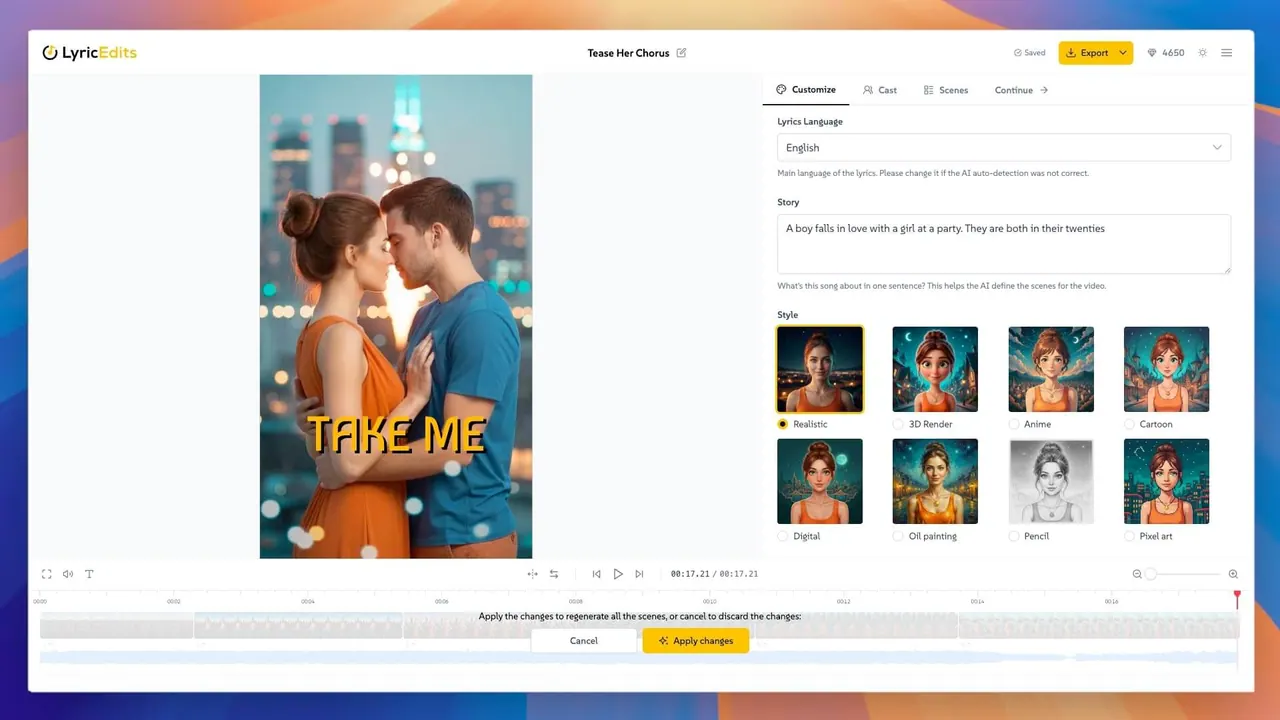
LyricEdits is an AI lyric video maker built specifically for songs—so you can turn your track into a lyric video without starting from scratch. Upload an MP3 or WAV, and the AI transcribes your lyrics automatically, then syncs them to the music. From there, it generates a lyric video you can shape into something that truly matches your song.
Use the real-time editor to customize the creative direction: change the story, art style, fonts, colors, scenes, characters, images, videos, and the lyrics’ pace/timing. You can also iterate quickly by adjusting details without needing video editing experience. Instead of relying on templates, you start with an AI-generated workflow and then make it yours.
LyricEdits supports lyric transcription in 90+ languages and uses a range of AI models (including Flux 3, Nano Banana 2.1, Seedance 2.5, MiniMax H3 Max, Grok Imagine 2, Gemini Omni Flash, GPT Image 2.5, and Kling 3). It’s used by 20,000+ musicians worldwide.
Export when you’re ready. You can export for platforms like YouTube, TikTok, and Instagram, or continue with advanced editing in DaVinci Resolve, Premiere Pro, or Final Cut Pro. Start free with a free preview—no credit card required, with no watermarks and you keep all rights.
What file types can I upload to create a lyric video?
Upload an MP3 or WAV. After you upload, the AI transcribes the lyrics automatically and syncs them to your music.
Can I customize the video after the AI generates it?
Yes. Use the real-time editor to customize the story, art style, fonts, scenes, characters, images/videos, colors, and the timing/pace of the lyrics.
Do I need video editing experience to use LyricEdits?
No. LyricEdits is designed to work without video editing skills, letting you adjust details directly in the editor.
Is there a cost to start?
You can start with a free preview and no credit card required. You can build your video in the editor before paying anything.
Can I post the finished lyric video on YouTube, Instagram, or TikTok?
Yes, you can post it on those platforms (and more) as long as you own the rights to the song or have permission from the artist. Some platforms may have requirements for moving imagery, so check their rules.
Who should I have permission from if I want to upload on behalf of another artist?
Get permission from the artist before uploading their song. You should only use songs you have rights to or have been authorized to use.
This listing is claimed
Own LyricEdits? Sign in with the email used to claim it to manage this listing, or upgrade to Pro for featured-first placement and a newsletter feature.